













Being a DIK [v0.11.1] [DrPinkCake]
A young man from a low-income family moves away from his widowed father and his summer love to attend college at Burgmeister & Royce. As he is cast into freshman life and persuaded to join the up-and-coming fraternity Delta Iota Kappa, he'll be exposed to a new world filled with conflicts, alcohol, drugs and sex.
Download Links
Season 1 & 2
Android --> APK --> DATA
Windows/Linux
Mac
Compressed:
Windows/Linux
Mac
Splits-S1&2
Win/Linux
Part 1
Part 2
Part 3
Part 4
Season 3
Android --> APK --> DATA
Windows/Linux
Mac
Compressed:
Windows/Linux
Mac
SPLIT-S3-Int+Ep11
Win/Linux
Part 1
Part 2
Part 3
Part 4
Walkthrough
Season 1 (Ep 1 - 4)
Season 2 (Ep 5 - 8)
Season 2 (Ep 9 - 11)
Vault Codes:
Episode 1: 1386
Episode 2: 4413
Episode 3: 3985
Episode 4: 0421
Episode 5: 4226
Episode 6: 4463
Episode 7: 1159
Episode 8: 3211
Interlude: 2575
Episode 9: 4232
Episode10: 8313
Episode11: 3258
Transferring save files to Season 3
BaDIK Season 1-2 (episode 1-8) and Season 3 (Interlude) are separate game instances:
You must extract Season 3 (Interlude) to a new directory.
Do not install Season 3 (Interlude) over the top of Season 1-2 (episode 1-8), this will break things.
Do not copy your Season 1-2 (episode 1-8) saves directory into Season 3 (Interlude), they won't work.
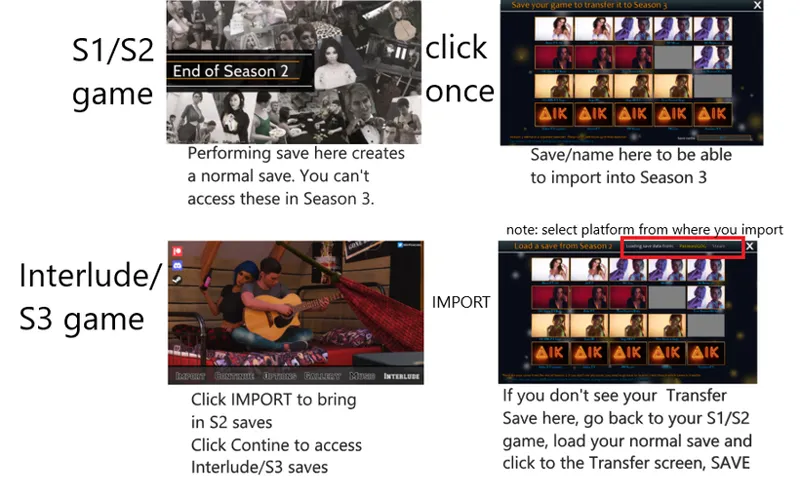
To play Season 3, you need to have created special transfer saves on the "Save your game to transfer it to Season 3" screen at the end of Season 2.
These special transfer saves aren't stored in the same place as normal saves, they should still be available even if you've deleted BaDIK Season 1-2.
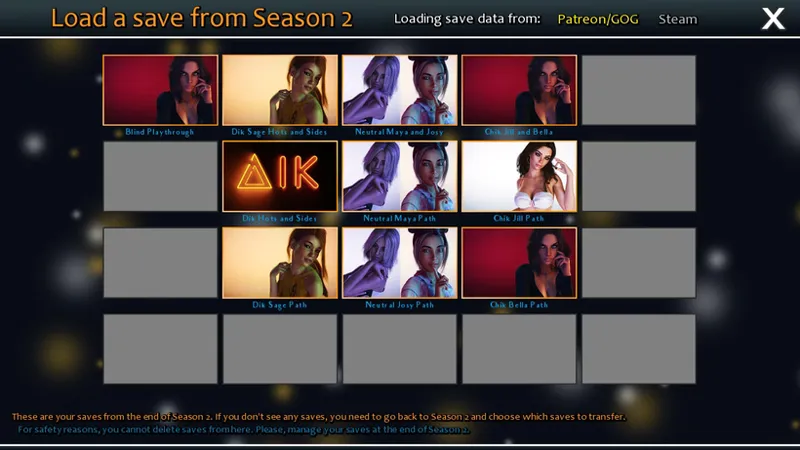
When you start Season 3, on the main menu click IMPORT to pull your Season 2 special transfer saves into the game.
This will display a "Load a save from Season 2" screen. Click any of your save files to load and start playing the Season 3 Interlude.
Click the "Loading save data from:" text button to swap between importing Patreon/GOG and Steam save files.
If this screen doesn't show any saves to transfer, you need to go back to Season 2 and create some by playing through to that "Save your game to transfer it to Season 3" screen at the end.
If you don't have Season 2 anymore, or don't want to play through the end again, then you can use SteveyP's transfer saves (OP > Extras > Save).
The actual saving and loading within Season 3 are handled like usual; only the save transfer between Season 2 and Season 3 works like this.
You can play Season 3 using saves from the end of Steam, GOG, and Patreon versions.
The saves you make while playing the Patreon version won't work with Steam or GOG versions when those versions are released in the future.