



v1.3.0 ~ Downloadable maps 📥 Automatic mod setup, Translations & more!
Hey! TruckSim GPS v1.3.0 is now ready to download on Google Play and Apple App Store.
This update needs PC Telemetry Server v1.4.0. It shipped a few days ago. If you don't have it yet, close the PC Telemetry Server and open it again, it will prompt you to update on its own.
This major update finally makes the map mod system ready to scale: maps are no longer bundled inside the app. The app size went from around 1 GB to ~350 MB, map mods now download on demand, and mod updates reach you without waiting for an app update.
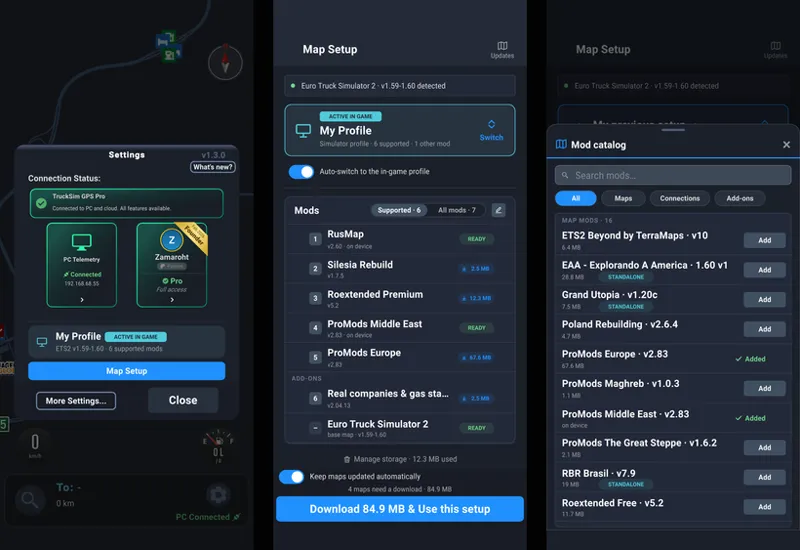
This also made room for the second big change: the app now detects your game profiles and the map mods inside them, and sets everything up on its own. No more picking mods one by one from a list.
Also, translations! The app is now available in 11 languages.
The work needed to get everything working ended up being bigger than I first expected, so voice navigation is getting delayed into the next 1.4.0 update. Keep reading for more info!
---
👉 Enjoying the app? TruckSim GPS only exists because people choose to pay for it. If you can, consider supporting the project on Patreon or by going Pro in the app, both help equally. 👈
---
Questions? Check the FAQs or ask us on Discord.
🌐 https://trucksimgps.com/
Changelog
🚀 New / Improved
Downloadable maps: the app no longer ships with every map mod inside it
App size down from 1 GB to ~350 MB
Only the map mods you actually use get downloaded
Map mod updates arrive on their own, no app update needed
New storage screen to see and delete downloaded maps
New Map Setup screen, rebuilt from scratch
Automatic mod setup:
This is now the default (and recommended) option
Your in-game profiles and their map mods are detected automatically
Switching profiles in the game switches the map setup in the app
Manual mod setup is still available:
Now you can create multiple custom profiles with different mods each
New map catalog with a search box you can type into to browse compatible map mods
Reorder map mods with drag & drop instead of arrow buttons
Also, changing the map setup no longer needs an app restart
New Updates screen inside Map Setup: a dated changelog of new and updated map mods
New #map-updates Discord channel: a message is posted automatically every time a map mod gets supported or updated
The app is now available in 11 languages: English, Portuguese, Polish, German, Spanish, French, Turkish, Dutch, Czech, Russian and Indonesian. Detected from your device's language, changeable in Settings
Route line is now elevation aware: it renders under bridges and overpasses
Distances under 10 km/mi now show one decimal (no more "0 mi" left)
Refreshed UI look: new toggles, sliders and dropdowns, most visible in More Settings
PC Telemetry Server v1.4.0: profile detection for the new Map Setup, plus improved logs so we can debug issues faster
🐛 Fixed
Company locations are much more accurate. Drop-off markers used to be off by several meters (up to a couple hundred in some spots). If destination positions are still wrong, please report them
Improved routing reliability when starting a route facing backwards or on the wrong side of a divided road
Fixed repeated "job delivered" popups when launching the simulator
Fixed the camera getting stuck in 3D after the truck despawns
Fixed the "city not found" banner sometimes staying on screen after that city was no longer part of the route
⚠️ Known Issues
Routing can send you to the wrong company when two companies share the same name in a city
Map Setup and profile detection are brand new. If a profile or a mod isn't detected right, please report it on Discord
🗺️ Map Updates
ETS2 Poland Rebuilding v2.6.4 → v3.0.0 (but expect many more to drop during the week)
Why maps had to change
The goal for TruckSim GPS is to support every map mod the community uses, including the huge combos with dozens of maps. We had two main issues in the way.
The first was app size. Every map mod's data was bundled inside the app, the download was already past 1 GB, and every new mod made it bigger. At some point adding mods stops being possible.
The second was updates. Each time a mod author released a new version, we had to ship a whole app update: go through Apple and Google review, and make you download the full app again. That's why some mods lagged behind their authors' releases longer than they should have.
Now the app only ships with the base ATS and ETS2 maps (we plan to move those out too, eventually). Everything else downloads on demand, and with the default settings, updates download on their own when they become available. You can see what changed, with dates, in the new Updates screen inside Map Setup, or follow the new #map-updates channel on Discord, where every new or updated mod gets posted automatically.
We're also automating the map pipeline on our side, so updates should land faster from now on, and a lot of new map mods are coming in the next weeks. Keep an eye on #map-updates.
Map Setup: it just works now
Picking your mods by hand and ordering them exactly like the game does was tedious, and if you play with several profiles you had to redo it every time you switched. Not anymore.
The app now reads the profiles you have in the game, highlights the one you're playing, and detects the map mods inside it. With the two default toggles on ("follow the active in-game profile" and "keep maps updated automatically") you never need to open Map Setup at all: pick a profile in the game, the app follows, downloads what's needed, and applies it on the fly, no restart.
If you want to tinker, the profile selector has two sections: your in-game profiles, and custom profiles you build yourself. Your old manual setup was migrated into a custom profile called "My previous setup", and reordering is now drag & drop instead of up/down arrows. Honestly, I can't think of a reason to use the manual setup anymore, but if you have one, let me know.
All of this is brand new and touches a lot of deep parts of the app, so I expect a few rough edges. If a profile or mod isn't detected correctly, please report it on Discord so we can look into it.
Translations!
The trucking community is worldwide, and an English-only app left a lot of you out. Now every screen and message is translated into the languages our users speak most. The language comes from your phone, and you can change it in Settings. If you spot a bad translation, let us know on Discord.
Route line under bridges
The route line now knows about elevation. When your route passes under a bridge, the line goes under it instead of painting over everything.
What's next?
The map system was at its limit, so it had to come first. Expect a bunch of map mod updates and new map mods in the coming weeks, automatically, no app update needed :)
Voice navigation is the top priority for 1.4.0.
The other big thing in 1.4.0 is the connection. Today your phone and PC have to be on the same local network, and I know a lot of people can't make that work: router settings they can't change, ISP-locked routers, the phone on a different network. We're building a relay hosted by TruckSim GPS so the two can connect over the internet when a direct connection isn't possible, with QR code pairing instead of typing IPs. Nobody should be left out because of their network.
Multiplayer: research has started, but don't expect it in 1.4.0. Maybe 1.5.0.
If you made it to the end, drop a comment! :)
Happy trucking!
- Nico
