



(Free Version) Anime Character Sheet Creator - QWEN Image Edit 2511
YouTube Video: https://youtu.be/921EUQxYl3Y
Hi everyone! Here is the free version of the anime character sheet creator workflows. As mentioned in the video, this is not the master workflow, it's the broken down variation of it. What I will say is that the master workflow can be manually constructed from just these two workflows, but we've found the full version to be intuitive!
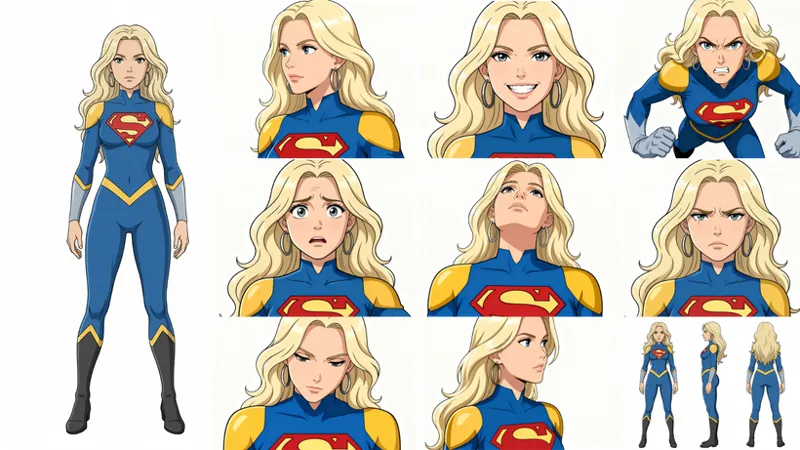
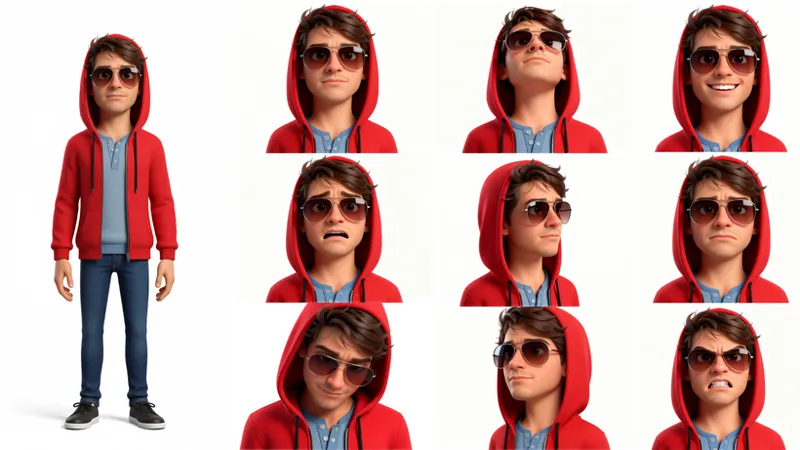
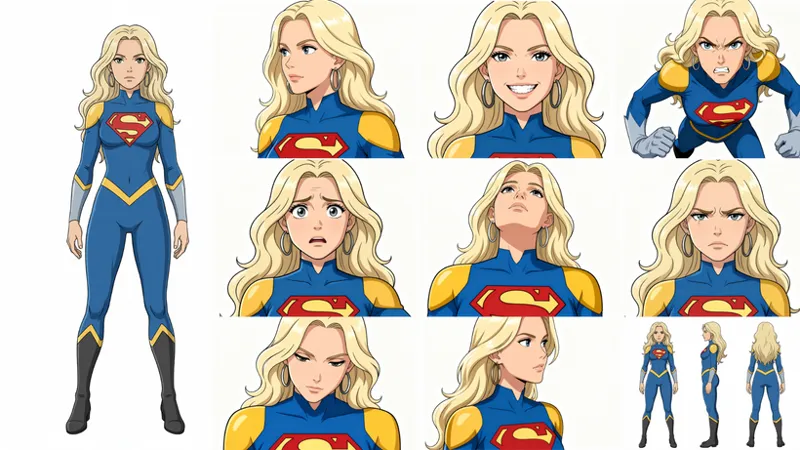
Regardless, with these two workflows, you'll still get a lot of the power from the master workflow. You'll be able to both create your stylized character from a reference image and also receive the first set of consistent character images for your character sheet.
Here are some results you might expect to see:
Workflow Notes
1.) Sometimes, as seen in the video, you might get weird results that don't align with the prompt. In this event, try changing your seed in the settings section, or adjusting the prompts yourself to your liking. We do intend to build this workflow out further so that reference images or control nets are used to further lock down the generations, but this will come later.
2.) If you have lower level hardware, consider subbing out the BF16 model with a lighter weight GGUF model that fits within your PC specs. You can do this by replacing the "Load Diffusion Model" node with a "GGUF Loader" node. To know which GGUF model you should install, compare the size of the GGUF model against your systems total VRAM. Pick a model that is similar in size. If you have a lot of system ram, you can also get away with using higher level models. For example, we have 8GB VRAM with 128GB system ram. With this, we can run models closer to the BF16 variant and larger than 8GB.
3.) You may have missing nodes when loading the workflow. To resolve this, click on "Manager" on the top right, then click on "Install Missing Custom Nodes". Select all that populate, and hit install. If prompted, choose "Latest" version. Once installed, restart ComfyUI, refresh the page, and reload the workflow. All nodes should now populate properly!
Luguoli KSampler Installation Guide:
I HIGHLY RECOMMEND TEMPORARILY BACKING UP YOUR COMFYUI FOLDER IF POSSIBLE BEFORE PERFORMING THIS STEP.
Why do we need this? This custom_node pack and KSampler solve the problem of "pixel shift". Pixel shift is a common issue in image editing models where new images don't align 1:1 with the input image. This issue can be particularly burdensome when exact 1:1 translation is needed and can be a common problem with both QIE models - this node resolves that issue.
Now, to be straight forward, this can be a little tricky, but follow these steps and you should be good to go!
1.) Close ComfyUI if you have it running.
2.) Navigate to your ComfyUI folder then open the "custom_nodes" folder.
3.) In the directory bar (where the directory of the folder you're in is printed), type "CMD" and hit enter.
4.) Once the command prompt window opens, copy, paste, and enter the following command:
git clone https://github.com/luguoli/ComfyUI-Qwen-Image-Integrated-KSampler.git
5.) Once completed, close the command prompt window and return to your custom_nodes folder. Find the folder called "ComfyUI-Qwen-Image-Integrated-KSampler" and open it.
6.) Once in the folder, again click on the directory bar and type "CMD" then enter. Once the command prompt window opens, copy, paste, and enter the following command:
pip install -r requirements.txt
7.) Boot up ComfyUI and load the attached workflow. You may still have missing custom nodes, but the KSamplers should be loaded correctly!
NOTE: After you've installed the custom node pack, if you start ComfyUI and it crashes or isn't booting up properly, navigate to the "update" folder along side your main "ComfyUI" folder. Within this folder, run "update_comfyui.bat". Once completed, try opening ComfyUI again, you should be all set!
Resources:
Original inspiration video: https://www.youtube.com/watch?v=8PLtSnTGVuE
Luguoli Qwen KSampler: https://github.com/luguoli/ComfyUI-Qwen-Image-Integrated-KSampler
Models:
Main Diffusion Model (/models/diffusion_models): https://huggingface.co/unsloth/Qwen-Image-Edit-2511-GGUF/blob/main/qwen-image-edit-2511-BF16.gguf
GGUF Variants (/models/diffusion_models): https://huggingface.co/unsloth/Qwen-Image-Edit-2511-GGUF/tree/main
Text Encoder (/models/text_encoders): https://huggingface.co/Comfy-Org/HunyuanVideo_1.5_repackaged/resolve/main/split_files/text_encoders/qwen_2.5_vl_7b_fp8_scaled.safetensors
VAE (/models/vae): https://huggingface.co/Comfy-Org/Qwen-Image_ComfyUI/resolve/main/split_files/vae/qwen_image_vae.safetensors
Lightning 4-Step Lora (/models/loras): https://huggingface.co/lightx2v/Qwen-Image-Edit-2511-Lightning/blob/main/Qwen-Image-Edit-2511-Lightning-4steps-V1.0-bf16.safetensors
QWEN 2509 Multi-Angle Lora (/models/loras): https://www.reddit.com/r/StableDiffusion/comments/1omvka5/qwen_edit_angles_final_boss_multiple_angles_lora/
4x Clear Reality Upscaler (/models/upscale_models): https://openmodeldb.info/models/4x-ClearRealityV1