


Map Inventory updated to 2.9.3
📜 Changelog:
- Added script calls to disable and enable all Hot Bar interaction, including hotkeys: `DisableMapInventoryHotBar()` and `EnableMapInventoryHotBar()`.
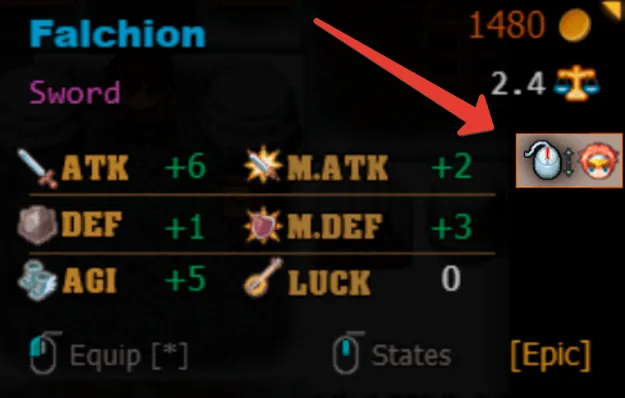
- Added Max HP and Max MP rendering support to the equipment stats window.
- Added the `<NoStatsDisplay>` note tag for hiding the stats section of specific weapons and armors.
- Added `<NoPartySelector>` and `<NoPartySelector:SWITCH_ID>` note tags to use items or equipment on the party leader without opening the Party Selector.
- Added equipment stat previews for every party member who can equip the selected weapon or armor. Scroll through the stats pages to preview each eligible actor.
- Added an actor-switch hint to the equipment stats window. The hint displays a custom actor image specified with the Actor note tag `<EquipStatsHeadImage:filename>`.
- Added the `Actor Switch Hint` plugin parameter group for configuring the hint position, actor image position, and an optional keyboard actor-switch key.
- Added the weapon and armor note tag `<NoPartyStatScroll>` to disable party member stat-preview switching for individual equipment and restore the original single-actor preview behavior.
- Added the “Store All Matching Items” storage command and chest button. Press the button or the configurable `Store All Matching Items Key` (default: `S`) while a storage chest is open to move every inventory item whose type is already present in that chest. The command is also available through the `StoreAllMatchingToChest()` script call.
- Added the `Remember Last Inventory State?` plugin parameter. When enabled, the inventory remembers its last selected category and page between openings and save loads.
- Added Favorite Items. Press the configurable `Favorite Item Key` (default: `F`) while hovering an inventory item to toggle its favorite status. Favorite items display `favorite_mark.png`, are sorted first, and persist in save files. The `Protect Favorite Items?` parameter prevents favorite items from being discarded by default.
💿 Download BASIC (2.9.2):
From my Google Drive folder (BASIC).