


3.7 Notes
The mod fixes are still ongoing. Jingran and Luuk are already available on github.
For the mods to work properly, you must:
Uninstall wuwa and download the new launcher from kuro's official website. The new launcher has a blue button, and then get UHD selected to download. Otherwise, you won’t be able to enable the UHD option. After downloaded, make sure to select DX11.
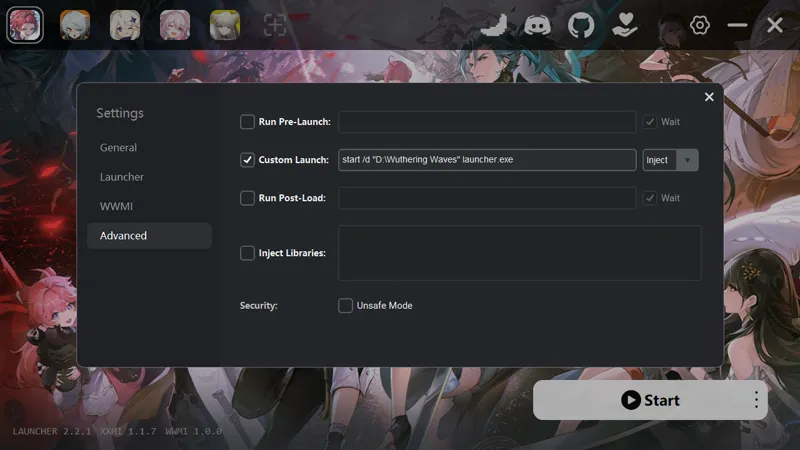
Follow this post to set up Custom Launch: https://gamebanana.com/tuts/20326
After step2, make sure the official wuwa launcher is closed.
Check Engine.ini, make sure it’s the same as shown in the third image, and save it.
Then start XXMI as usual. This will automatically open the official wuwa launcher. When the XXMI launcher shows injecting, click Start in the official wuwa launcher.
After entering the game, set LOD Bias to Ultra High.
Comments (6)
The link for the gamebanana post doesn't lead to a direct post.
fck Kuro, the launcher binding is clearly aiming for mods and external plugins
Hey, i did evreything in this post and finally got jingran's mod to work, but it still gltiches sometimes is there anything else we can do?
Jingran mod was broken,please fix it,TvT
Important: The UHD and HD versions use different hashes. Since I’m using UHD, the HD version will no longer be maintained. Unless XXMI or another tool adds compatibility in the future, you’ll need to fix the hashes yourself.
About that, I try adding "-krqlv=hd" in the launch option under xxmi launcher's general tab, and it works as well. alternative is replacing hd part with either uhd or sd depending on which downloading package you chose.