

wuwa 3.5 fix
Note: This is not an official fix from wwmi.
First, download the latest version mods from my gitHub. They are compatible with the latest hashes.
Have RabbitFX downloaded.https://gamebanana.com/mods/527815
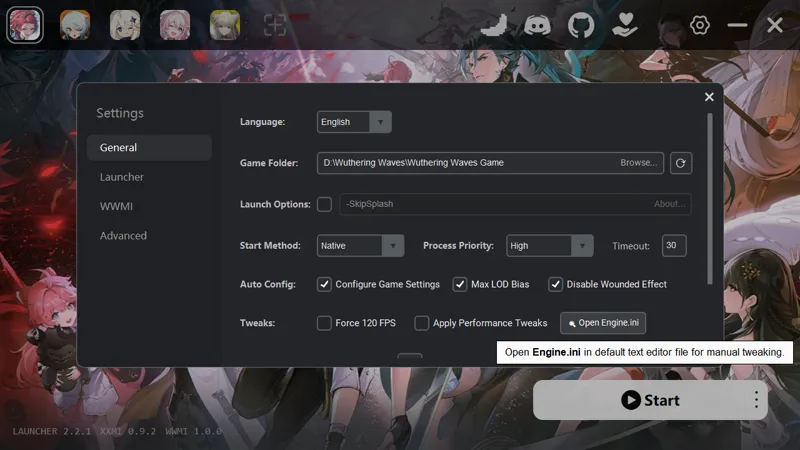
Open engine.ini through the launcher and add the following line at the end:
r.Streaming.HiddenPrimitiveScale=25
Comments (11)
If your Brant still has issues, go to the graphics settings and set LOD Bias to Ultra High.
把画面细节调到极致
NPC Mods still not working!Help
Brant , Aalto , and NPC Mod doesn't work Can you please update for texture?
I dont know what I'm doing wrong but luuk's mod looks great when I go into the character page but is distorted when i go out of it. I have dont the github and RabbitFX fixer to my knowledge. Can anyone advise? Maybe i did a common mistake?
Many thanks for repairing the mod! I hope the Morteffi and Aalto mods will also be fixed
Thank you, it was very useful. I was able to fix most wuwa mod with this method. But the mortefi mod still doesn't work. It's an old mod, but could you please update the mortefi as well?
i dont know if it is just me, but brant's, calcharo's, and rover's dont seem to be working for me. all other characters seem okay with this fix. please help. thank you🙏
me too
why do the team setup icons not work for me? i have the chibiportraits downloaded
You’re my lifesaver!