
August 7, 2025
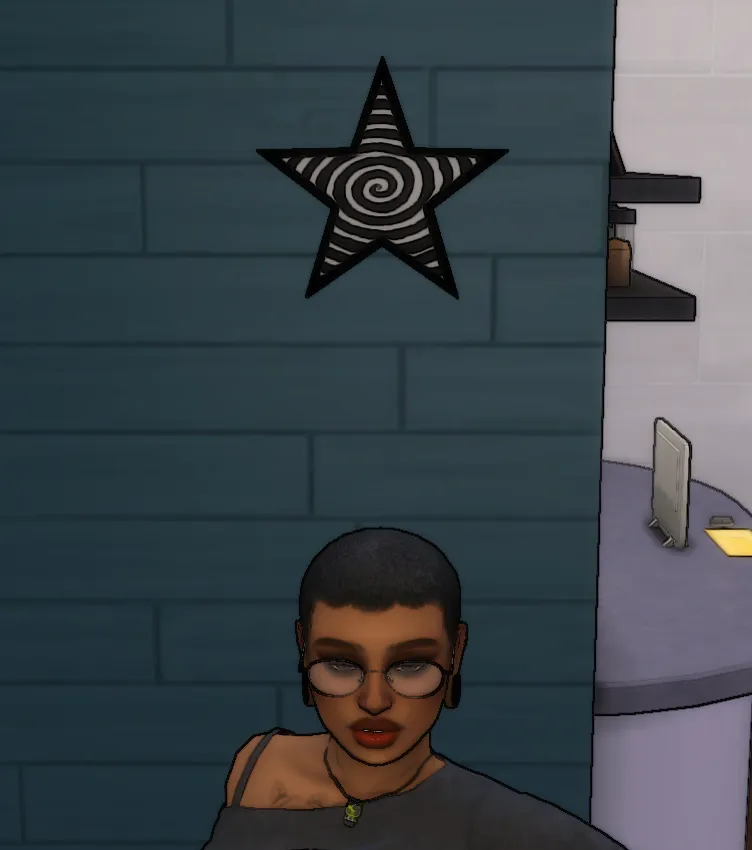
Spiral Star plumbob override
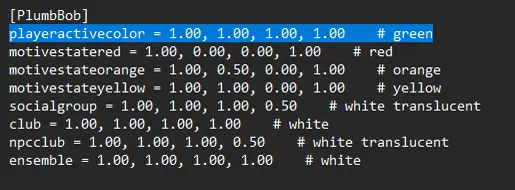
To ensure that the plumbob looks like this you must locate the "Default . ini " file and change the highlighted numbers to 1.00 directory fo
To ensure that the plumbob looks like this you must locate the "Default . ini " file and change the highlighted numbers to 1.00
directory for windows :C:\Program Files\EA Games\The Sims 4\Game\Bin\Default
directory for mac : /Applications/EA Games/The Sims 4.app/Contents/Resources/Default.ini
Comments (4)
S
Sahmie . · January 31, 2026
where do i find the highlighted numbers after entering default
T
Thousand_Simmer · February 1, 2026
sorry it seems the image corrupted i have updated the page so the image should be there now
J
Jj · January 24, 2026
hey just wanted to let you know that now with the ea app you can't find the default ini on Mac
T
Thousand_Simmer · January 24, 2026
It’s not in the bin folder?