
Countertop Appliance Expander
🎆Happy New Year, everyone!
Sorry for disappearing for a while without posting any updates. Thank you so much for your continued support — I truly appreciate it.
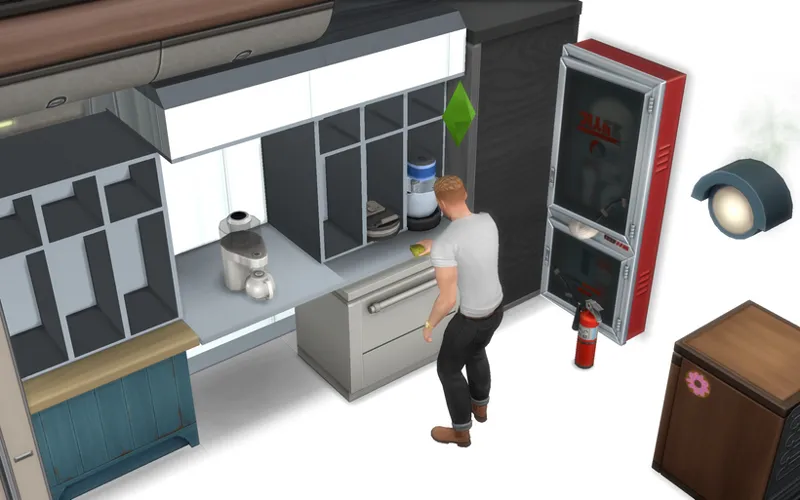
Over the past months, I’ve been continuously researching and experimenting with aircraft-style kitchen and galley cabinet systems in The Sims 4. However, as my available time is becoming increasingly limited, I recently decided to package my completed research into a practical and easy-to-use CC tool, so that this work can still be shared and put to good use.
-
😵💫About my recent situation
Recently, and for the near future, I need to focus on preparing for my university graduation. For quite a long time, I have been trying to squeeze in moments to experiment with galley cabinet systems mods — mainly planning and testing cabinet dimension systems, and researching alternative ways to handle countertop appliance placement in The Sims 4.
However, it has become clear that creating a full galley cabinet systems will require a much longer development cycle. I’ve already been “away” for some time, and it’s unlikely that I’ll suddenly have large blocks of free time again. Not releasing anything new for such a long period made me feel uneasy😢, so a few days ago I decided to turn my completed research results into something practical that I could share as soon as possible.🤩💡
-
🚛About this research & CC
I believe this item can solve a common problem faced by many builders — a problem I personally struggled with as well.
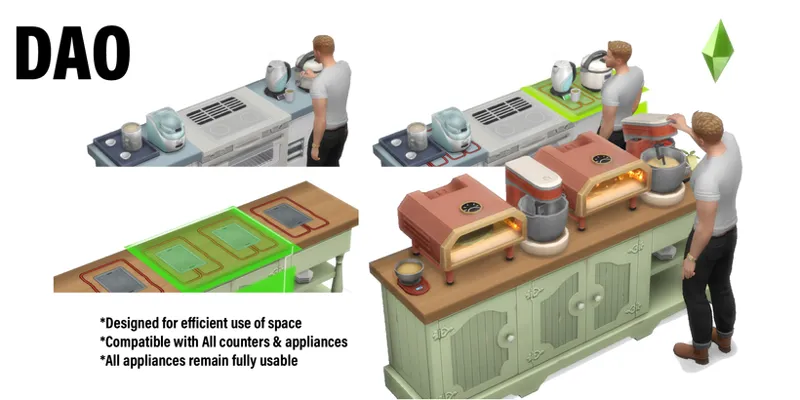
This object is a direct application of my ongoing research into aircraft galley cabinet systems. My main focus has been on how countertop appliance slots work in The Sims 4. The conclusion I reached is that installing an additional “slot-providing object” on top of existing appliance slots is the most maintenance-free and future-proof solution. This method remains compatible with all countertops and small appliances, without requiring constant updates.
In practice, it works much like a power strip: simple, flexible, and reliable — and thankfully, without introducing any electrical safety concerns to the Sim world.
includes 1 package files ( Base game compatible ) :
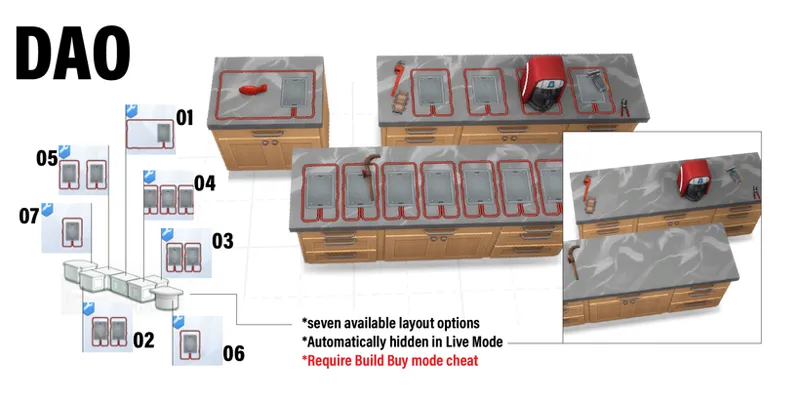
📦 01 | DAO_ApplianceCoordinationUnit_Mk.I
1 items | with 7 layout variants | counters
⚠️Usage notes
When installing this object, please make sure Build/Buy cheats are enabled.
After placement, the object will automatically remain hidden in Live Mode.
You can always return to Build Mode to move or adjust it. If any unexpected situation occurs during gameplay — such as the object becoming dirty or damaged by fire — it will temporarily appear in Live Mode, allowing you to select and interact with it until cleaning or replacement is completed
🤔Important notes regarding dishwashers
Please be aware that built-in under-counter dishwashers may become unusable if a countertop appliance occupies the center position directly above the dishwasher.
Any of the following solutions can resolve this issue:
1. Manually drag dishes to the dishwasher instead of having Sims carry them.
2. Use a two-slot layout instead of a three-slot layout to avoid placing an appliance in the center position.
3. Avoid placing countertop appliances in the center of the counter directly above a dishwasher
⚠️Files updated (February 24, 2026)
The download files in this post have been updated to the latest version.
Comments (70)
Perfeito 👏🏻👏🏻🌟👏🏻🙏🏻😃😃😃😃😃
is it compatible with the latest patch?
yes
i dont exacly know how to make it work, can someone tell me what to do please?
Have you enabled custom content in your game? You need to do this and restart for it to appear in the build catalog. Also, you can simply search for the name and it will appear, or filter by custom content.
I'm gonna be so honest i cannot find the part anywhere in my build mode. Where would it appear? it doesn't show when i search it either. edit: I found it under my custom content tag thank you so much for creating this!
I downloaded this two days ago and used it to reorganize my sim's kitchen. It came out amazing. However, the next time I tried to load my game my game wouldn't load. I did the whole 50/50 troubleshooting method and it looks like this mod won't allow my game to loadn for some reason. Has anyone else experienced this?
this is such a lifesaver i hope you have all the happiness u deserve in life
This is an absolute banger, thanks!!
Thank you so much.
This mod brings tears to my eyes. THANK YOU!!!!
all my appliances attach to it backwards. I dont know why.
感恩!
神仙!
伟大的发明
Thank you! <3
I'm not sure what I'm doing wrong but for some reason this is not working for me. I have testingcheats on, bb.moveobjects and bb.showhiddenobjects. it will only let me place on the middle spot (the usual one) no matter what I do. I also tried downloading from curse forge as well as directly from your patreon and neither are working
Same here!
so perfect!
omg thank you!!! you're a godsend
O melhor. Você é demaisssss. beijooos s2
This is an absolute game changer and EA should take notes! 🙌 Will this mark builds as containing CC and be required to download if the build is shared with others?
Thank you, Yes, using this expander unit will mark the build as containing CC. this is inevitable😢. and downloading a build that uses it will also need to download this CC for it to function correctly
ABSOLUTE GAME CHANGER! A must-have in my game, thank you!
谢谢老师,甜菜
thank you so much!!
Hiii, first of all thank you for this amazing mod. For some reason my sims can't use the counter with three appliances. But the other ones they can. Am I doing something wrong? Thank you for your feedback.
I'm sorry to hear that. This is a tricky issue because it could be affected by many factors, such as some appliances being too large and not suitable for a narrow layout, or sometimes it could be other things that affect the operation of the sims... You can try such as changing the position of the cabinets, replacing the appliances, or avoiding some ineffective appliance arrangements.
I downloaded it and followed the steps, put it in the mods folder, enabled custom content and script modifications, but it didn't work; the mod doesn't appear for me. What could be going wrong?
its on counter category, and usual on first, because it price is 35.
Meu Deus que perfeito, muito obrigada por compartilhar essa maravilha com nos ♥
this is genius and such a necessity, thank you so much!!
Это лучший мод в мире!!!!
AMAZING!! tysm <3
WOW!!!! This is so great!
Adorei!
you saved my life ily
Thank You
LOVE THIS
"When installing this object, please make sure Build/Buy cheats are enabled." does this just mean to activate moveobjects before placing it or am i missing something?
you haven't missed anything. or if placing it have problems, you can check "Auto Cabinet" function is off.
You are a genius! Thank you so much! I made a short introduction video about it on my TikTok channel 😍
I LOVE YOU.
This is such a great idea, can't wait to try it in-game. Thank you!
Incrível
Hi, so I downloaded your mod after I saw it because I thought it would be a game changer and it is. However, for some reason for me I can't use it properly without using the island counter tops and turning them around because the footprint from the counters interferes with the mod. I followed all the instructions, so I know it's not an installation issue and I have the cheat on. I am really just making this comment in case anyone has the same issue as me and really wants to use your mod. Once again, thank you for your work and good luck in college.
Thanks for your kind words! The expander unit depends on counters. For stable functionality, 🟢: the appliance, the expander unit, and the counter (or island) must all be slot-attached and treated as a single object by the game. ❌: Placing the expander unit floating or visually aligned instead of slotting it onto the counte
Saw a video on the TT app about this, and I ran here faster than I have ever run before! I dunno who you are hero, but I love you! Thank you for this amazing CC!
What a brilliant idea! Thank you for sharing. All the best with your studies and graduation. Please don't feel stressed about releasing mods on a regular basis - we all know how RL can be with time pressures, etc. Stay well! <3
This is amazing, love it !!
thank you for this, i can't imagine how much time and effort put into this especially with your schedule. wishing you the best on your upcoming graduation, congratulations!
Love it!!!
Thank you Spookling! Click the gears are the counter options. That worked. Sweet!
I have MCCC installed and all build mode options enabled and it won't work right for me. There is only 1 option not 7 and only 1 appliance can be set on the counter in the same place as always. So I don't know what I am doing wrong.
the item acts like a counter - click the gears to pick a different type of counter, and you'll get the different slots for the item
This is awesome!? 😍😍😍
phantastisch♥
congratulations on graduating 🍾🎓
Saw this on Tiktok and ran here!!! Love it, thank you!!!
Every time you release something it blows me away! ♥ Happy New Year!
OMG ur the best!
Omg this is amazing!
fantastic, thank you!
i love you
brilliant!!!!
Amazing! Game changing! Thank you so much!
超级有用!老大你是天才!飞机系列仍在等!!!
Awesome!
very useful, thank you so much! and good luck for your university graduation ♡
this is amazing, thank you! 🥺🤍