
Preset Gate Cabin Kit PART/01
includes 5 package files ( all Basegame compatible) :
📦01|DAO_WallPanel_RNCL2
4 items|25 swatches|Window
📦02|DAO_OverheadBin _QuarterPipe
2 items|25 swatches|Display / Window
📦03|DAO_PSU_SquareUp
25 swatches |Base Game compatible|Light (wall)
📦04|DAO_Shade_FlyingPancake
30 swatches|2 pattern x 15 colors in one|Curtains
📦05|DAO_FloorRail_Tributary
24 swatches|4 pattern x 6 colors in one|Rug
Design Your Dream Aircraft Cabin with This Modular Kit ✈️
With this collection, you’re ready to start building the aircraft cabin of your dreams.
Begin by creating a room that’s 4 tiles wide (recommended) and as long as you like. Choose your favorite wall color and flooring, then install a set of wall panels in the color scheme you prefer.
Add the matching overhead bins and place Passenger Service Units (PSUs) above each row of seats to softly illuminate your cabin… and just like that, your aircraft interior begins to take shape.
Here are a few advanced building tips to help you get the most out of this set:
💡 Try unexpected combinations: These modular items are designed to pair well with Maxis content. You don’t have to use only the matching parts—try using base game curtains in the curtain slots, or place regular wall sconces as reading lights. You might discover a surprising combo that works beautifully.
💡 Take advantage of extended cabin walls: The cabin’s curved sidewalls extend slightly outward, giving you an extra 0.25 tile of space on each side. In Build Mode, enable the bb.moveobjects cheat and press F5 to activate quarter-tile grid. This small extension still allows most functional items to work as expected.
💡 Align the groove patterns under the overhead bins: The standard and extended bins have different decorative groove spacing underneath. For a realistic passenger cabin setup, try placing seat rows every 1.5 tiles, and align PSUs with the same spacing. Then alternate standard and extended bins based on the PSU positions—this helps distribute the groove pattern evenly with minimal effort
A Few Small Issues & Workarounds
🚧 No exterior structure for wall panels (yet)
Currently, the cabin wall panels do not include an exterior shell. This is because I plan to modularly rebuild the entire aircraft body—this idea has already been tested and proven feasible. The exterior shell is planned for a later stage.
In the meantime, consider building your cabin mock-ups in the basement to avoid disrupting your lot’s external appearance.
🚧 Curtain shading may appear incorrect
Sometimes curtains placed in the custom wall panel slots may display incorrect lighting. This usually happens after structural edits to the building and is a temporary rendering issue.
To fix it, you can manually move the curtain slightly to refresh its shading. Alternatively, reloading the lot (e.g., traveling to another area and returning) will automatically correct the visual glitch.
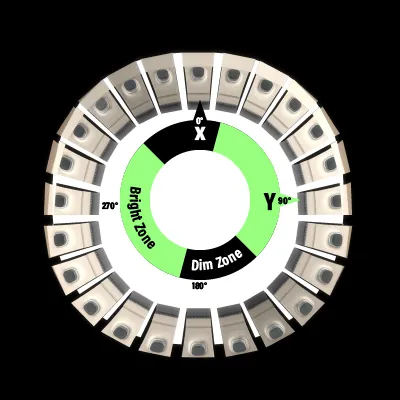
🚧 Wall panels may appear dimly lit
This is a known limitation of the window shader used in these panels. There’s no true fix at the moment, but it can be avoided.shading depends on the absolute world orientation.
try testing how the panels appear when placed on different walls before finalizing the direction your airplane faces. The right orientation can significantly improve the overall lighting appearance.
The aircraft-themed items will be released gradually in multiple smaller phases. To avoid confusion or errors from reinstalling duplicates, new sets will not include any .packages already released in previous sets.
🗄️|If you’re missing a file or want to download a specific package individually:
Comments (10)
OMG! I just came across this and it's amazing! I will definitely be keeping up with what you have planned. This is perfect!! I had to go back and add this content. My lil plane is looking really nice right about now. Thanks so much!!
Thank you so much !! This is astounding!
Yeeeeee, you spoil us!! Time for another update!!! 🖤 (also, I tried to tag you on your tumblr, and it wouldn't work, I'd hate for you not to see what were all making with your amazing cc!)
This is amazing! Cant wait to try in my game Tay the youtuber made an amazing plane showcasing your art! Thank you for your skill and time.
Dao, you're literally amazing ♥
best cc creator of 2025!!!! thank you!
Amazing job, something we've been needing for such a long time! Love your work!
This is incredible
Dude YOU are literally amazing!👏 Been in love with your stuff since the first plane chairs, I'm thrilled to see you're making more content. It all looks so good and is so well thought out! Thank you!
Wow - this is really cool! Thanks so much.