
Download ColorPicker V2.06
My mods are kept compatible with the latest patches and do not break frequently. To see which mods need updated check my Mod Status and Links Post where you can also find support.
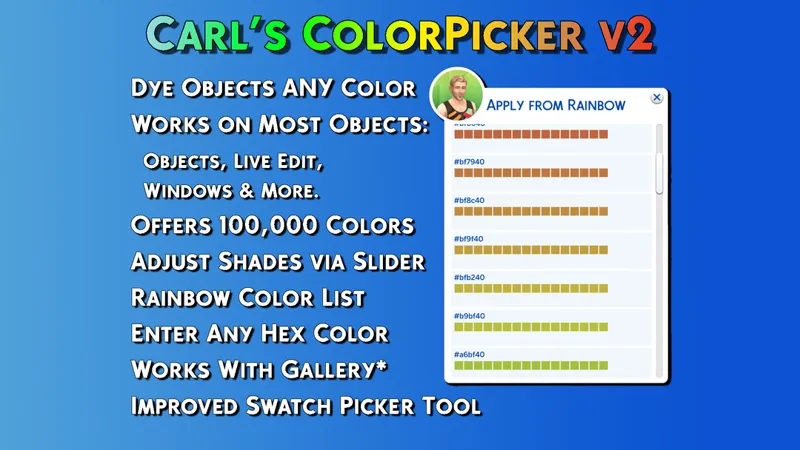
The Sims 4 ColorPicker V2 is an evolution of my original build make-over tool, that introduces the ability to select colors and tint almost any object with those colors. From simple lightening and darkening operations to every color in the rainbow, the mod has you covered. When it fails to provide a color, you can paste a hex code to fill in the gaps.
v2.06 Critical Fix - August 19, 2025
Fixed mod breakage due to the pack selector tool update.
v2.05 Critical Fix - July 1, 2025
Fixed mod breakage due to Enchanted by Nature Pack Patch.
v2.03 - Update for Life and Death - March 21, 2025
Fixed bugs with menus introduced with the Businesses and Hobbies pack patch.
v2.02 - Update for Life and Death - Oct 27, 2024
Rewrote the menu that appears after changing color to be more reliable about intensity. A recent patch broke this menu, so it was a good opportunity to improve it.
v2.01 - Update for Crystal Creations - Mar 2, 2024
Fixed all tunings to not have errors and ensure that no specific packs are required for functionality.
Improved Features:
New ColorPicker menu with various functions. Tint objects any color, increase their red, green or blue shades, lighten or darken them.
Explore new build options by creating never-before seen looks.
Copy a color from an object and paste it to another.
Apply to multiple targets, or shift to single-target mode.
Lock objects to avoid the mod targeting them in the future.
Enter a hex code if you can't find the color you want.
Works best on light colored objects, for obvious reasons.
Uses the light dimmer menu slider to allow for adjustments.
Improved Swatch Picker logic.
Learn About the Mod:
You can learn about features in ColorPicker V2 here.
Installation:
Like any other mod, put in your Documents/Electronic Arts/The Sims 4/Mods directory. Ensure script mods are turned on, or it will do nothing. If you don't have testingcheats on , you won't be able to see the menus so make sure of that before seeking support.

Comments (28)
Doesn't work anymore. Shows LE everytime I picked color
BE throwing exceptions
Will this mod be updated any time soon? It is not working w/this recent update (sept 18th)
This version conflicts with the version currently
i downloaded the mod, put it into my mods folder, turned on testingcheats, but it still won’t work for me despite it showing up in my mods folder when i open the game :/
Does it conflict with MC?
I develop all my mods with MCCC installed.
How can I download the previous version of the mod? I haven't updated yet.Thank you!
Hi, I think this mod is broken from the business and hobbies patch.
I’m sorry I’m a little bit late to the party. What if you don’t have all the pack can would it still wrk.
I only have basegame, a stuff pack, and a kit, and it works fine for me! (the stuff pack is backyard stuff, and the kit is blooming rooms)
Thank you so much for this! You are amazing, I hated all the drab and pastel colors. <3
Hi Could you please advise if this mod is ok and doesn't need updating due to the new patch we just received since it did break many mods
I need to give all my mods a look over. I do not believe this mod to be broken atm but people who do not own certain packs might be missing interactions. So not "broken" if you own all the packs as far as I am aware. But I need to get to ALL of my mods and it's taking time. I'll put out a patch and hopefully patreon will let me edit this with the change notes :)
does it mark house build as modded when you upload to the gallery?
hi i have just installed colourpicker i cant find all the colur or wheel just the basic can someone help please
Did you enable script mods in your game? Also make sure to enter the cheat "testingcheats true" in the command field. To enter a cheat code you must first open the Cheat Console by pressing “Ctrl + Shift + C”. I hope that helps!
French translator alone. https://www.mediafire.com/file/u9sentgrtuj8t63/%2521Carl_ColorPicker_Fr_par_Braville.rar/file
Insane what you do with this game! You've made building such a better experience!
I just have to tell you that this works Perfectly. Oh my gosh, so easy to use!
Carl, has anyone told you that you are awesome? Modders like you continue to restore and maintain my love for The Sims 4! Thank you!
Not all heroes wear capes
This guy might actually have a cape.
Wow. I remember this in an earlier iteration of the game. Its so cool to have something like this back again.
Game-changer!!! Carl, you are remarkable!
Thank you Carl. I do still your review though
Thank you from me too, Carl! Just pledged!
Thank you very much for all your hard work, Carl - this is awesome!!