
Carl's Sim Spawner & Filter Tool - SSFT Features
If you've followed my work on Youtube, you know I have a bone to pick with Nancy Landgraab and Thorne Bailey. Sim Spawner & Filter Tool (SSFT) started as a project that would let players be selective about where Sims are allowed to spawn based on location. Once that feature existed, a lot of possibilities opened up and I pursued them through much trial and error.
My Sim Spawner and Filter Tool is in Early Access DOWNLOAD HERE.
Features Overview
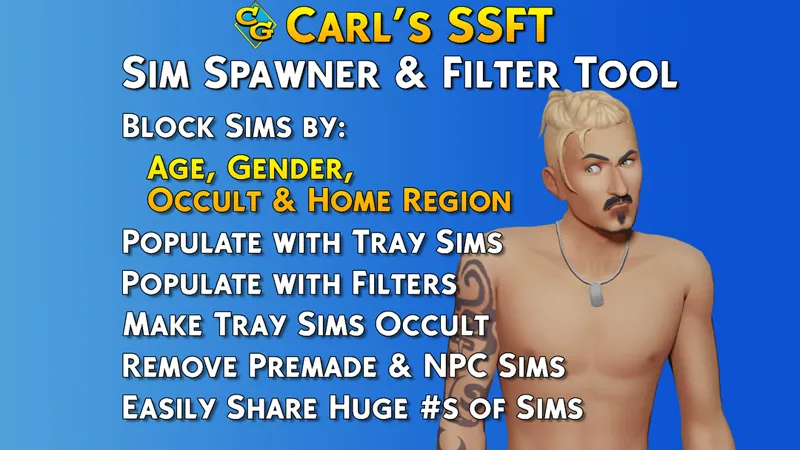
SSFT will allow you to:
Keep Sims from spawning based on their home region.
Prevent paparazzi and fan situations that spawn with celebrities.
Block Sims based on age or gender in specific places.
Block Sims based on occult in specific places.
Delete all randomly generated Sims in your save
Delete all but important premades with a simple command.
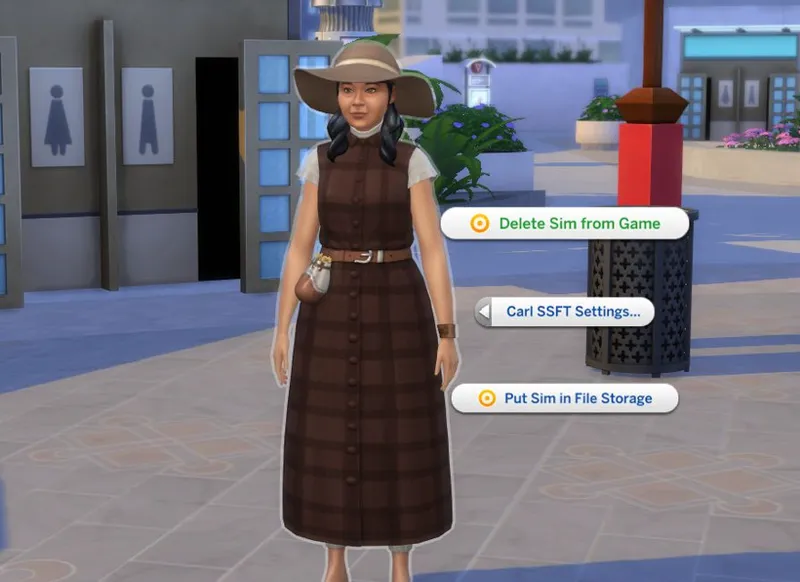
Delete a single Sim and remove them from your game.
Populate a world with your Tray.
Experience your own created Sims roaming your world as walkbys and filling jobs.
Populate using filter rules, so you can pull in only females or a particular occult.
Use SimShare files. The mod comes with about 230 Sims, created by players.
Put your own sims in a SimShare file to share with others.
V1.01 Patch Notes:
I made some improvements to the Carl.KillRandoms cheat. It will now be more accurate and protective of Sims who are from CAS or the Gallery, any Sims who are family members of yours (even NPCs) and should be more useful to a number of players.
You are now able to use the Tray/SimShare settings button under the SSFT Settings menu. This will let you skip your own Tray for imports, allowing you to generate Sims only from the CarlSimFile_CarlsGuide.simshare or any other creators/manual files you have. This will help those of you with messy trays.
Blocking Sims
Blocking Sims is made easy with the menu system I created thanks to a lot of feedback from players on our Discord. There are three types of blocking you can do, but a lot of flexibility.
Block Based on Age, Gender, or Type:
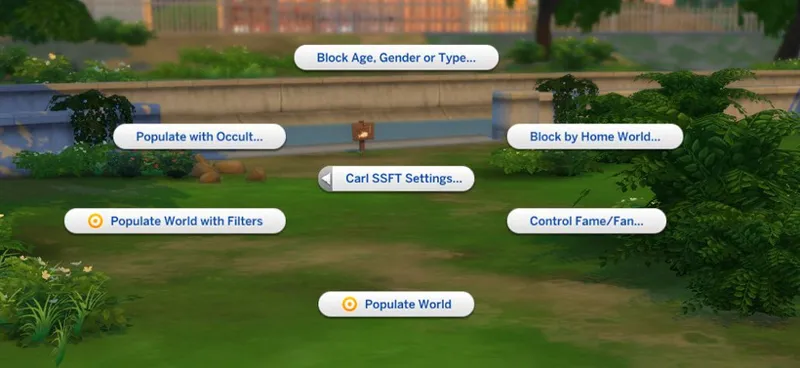
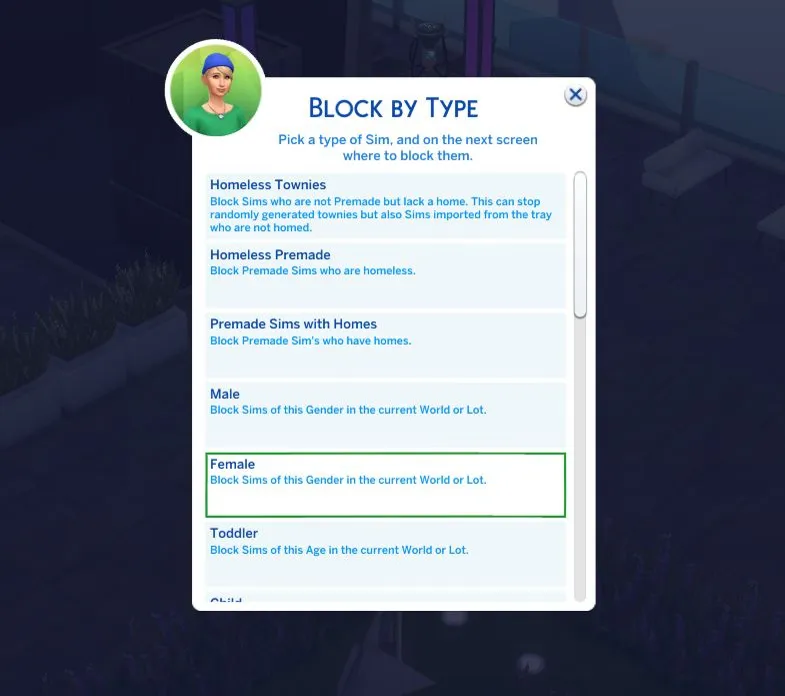
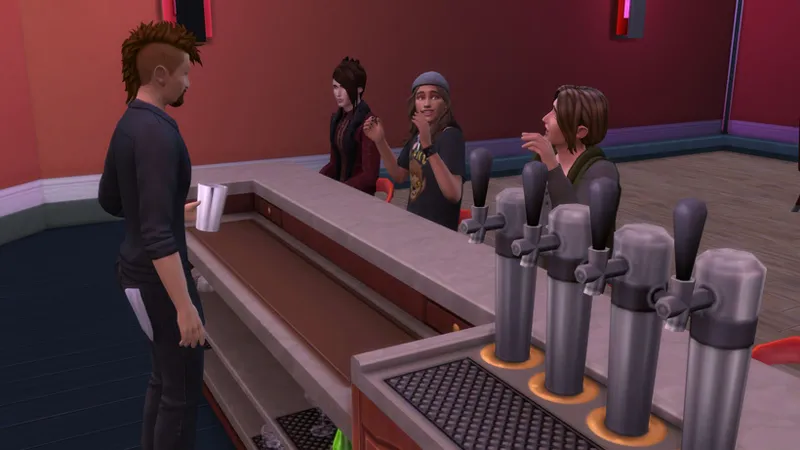
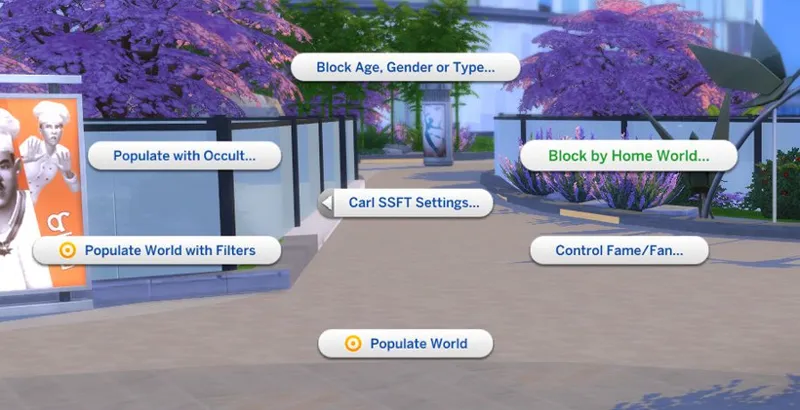
The part of the blocking component I am most proud of is the ability to block Sims based on their attributes. Let's go over an example. We want Sims at a night club to be male-only. In order to block on a specific lot, we need to travel there. Once at our destination night club, we pick Block Age, Gender, or Type in the Carl SSFT settings menu.
Pick Female
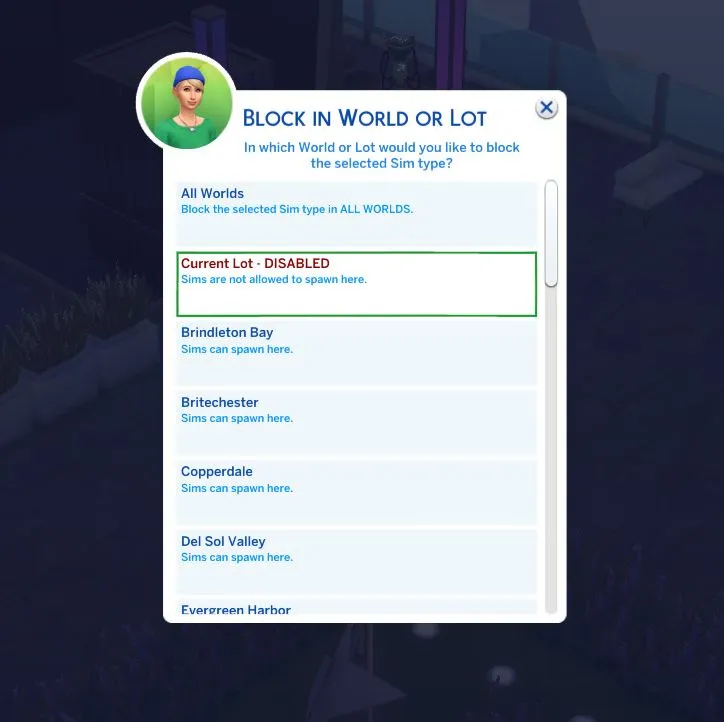
Pick Current Lot.
Now nearly all Sims who spawn on this lot will be Male.
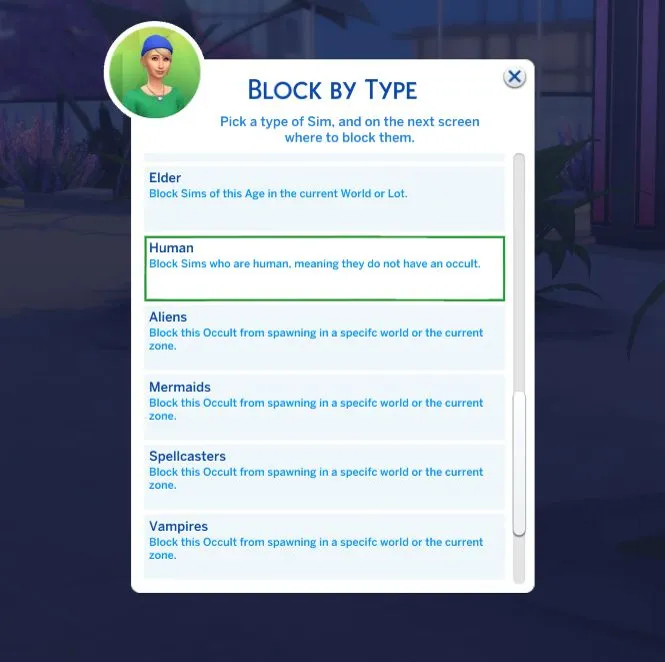
For another example, let's block Humans in Moonwood Mill.
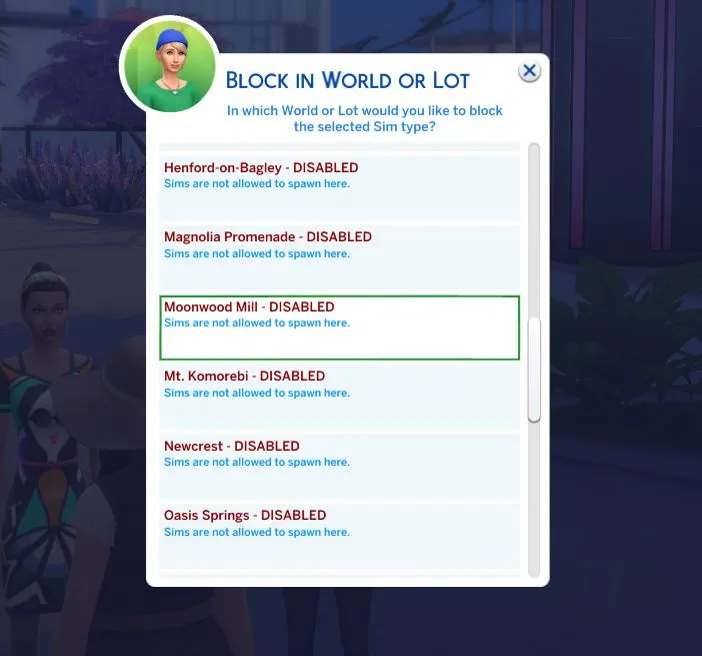
Select Human in the Carl SSFT Settings menu, then Moonwood Mill! Now the entire world has a blocker that will stop humans from spawning.
With the ability to block by age, gender, and occult you should be able to make unique places in your game and tailor the world to suit your needs as a player.
Block Based on Location:
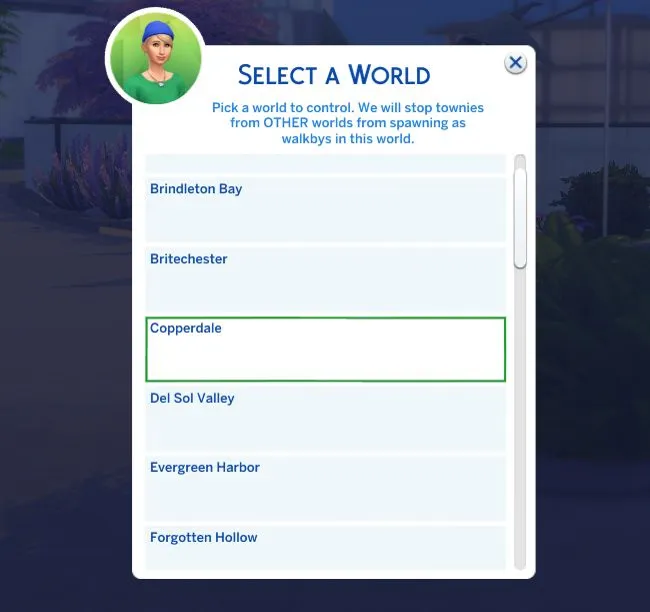
Let's make sure that Sims from the Base Game worlds of Willow Creek and Oasis Springs cannot spawn in the new world of Copperdale from High School Years. This will not only prevent them from doing walk-bys, but also stop them from being assigned as students.
In the Carl SSFT Settings menu, select Block by Home World.
The menu that comes up will let you choose in which world you want to control spawns. So for our example, we will pick Copperdale since we do not want Sims from the Base Game to spawn there.
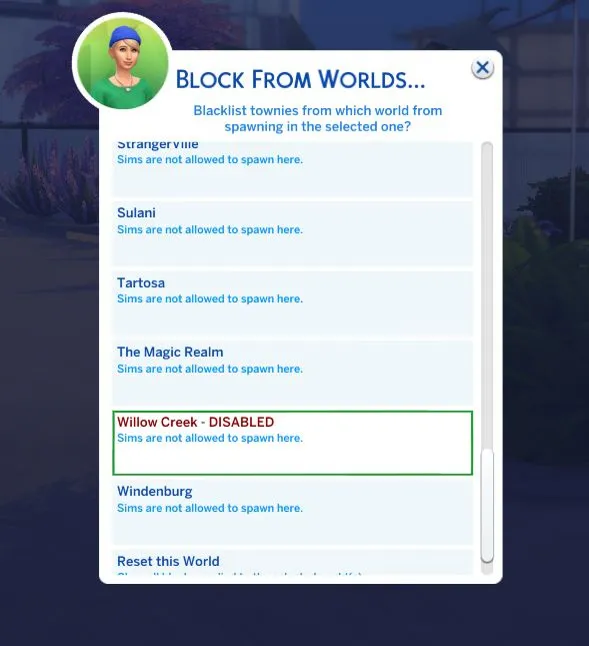
On the next menu, we can select Willow Creek and Oasis Springs. Both will switch to blocked. If we wanted to, we could select all worlds at the top. This would stop Sims spawning everywhere except their home region.
Block Paparazzi Situations:
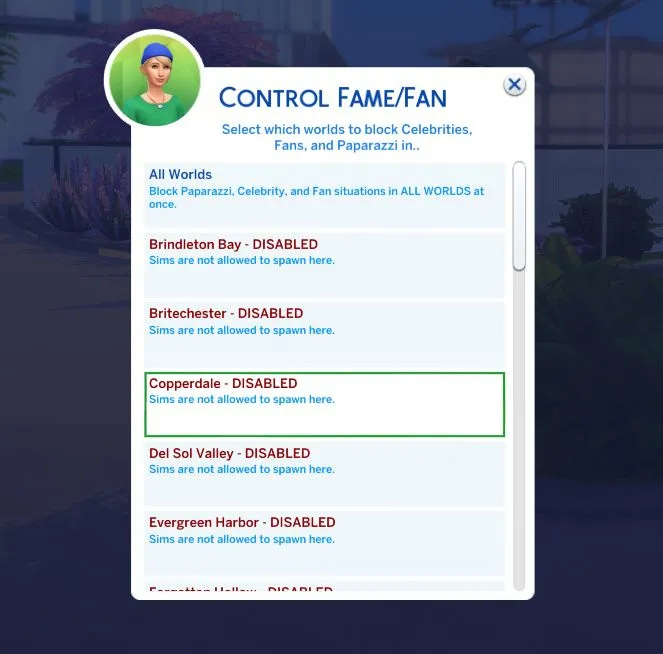
This is a specific tool for blocking the situations that come up where Sims are assigned as Fans, Paparazzi appear, and Celebrities will spawn and do their distracting behaviors. This menu only has one level unlike the others. Just pick the worlds you want to stop the situations in directly. It's very specific, so if you select Del Sol Valley, it will even stop them there.
Removing Sims from the Game
If you don't simply want to block Sims, but get rid of them, SSFT can help with this. The mod comes with two custom cheats you can type that will take care of those existing Sims for you.
NOTICE: These cheats make the buttons in the game's menu in the top right and esc menu both blink a bit after running them. I believe the game is rebuilding some caches once Sims are removed. Wait a moment until it stops blinking before doing anything. The amount of time it takes is based on your PC and the number of Sims removed.
Carl.KillPremade
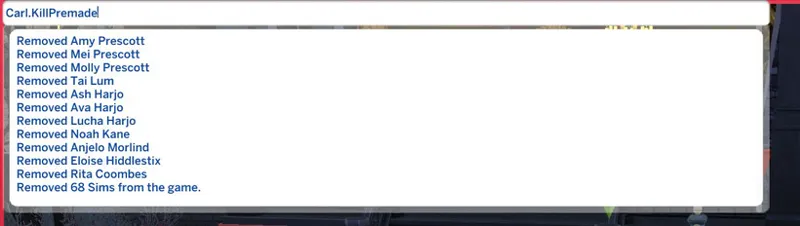
Type Carl.KillPremade into the cheat console, and all Sims who lack an important role in game will be removed. Examples of Sims who are not removed are those involved in StrangerVille (Erwin), Sims from Batuu, and Werewolves from Moonwood Mill as this would break the clan system.
When you type the command you will get a report on the Sims who were removed. If one Sim in a household is important, the household itself will stay so their relationships can be maintained.
Carl.KillRandoms
PLEASE be careful with Carl.KillRandoms and check Sims removed before you save after using it. It is possible some game-generated randoms you like could end up caught in the removal. I have updated it to be more careful around families and gallery/CAS created Sims, but you should still check to make sure you are happy with the Sims removed
Type Carl.KillRandoms into the cheat console, and all NPCs generated by the game who are not premade Sims will be removed. On older saves some players report a speedup with these pointless Sims gone. It tests to make sure they are not player Sims, and also attempts to look through family trees to make sure family are not pruned.
Delete Individual Sim
Under Carl SSFT Settings, you will also find a command that deletes an individual Sim. While I made efforts to prevent errors here, it's possible if a Sim is in certain situations you might get a LastException. These should be harmless and allow the game to carry on as normal. It's probably because another Sim had them targeted. If the Sim is the last member of the household and you delete them, the tool will delete the household as well.
Importing Sims to Your World
SimShare Files & Populating
I've made a file type with this mod that will automatically import Sims from your tray when the game starts and store them in said file. Your own SimShare file will be named CarlSimFile_YourCreatorName.simshare - it's very light and compact and good for sharing Sims with others. When you use the Populate World tool, it will scan ALL SimShare files in your folder. So you can have Sims from multiple other players.
Populate World
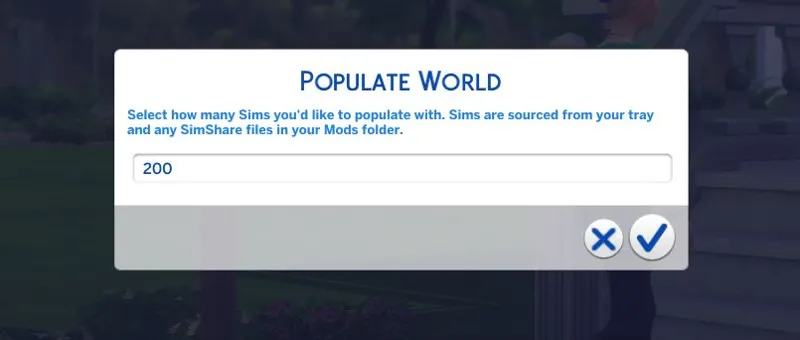
If you click the Carl SSFT Settings you will find Populate World. This box asks you how many Sims you'd like to pull in from that file. These will be added to the possible Sims who can do walkbys and work jobs in the game. You can add up to 500 at one time, though it defaults to 200. If you have a low end machine, you can inject some more variety into your world using lower numbers.
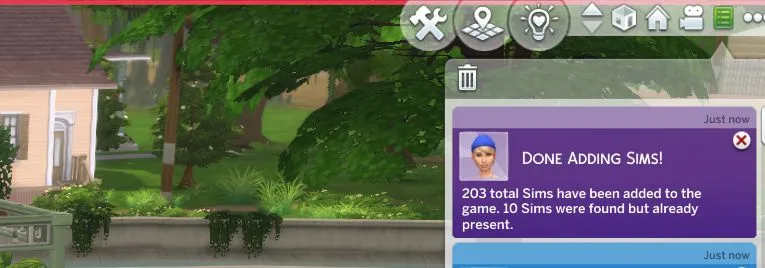
Note this notification can be finicky and I'm working on a solution that is more reliable. The game delays sending them, and I need to find a way to tell it to get off its ass.
Populate with Filters
This option will use the current filter rules when importing Sims. So, if you have vampires blocked where you are while running it, no vampires will be brought into your game. Cool, huh? You can block based on ages, gender, or occult. Block humans if you want. Import, then unblock humans and you will get a bunch of occults from your tray.
Going Sim Shopping
Because adding Sims to the Library when using the Gallery will put those Sims into the Tray folder, this means they are accessible to my populate world tool. Note that it only scans these files on startup! You can shop for Sims, add them to your library, then with a couple clicks add them to your game.
Manual SimShare File
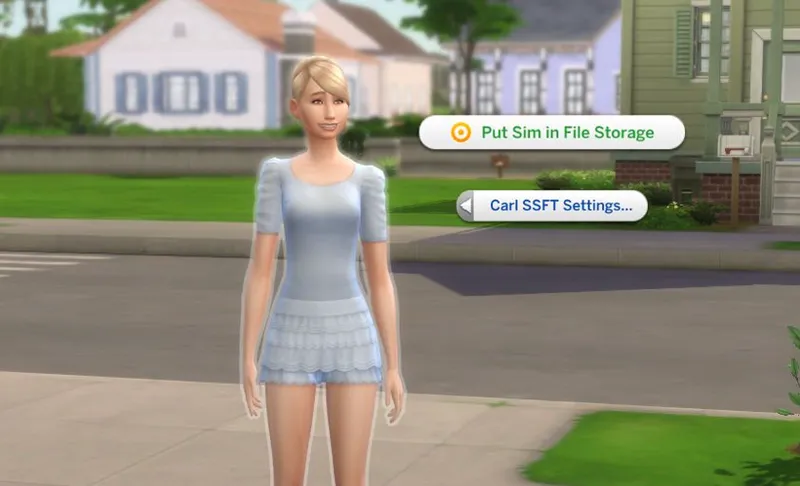
When you shift-click a Sim, you will see an option 'Put Sim in File Storage' under the Carl SSFT Settings menu. This will create a CarlSimFile_YourCreatorName_Manual.simshare file. This can help you to share only a handful of Sims. Sims that you shift-click will be added to this SimShare file.
More on SimShare Files & Credits
The mod comes with a CarlSimFile_CarlsGuide.simshare file. This file is to help players who don't have many Sims in their tray, or add variety for those who do. They are curated Sims made by the following people:
Cara Grace
eric the forklift
Esther | ThatSimsLady
froggo
GhoultheKitty
Mizu
Playalot
spaceroxy
Tsukichild
DOWNLOAD:
My Sim Spawner and Filter Tool is in Early Access DOWNLOAD HERE.
Comments (59)
Is this the same as MCCC Import tray settings option? Can I use this aswell?
Not sure which post you read re: this mod, so I am posting here too: Hey, Carl. The game won't save after I attempt to delete all EA generated NPCs with the "Carl.KillRandoms" cheat. Every single time: The UI begins to blink, and the game *won't save*. I can play for a while after I use the cheat, but never save again after having used it. Do you, or anyone else, have any fixes/workarounds, or ideas as to why this is happening to begin with? Thanks so much: love your work! Cheers!
Would love to see this updated man!
The update version is just here : https://www.patreon.com/posts/v1-03-download-69926725
This mod looks like it could be a GAME CHANGER... PLEASE update it. Thank you.
The update version is just here : https://www.patreon.com/posts/v1-03-download-69926725
;(
It's not working for me either with this patch. I was just looking to see if I missed an update. love your mods carl! :)
I dont think this mod is working anymore. If you are ever in the place to update it, That would be incredible!
Is this mod retired ?
i dont think this is compatible with the newest version of mccc, i updated mccc and it immediately stopped working
Love this mod, Is there any chance you can add a block by gender preference options? I tried for personal use and failed miserably, lol. It would be cool if we could add custom block by traits options through a snippet or something.
Curious if this also conflicts with Lotharihoe's Sim Spawn Overhaul
I'm curious if this conflicts with Bienchen's spawn mods. Specifically, "dog walkers in other worlds" and "more children at parks." To my knowledge, neither will produce random Sims, but idk if they only use Sims from whichever world my Sim happens to be in.
Hi, I tried to make a male only spa because in real life it's my favourite thing to do (leave the family at home for a day or evening and hang out with the guys, no women to worry about or guys trying to impress girls) But, it doesn't work in the game. After selecting female it said current lot - disabled but they're still spawning :( I'll try to reload the game see if a fresh start fixes things.
Thanks so much for this, I have OCD and this has changed my life. Quick question though, does this mod keep random sims from generating? :)
Not from generating yet, though I am looking at it. With a big enough population you can discourage the game from doing that though.
Hi Brianna, yes I have. I have currently blocked the non-pre-made homeless townie Sims, the homeless pre-made Sims, and the pre-made Sims with homes in both places. Non-pre-made homeless townie Sims are still appearing at the high school. My best guess is that the game requires 11 total high school students to be in attendance per day so that if a certain percentage of them doesn't include any pre-made Sims, there have to be non-premade homeless Sims present to make up the difference. I should probably just be content to have the non-pre-made homeless townie Sims present but it would be awesome if all the high school Sims could be ones I myself have created.
Hi orangesodaaa, no I haven't received a response yet. I think I might have better luck on Discord but I don't know how to access Carl's channel there. The Block By Type menu appears to be keeping premade Sims from generating in my Copperdale. My main concern now however is that non-premade homeless townies continue to be generated at the high school. I have created 10 teens in Copperdale and I would like all or most of them to appear at the high school on any given day rather than the non-premade homeless townies. The one thing I do really like though is being able to delete the townie teens and other townie sims with the Delete Sim function. I am not however deleting premade Sims at this time.
Have you tried blocking homeless Sims in Copperdale or the Highschool lot?
Does not work. I'm still getting sims from outside their home region spawning.
Hello, I'm not sure what I'm doing wrong but Block by Home World does not appear to be working for me. On the first menu (the "Pick a World to Control" menu), I select Copperdale as my world to control. At the top of the next menu it says "Block townies from ALL worlds from appearing in Copperdale as walkbys." It shows all of the worlds as Disabled in red. But then when I go to click the x to close the menu, the first menu (the "Pick a world to control" menu) reappears and the process seems to start all over again as if I'd made no changes whatsoever. This loop repeats indefinitely. I hope I'm explaining this well enough. Do you have any suggestions as to what I might be doing wrong? Thanks so much for your help.
It is broken for me too. Did he ever respond?
Hi! I just downloaded this and populated my worlds but every time I try to load a family it loads and loads and loads and I can't actually play... anyone else having this issue? how do I fix it?
Hey Carl! First off, I wanted to give you a HUGE thank you for this mod and all the work that went into it! I feel like everything is running smoothly in my game, (e.g. vendors are pulling from my sims), but I'm having issues with the vet clinic in particular, my game is still randomly generating sims for vets specifically. Could be user error, but I just wanted to reach out and say something! Oh to add, school jobs seem to be using randomly generating sims as well.
Is there a way to delete sims by age? teens for example?
I've considered adding this. While I have a "add with filters" I don't have a "remove with filters" yet. It's a bit more complex to setup. I could in theory let you pick an aspect of a Sim and then scan for Sims that have that.
I was only half-reading the updates when you were working on this but now that I've sat down and read through it... I am in awe. I can't afford to buy HSY this week but I'm not even sad because this mod is seems much more exciting.
Hey, thanks. This was a real passion project lol. I really did grind on it every day the entire month of July and then some. It required me to pick up some new skills but I am very happy with how it turned out. I wanted it to be very powerful so a player could make all-male bars or just limit who is coming into their world. I will be adding a celebrity trait check here soon, so you can ban them entirely and not just on the fan/paparazzi situations.
Thank you for all you do in helping make the Sims 4 more enjoyable for all of us. This is an amazing mod :)
You're very welcome!
Can the mod still work without the simshare files?
Yep. It can do blocking and all of that. My Simshare file is just an optional addition , they generate automatically (and it comes with one) it will only be used if you use the populate command. The main goal of this mod was to do NOTHING unless the player wants to. SO it will do nothing unless you tell it to.
This sounds great. Would it be possible to select which tray files you want to use to populate, not just filter categories? I keep my legacy families in there in case a save file gets corrupted, along with NPC types, and I'd like to have a choice where I can just pick the NPC types to populate the world.
I believe I have fulfilled this request with the new option to disable tray. Then it would only populate with the included simshare file or any others you come across from friends etc.
Are you familiar with the NPC Control mod Carl - from what I'm reading here your mod is actually way more useful and in depth than NPCC - (going to test it now and can't wait!) Paulson has many, many paying players who use NPC Control but he has stopped updating it. We're in a little group together lol looking for solutions and I'm going to direct them to you! I appreciate the mdos are prob different but yours seems amazing. Thank you so much for the detailed and time consuming work you put into this.
I just got this but don’t know how I can start blocking NPC. Don’t know how to get up the menu :(
Sorry I will edit this post. It is on the download instructions page that you need to enable testingcheats on to see them.
This is very impressive. If this is meant to supplant a lot of smaller mods with a more complete set of functions in one spot? I'd love to use this. I'd also like to know what MCCC features or other mods I might need to remove or adjust to use this properly. You've done a lot in the space of a year and I wholly encourage you to keep going and keep making updates and improvements. You're definitely getting some money from me.
I didn't really plan to supplant anything, just give my own take on the idea. I do know some mods are all or nothing and for my purposes as a player were a bit too heavy. I also don't like that some mods use the XML in the game and this can lead to conflicts. My mod doesn't really use any XML from the game so if EA-made situations need modded in other mods, this won't impact it. MCCC works fine with my mod, since it doesn't really do anything unless told. I know MCCC can also spawn from tray. It was just something I really wanted in my own, and a means of sharing Sims in bulk was an end goal.
I promise I'll keep donating even if ea sucks
Haha thanks.
This is something I wanted for so long. Amazing and thorough work as usual Carl 💖
Aw, thanks. I will keep working on it. There is definitely more that can be done in this space.
No matter what you will still be getting my monthly donation.
I just downloaded this into my game and...OMG!!! This is amazing. Total game changer. Thank you so much for this. I have a question, though - does this mod automatically prevent the game from randomly generating new sims or do I have to select that somewhere?
Just a bump from me. As a super control freak I would really appreciate preventing the game from randomly generating new sims and use the ones I already provided. Is there such an option?
Wow! Thanks so much. Brings a whole new "fun" to my game.
EDIT: It was kind of a dumb question 🙈 😅 If finally found it. Sorry for bothering!! Where do I find the Carls SSFT menu? I don't know how to find it? Have I to click on a Sim? The Floor? PC ...? Sorry if it's a dumb question, but I'm kind of helpless.
Ooh. Just in case anyone else wonders in the meantime... Shift click your sim or mailbox.
THANK YOU, Carl! I'm a lurker, but I've been following your progress with this mod for a while. I became a patron as a big thank you for creating this tool. I'm so excited to test it!
Let me know how it goes for you! I'm going to keep updating it :)
You should know, that EA has made rules for mods more strict. Early access is no longer allowed. I just don't want you to get into trouble. <3
I knew that this would come up, so no shade toward you. I'm happy to address it. I'll use your comment to help others understand my perspective. If EA plans to change that policy, posting it in a random help article is not how to do it. Especially when they posted it only in the context of "If you need help with mods". That article tells me very little and hundreds of people are assuming they know the intent. Assuming EA can't just drop the ball and forget important details on a post like that. I know it's going around a lot, but it's not clear cut at all. If that were their intent we deserve MUCH more respect. Meaning for me to change my patterns, they are going to have to say so directly.
THANK YOU!
YOU'RE WELCOME!
OMG!!!!! This is amazing!!!!! Nice
*Keanu Reeves voice* Whoa
I know jiu-jitsu!