

[Notice]
texture Issues After Recent xxmi Update After the recent update to xxmi, some mods are experiencing texture issues. Because I’m also using a
texture Issues After Recent xxmi Update
After the recent update to xxmi, some mods are experiencing texture issues.
Because I’m also using auto-update, a few of my mods ended up with broken textures as well.
Simple Solution:
One quick fix is to downgrade xxmi to an older version.
Versions like 1.7 or 1.8 seem to work well.
Although xxmi usually updates quickly, the current version is still causing issues.
You can manually edit the .ini file for each mod.
This method is actually very simple, but if you're new to .ini editing, it might seem a little tricky at first.
For example, in the case of Lycaon, your .ini might include something like this:
Resource\ZZMI\Diffuse = ref Resourcelycaon2hairADiffuse Resource\ZZMI\NormalMap = ref Resourcelycaon2hairANormalMap Resource\ZZMI\LightMap = ref Resourcelycaon2hairALightMap Resource\ZZMI\MaterialMap = ref Resourcelycaon2hairAMaterialMap run = CommandList\ZZMI\SetTextures
However, with the latest xxmi update, these Resource\ZZMI lines no longer work properly.
So, here's what I did — I switched to using RabbitFX instead.
You just need to change those lines like this:
Resource\RabbitFX\Diffuse = ref Resourcelycaon2hairADiffuse Resource\RabbitFX\NormalMap = ref Resourcelycaon2hairANormalMap Resource\RabbitFX\LightMap = ref Resourcelycaon2hairALightMap Resource\RabbitFX\MaterialMap = ref Resourcelycaon2hairAMaterialMap run = CommandList\RabbitFX\SetTexture
That’s it! Simple, right?
You just replace xxmi with RabbitFX.
I'll be updating and re-uploading my mods when I have time,
but if you don’t want to wait, feel free to try this fix yourself — it’s very easy!
This method only works if you are using the RabbitFX mod.
To make things easier to understand, I recorded a video.
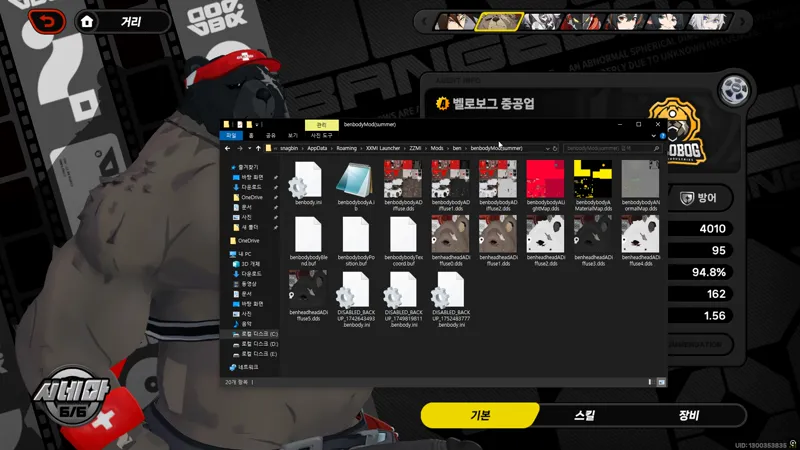
One part shows how to modify a mod that uses zzmi texture assignment (the ben mod), and the other shows how to modify an older mod that doesn't use it (the lycaon mod).
With this method, even older mods can be made to work properly.
I've created so many mods by now that going back to fix and re-upload each one individually would be overwhelming.
But if you watch the video, you'll see it's actually very easy to understand and apply.
This method doesn't only apply to my mods — it can be used for any Zenless Zone Zero mod. So I recommend learning it and keeping it in mind!
Comments (10)
I used rabbitfx and fixed as much as i can, are the character's mods supposed to not work while out of combat? like walking around at town
No, if applied correctly, the character mod should work both in and out of combat. You're using XXMI, right? If the mod only shows during combat, increasing the in-game graphics settings might help. If that still doesn't fix it, it's possible that something was modified incorrectly. But honestly, I've never heard of a case where the character mod only works during combat, so I'm not exactly sure what's going on.
Is there anyway to let RabbitFX automatically fix the mods that I don’t need to manually change the scripts in the .ini files?
I'm having trouble with rabbitfx newer version (After V46). It makes everyone Black, including NPCs. Do you know how to fix this?
Hmm… You're using XXMI, right? Not 3DMigoto. And you're saying that everything still appears black even when using the latest version of RabbitFX (after v46, like 5.5.1)? In that case, completely uninstalling and reinstalling XXMI might help fix it. I'm not exactly sure though.
I saw that Manato tail skin was broken. Sorry, I haven't tried to fix it yet. But I need to know first Is this work for Manato skin broken?
Manato's skin may appear broken if RabbitFix is not used. Please download the ZZMI RabbitFix mod from GameBanana and place it in your mods folder. If it still doesn't work after applying it, please double-check that it's properly installed. It’s likely that the installation was done incorrectly.
Thanks for the amazing mods and the constant help my guy!!! You are awesome, as soon as i got the money i will 100% suscribe
The files that I'm guessing are supposed to be .ini files (the diffuse, normalmap, lightmap, and materialmap in the folders are .dds files, does this mean anything? Also how do we get RabbitFX?
Please open the ini file. You can find RabbitFX on the GameBanana website.