


How to Fix a Mod Without Using a Fix Tool
Sometimes the fix tool (FixTool) doesn’t get released, or the developers say they won’t release a universal one. In many cases, fix tools are mostly focused on female characters, while male characters are often ignored or take a very long time to be supported. Because of this, I’ll explain how to manually fix your mod without using any fix tool.
⚠️ Key Point
Each character is composed of different parts, and each part uses the following 4 types of maps:
Diffuse
NormalMap
LightMap
MaterialMap
Inside the folder of a downloaded mod, you will usually find a file named something like modname.ini. This file includes entries for each texture type for every body part.
Here’s an example from panyinhu .ini file:
[TextureOverridepanyinhubodyADiffuse]
hash = c0928025
this = ResourcepanyinhubodyADiffuse
[TextureOverridepanyinhubodyANormalMap]
hash = ebac056e
this = ResourcepanyinhubodyANormalMap
[TextureOverridepanyinhubodyALightMap]
hash = 7d3c4c3d
this = ResourcepanyinhubodyALightMap
[TextureOverridepanyinhubodyAMaterialMap]
hash = 42fc25f0
this = ResourcepanyinhubodyAMaterialMap
The part you need to fix is the line that starts with hash =.
These hash values can change depending on your server or game updates. If the hashes don’t match your client version, the mod will not display correctly (wrong lighting, broken textures, etc.).
Therefore, you need to update the hash values to match your local version.
🔧 How to Find the Correct Hash Values (Using XXMI)
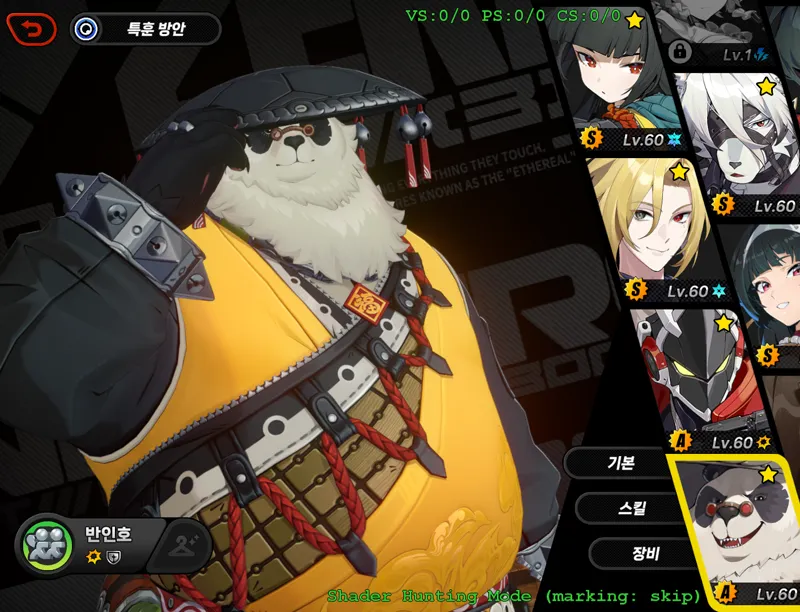
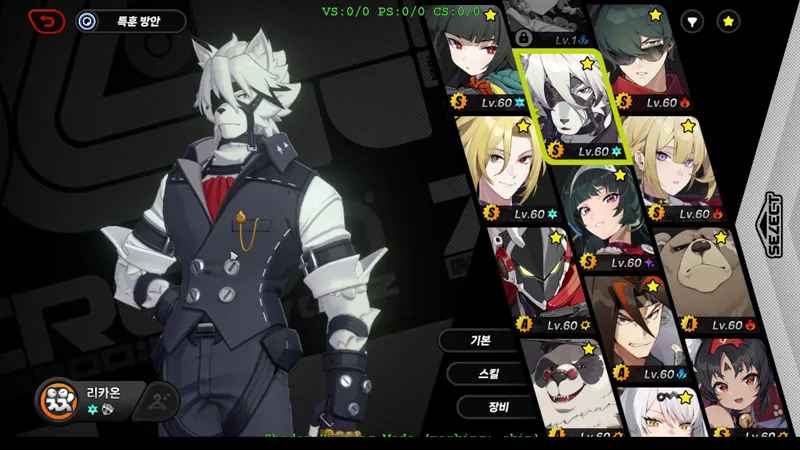
Run the game using XXMI, and go to the character selection screen for the character you want to fix.
Press F12.
This will display the key used to activate hunting mode — it’s usually Numpad 0.Press Numpad 0.
Green numbers and English text will appear on the screen.Press F8 while in this state.
The character’s data will be dumped to the following location:
XXMI Launcher\ZZMI\frameanalysis\[date]Open the log.txt file inside the frameanalysis\[date] folder.
Use Notepad and press Ctrl + F to search for the Diffuse hash of the character you want to fix.
It doesn’t have to be Diffuse — if the character doesn’t appear broken but has weird shadows or lighting, starting with Diffuse is okay.
🔍 Note:
A character usually uses 4 maps together as a set:
Diffuse
NormalMap
LightMap
MaterialMap
It’s rare for all four to have changed hashes.
So even if you can’t find the Diffuse entry, try searching for one of the others.
If you find one hash value, the others will typically be listed nearby.
The order is usually:Diffuse
Normal
Light
Material
Now compare them with the ones in your mod’s .ini file.
Only replace the hash values that are different.
That’s all you need to do to fix the mod.
✅ Final Notes
Once you understand the process, it only takes about 2 minutes to complete.
However, if this is your first time doing it, it can feel overwhelming or stressful.
Unfortunately, I can’t provide hash values for other servers, so you’ll need to extract them yourself.
I’ve also uploaded a video tutorial to help guide you through it.
If you have any questions, feel free to ask.
Comments (34)
그 log.txt파일 안에 해시값이랑 모드 해시값이 4개 전부 다 일치하지 않으면 어떻게 해야하나요?
어...vram이 낮을경우 텍스처의 모든해시값이 달라지는대 그럴경우는 처음 추출할때 0버튼 누르고 7이나8누르면 몸파츠를 지정하는해시값을 알수있거든요. 그해시값을 검색하면 아마 나오는걸로 알고있아요. 음... 간단히 아는방법이 게임바나나에 있다고들었는대 저는 어려운방법밖에몰라서 지금은 그냥 2.0버전 픽스툴 사용하세요.
Hi so I'm having a problem with the Suit NPC body guard mod and I'm trying to fix it. The npc has stretched out body parts and stuff and I'm trying figure out what part i should change in the mod because the diffuse, light, texture and material seem to match I think its a different section I need to correct
Hi, when trying this method nothing pops up when trying to enter Hunt mode. When I pull up the command key binds with f12 it still says that num 0 is the right key bind. is there a way to change the key bind or is there something else wrong?
If you launch the XXMI launcher, there is an option in the settings where you can enable Hunting Mode. The FixTool version 2.0 is currently available on GameBanana, so you can just use that.
Is there a fix for ben bigger body mod?
Hello, I tried doing these. But the log file DOES NOT have the hash "codes" from the mod. For example, Billy Big Daddy hash does not appear in log file even though I did everything from the video. Please help me fix. I really really love your mods, especially the Big Daddy one, but it doesn't work.
It seems like you're using a laptop or a low-spec PC. In such cases, the game automatically lowers the quality of all textures, which changes all the hash values. I recommend waiting until the 2.0 version of the Fix Tool is released.
do you have a fix for White and Black Ben?
Try it out if a 2.0 version of the fix tool comes out.
why i can't turn on the toogle hunting mode?
Please scroll down the comments a little.
Every time the screen is reloaded, the character textures need to be reloaded. It has a slight impact on the visual experience
That seems to be an issue with your computer...
Every time there is a cutscene animation, the model on the character's chest will make an error and need to be reloaded(lycaon)
hello han! i fixed the anton lifeguard mod using this :) everything is very good but the surfboard's texture is not good. i think it's because not apart of the original body, how do i fix it? thank you ♥
change the coat part.
Thank god I can do it
hi han! what do you think of a genderbend yixuan mod like the john doe one? love ur work btw
do you have a fix for lycaon mod 3.0?
The hash value for Lycaon has changed. For me, the lightmap hash under [TextureOverrideLycaonBodyALightMap] is: hash = fbf5a9b5 Try changing it to this value, and if it still doesn't work, try the method I uploaded.
thank you so much for trying to help! really appreciate your efforts.
Thank you!
When the fix tool does come around, would it be done by updating the mod installer or would we not have to do anything on our end?
If a fix tool gets released, just use that tool. The person who shares it will explain how to use it in detail.
How to find the OfficerMewmew's data? I can't find him in thecharacter selection screen.I try to talk to him and use F8,then i can't search the four number in the log.txt.🥺
The method is the same. Extract while the character or NPC is visible on the screen, then open the log.txt file inside the FrameAnalysis folder and find the hash values. If the diffuse hash value is not found, try looking for other hash values. Diffuse, NormalMap, LightMap, and MaterialMap usually come as a set, so if you find one, you can identify the others. Here is an example output I got:3: view=0x000001BD90619000 resource=0x000001BD907CE578 hash=6dee1ef4 000100 PSSetShaderResources(StartSlot:4, NumViews:1, ppShaderResourceViews:0x00000437B823A268) 4: view=0x000001BD9061B000 resource=0x000001BD907CB3B8 hash=16a5a408 000100 PSSetShaderResources(StartSlot:5, NumViews:1, ppShaderResourceViews:0x00000437B823A1A8) 5: view=0x000001BD9061ACC0 resource=0x000001BD907CC378 hash=eba9b7f6 000100 PSSetShaderResources(StartSlot:6, NumViews:1, ppShaderResourceViews:0x00000437B823A298) 6: view=0x000001BD9061AE80 resource=0x000001BD907CE2F8 hash=266ccf78 It comes out like this, but the hash parts will probably look different for you. Here, 6dee1ef4 is the diffuse hash, 16a5a408 is the normal hash, eba9b7f6 is the light hash, and 266ccf78 is the material hash.
I also had the issue where pressing Numpad 0 didn’t work. I thought others were fine. The fix is simple. While the game is running, open the d3dx.ini file inside the xxmi folder. Scroll down a little and you’ll see the following lines: [Hunting] ; 0: Release mode is with shader hunting disabled, optimized for speed. ; 1: Hunting mode enabled ; 2: Hunting mode "soft disabled" - can be turned on via the toggle_hunting key hunting = 0 Change that line to: hunting = 2 Save the file. Then go back to the game, press F10 to refresh, and try pressing Numpad 0 again. It should work now.
오 됐어요! 번거롭긴 하지만 지금처럼 모드가 꽤 망가졌을 때 그냥 Fix가 나오기를 바라는 것보다 훨씬 편하네요. 감사합니다!
절차대로 해봤는데 넘버패드 0을 눌러도 아무런 반응이 없네요ㅜㅜ 뭔가 환경이 다른 걸 수도 있겠네요.. xxmi 버전 업그레이드는 꼬박꼬박 하긴 했는데
When i press 0 on the numpad its not doing anything ;-;
Um...! I don't know perfectly!!
Question though: If hash values are server specific then how do mod authors make mods that everyone is able to use? Has it always been server specific or is that a new thing?
From what I’ve seen, the hash values aren’t completely different between servers — maybe about 80% different. So I think some mod creators apply multiple known hash values to cover all possibilities. I don’t know of any way to find other servers' hash values myself, though it would be great if there were one. As far as I know, there are probably around 3 servers. If users are on the same one, mods work fine. But if they’re on different servers, they may notice small issues. As for mods that seem to work for everyone, I believe it’s just that the hash values happened to match — not that they’re universally compatible.