
May Progress Update(May 16 Bug Fixes)
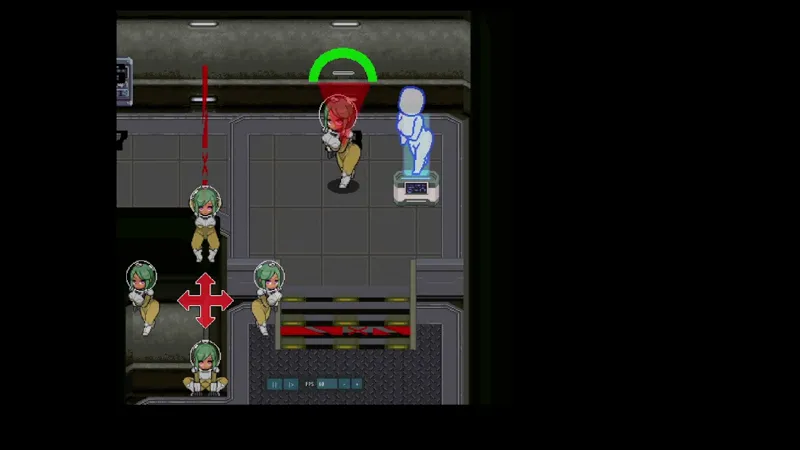
The QTE section in the East Corridor has finally been completed.
As for the progression route in the lower level, the planned flow is:
Lower Level Entrance → Colony Expansion Event → Battery Puzzle Event → Boss Battle in the Central Area → QTE Area → Main Reactor Room (the heart of the ship), where an event to brainwash the maintenance leader takes place.
After that, the plan is for players to control the maintenance leader, take the elevator, and proceed to the upper level.
Right now, I am working on the mechanics and interior design of the Main Reactor Room. After that, I plan to start creating the boss.
After clearing the second QTE, the brainwashed character will lose consciousness, allowing the alien to attack.
I originally considered doing something similar after the first QTE as well, but the next mind-control target was too close by, so I decided against it this time.
The boss design has been decided to a certain extent, but it is still too early to reveal the details, so please wait a little longer.
This time, I am uploading Demo Version v1.00. I believe most of the major bugs have been fixed at this point.
There were reports of a bug where save data was not functioning properly, but I was unable to reproduce it on my side. If you are unable to load after saving, or if the game loads into a different scene than where you saved, please let me know.
Important Note:
When you establish the colony, a message saying that an auto-save is being performed will appear. However, the loading system is currently not functioning properly, so you cannot load directly from the point after establishing the colony.
If you want to save your progress, please use the manual save option from the pause menu.
Comments (27)
So, here's what happens. When i go the Mechanic Route, the Game crashes after i change Areas with the Laser Wall. If i use the Kitchen Vent i can get through, but after i hacked the big Console nothing happens. The Doc also keeps telling me to go to Security. Am i missing something? Edit: And it does not save at all.
how do i play? i am just curious because i downloaded the files yet when i click the exe in the files it tells me it cannot load the game files and errors out
This game was made with Pixel Game Maker MV, so please check the system requirements first: https://store.steampowered.com/app/837510/MV/� If your PC meets the requirements, please download and try running the demo from the page above. If the game still won't launch, it may be because some required DLL files are missing. In that case, please install the following Microsoft Visual C++ Redistributable packages: Microsoft Visual C++ 2010 Redistributable Package Microsoft Visual C++ Redistributable Package for Visual Studio 2012 Update 4 Microsoft Visual C++ Redistributable Package for Visual Studio 2013 Microsoft Visual C++ Redistributable Package for Visual Studio 2015 If you are using Windows 7 or Windows 8, please make sure Windows Update has been fully applied before installing these packages.
Can I change movement keys? and also for some reason I can't load saves it might've been that I closed the game using X instead of a specific in game button so it didn't save properly.
Unfortunately, it isn't possible to change the movement keys. Regarding save data, save files from different or older versions may still load, but they are not recommended because they can cause bugs or unexpected errors. Also, the current version is still under development, so the save and load system is not yet fully complete. Because of this, you may encounter some issues. I plan to fully improve and finalize the save/load system after the main game has been completed.
What do I do when I double click on the player application and it opens the application window but then after a few seconds it closes itself and doesn't run?
This game was made with Pixel Game Maker MV, so please check the system requirements first: https://store.steampowered.com/app/837510/MV/� If your PC meets the requirements, please download and try running the demo from the page above. If the game still won't launch, it may be because some required DLL files are missing. In that case, please install the following Microsoft Visual C++ Redistributable packages: Microsoft Visual C++ 2010 Redistributable Package Microsoft Visual C++ Redistributable Package for Visual Studio 2012 Update 4 Microsoft Visual C++ Redistributable Package for Visual Studio 2013 Microsoft Visual C++ Redistributable Package for Visual Studio 2015 If you are using Windows 7 or Windows 8, please make sure Windows Update has been fully applied before installing these packages.
When I try to start the player (in the zip file) it says some files could not be found. MSVCR120.dll etc, how do I fix this? I tried reinstalling c++ redistributable, but it didn't fix anything.
MSVCR120.dll is included in the **Visual C++ 2013 Redistributable**. Please make sure you install the **x86 (32-bit)** version, not only the x64 version. Games made with Pixel Game Maker MV are generally 32-bit, so the x86 version is especially important. Also, please do not run the game directly from inside the zip file. Extract the entire zip file into a new folder first, then run `player.exe`. Please try these steps: 1. Extract the entire zip file into a new folder 2. Install or reinstall **Visual C++ 2013 Redistributable x86** 3. If possible, also install the other Visual C++ Redistributables listed in the troubleshooting guide 4. Run `player.exe` from the extracted folder
Is this game not playable on android since i cant download it or am i genuniely shit at extracting and stuff on games
Sorry about that. Since the game is made with Pixel Game Maker MV, it is currently only playable on Windows.
you should do lesbian sex when she's is hypnotized
Thank you for the suggestion! To be honest, I do not currently plan to add many yuri scenes. The main reason is that scenes like that have a fairly high production cost, and right now I want to focus on the core content of the game first.
this is so damn increible, i've been watching your progress since 2025 and im very happy for you :)
Thank you! I’m really happy that you have been supporting the project for so long. I’ll keep doing my best to make it a great game!
:)
:D
请问手柄用哪个按键保存进度?
暂停按钮目前只能使用键盘操作。 因为我还没有为手柄设置对应的按键配置,所以目前暂停菜单只能通过键盘上的 P 键打开。 打开后会看到“保存(Save)”和“读取(Load)”选项,请试试看。
大佬下次更新多久啊我很期待下层区加油!
可游玩的更新版本可能还需要一些时间。 不过我会持续发布开发进度!
Great!
Thanks!XD
千呼万唤始出来 呼びたてられて出できても
让大家久等了,不过我会持续更新开发进度,请慢慢等我哦!
This will be fun to play in a few days! I look forward to trying out the new area!
Thank you! It may take a little longer, but I’ll keep posting progress updates. I hope you’ll enjoy the new area when it’s ready!