
Hachi cursors!
I got a custom cursor for my PC of my vtuber and last night i said id throw the files up here to anyone who wants them
https://drive.google.com/drive/folders/1cf53ZAqF92mOIl_RF5LtlV05b1WEj81o
I personally havent figure out how to make it my default...i still have switch to this cursor everytime i turn on my computer but maybe someone knows how to fix that 😂
Comments (8)
Super cute! Who did you commission for this or did you draw it yourself?
Cute emoji animation. These are something to look forward to in chat.
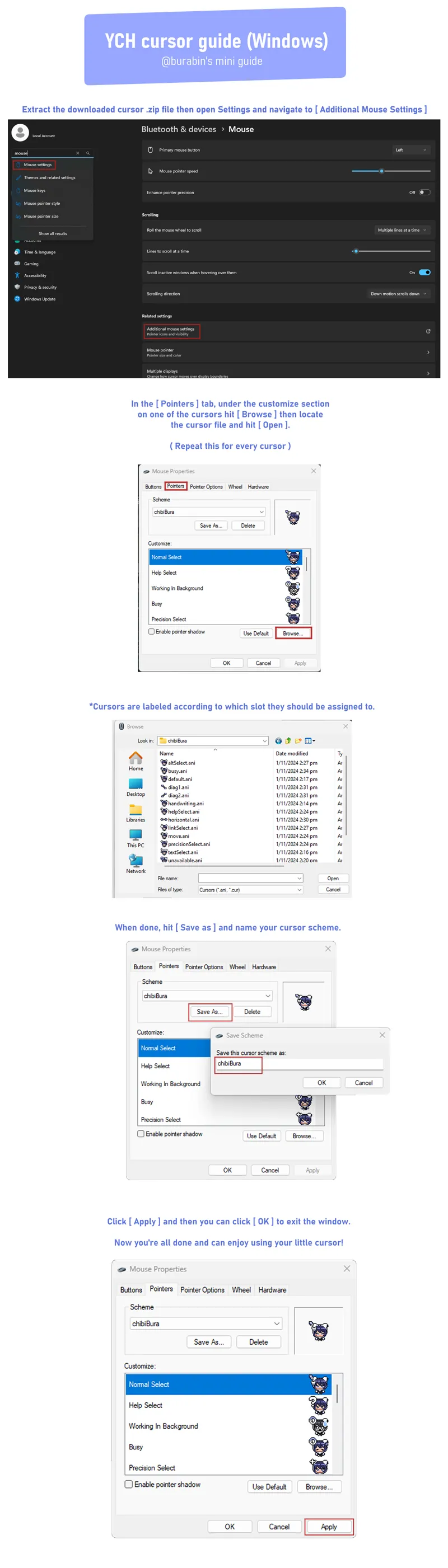
Hit windows button - type “cursor” -click “change the mouse pointer display or speed” -click the tab “pointers” on top of window - select the custom mouse pointer -click open - once desired pointer is chosen hit “apply” This should work Enjoy
Should save for reboot if follow the instructions. Only 2 options I can think of is 1) you didn't save the scheme or 2) you did save the scheme but as images weren't moved to C:\Windows\Cursors (like Gilbert suggests) meant the computer fails to reload them and so goes back to default.
You turn your computer OFF?!?!
Ahh too cute! I don't know if I ever had the problem of the cursor not staying, but I see the guide is for a manual install which leaves the files wherever you put them. Some custom cursors come with an install file, which also copies the files to the cursor directory in the windows folder on your C drive. You could try copying the folder containing the cursor files to C:\Windows\Cursors, and then following the steps again to manually change the cursors in the settings window, but this time choosing the files in the folder you just copied to the cursors directory.
CUUUUUUUUUTE!!!!!!!!!
Cuddly!