
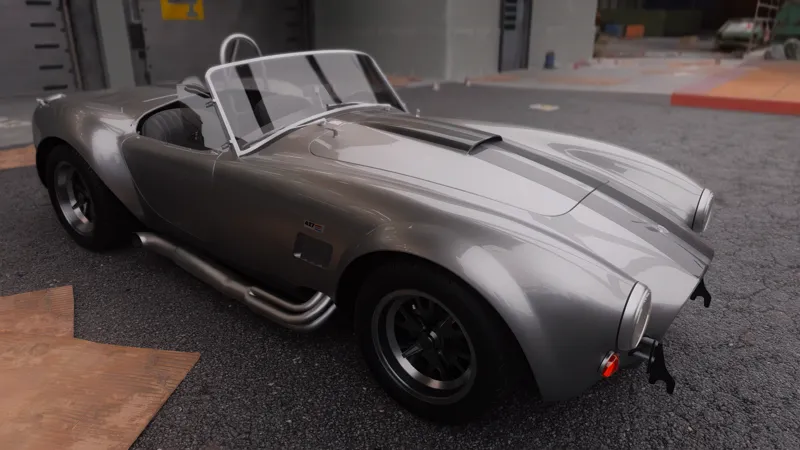
CINEMATIC RESHADE 1.0 (Legacy) + MODLIST + GUIDE [PC only]
NB: This configuration is intended for high-end PCs, some of these graphic mods will greatly tank performances.
Remember to check the description AND requirements page of mods you download to better understand what they do and how to use them.
HDR/SDR Settings
For HDR my settings are: Max Brightness 400 Tone Mapping 1.30 (Adjust depending on your monitor max nit brightness)
For SDR I recommend setting the Gamma to 1.10/1.15
-DLSS CUSTOM (Only NVIDIA RTX cards)-
For the best quality, keep Frame Gen OFF, DLSS Quality, Ray Reconstruction OFF.
DLSS Swap: https://github.com/beeradmoore/dlss-swapper/releases
Download Dlss Swapper, run the .exe and change DLSS version to 3.10 (or most recent supported) for Cyberpunk 2077.
If you experience screen tearing with DLSS try this fix:
go to the NVIDIA Control Panel > Manage 3D settings > Progam Settings (don't use global settings)
select Cyberpunk 2077. If not in the list, you click on "add" and it should appear in "recently used" if you launched it recently.
turn Vertical sync On + LIMIT YOUR FPS by setting your Max Framerate to 58 for a 60 Hz monitor. (more if your monitor has higher refresh rate)
disable "Low Latency"
Dlss Tweaks: https://www.nexusmods.com/site/mods/550?tab=description
Run the .exe, choose under “NvGlobalProfileSettings” Global Force Preset, select J or K
Force enable DLAA.
Resolution Offset -1.
Customize the scale on “DLSSQualityLevels” to 0.8-0.9 for higher details (at the cost of FPS).
Once you’re done press Save and close the app.
If presets are not being changed, run the EnableNvidiaSigOverride.reg included.
Reshade compatibility: rename Reshade’s dxgi.dll to d3d12.
-ESSENTIALS (required to run most mods)-
Go in r6/cache and create a “modded” folder
Cyber Engine Tweaks (CET): https://www.nexusmods.com/cyberpunk2077/mods/107
When you first start the game, a window will appear prompting you to choose a keybind to bring up the Overlay. Pick any key and save it. It will open with that key from now on.
RED4ext: https://www.nexusmods.com/cyberpunk2077/mods/2380
redscript: https://www.nexusmods.com/cyberpunk2077/mods/1511
RedData: https://www.nexusmods.com/cyberpunk2077/mods/14139?tab=description
Codeware: https://www.nexusmods.com/cyberpunk2077/mods/7780
TweakXL: https://www.nexusmods.com/cyberpunk2077/mods/4197
ArchiveXL: https://www.nexusmods.com/cyberpunk2077/mods/4198
Mod Settings: https://www.nexusmods.com/cyberpunk2077/mods/4885
Native Settings UI: https://www.nexusmods.com/cyberpunk2077/mods/3518?tab=files
Archive Conflict Checker Tool (To check for mod conflicts):
https://www.nexusmods.com/cyberpunk2077/mods/11126?tab=files
-UTILITY-
Appearance Menu Mod (AMM): https://www.nexusmods.com/cyberpunk2077/mods/790
(can cause stuttering)
To use it bring up the CET overlay, you’ll find the AMM mod menu.
SimpleToggleHud (CET): https://www.nexusmods.com/cyberpunk2077/mods/9311
(Find it in CET overlay)
Weathermancer: https://www.nexusmods.com/cyberpunk2077/mods/9805
Make sure you installed Native Settings UI, open the game menu and select “mods”, you’ll find Weathermancer options there.
Select the desired weather and hit “Set”.
To reverse to normal weather cycle hit “Reset”.
Weather Switcher: https://www.nexusmods.com/cyberpunk2077/mods/18027
Immersive First Person (CET): https://www.nexusmods.com/cyberpunk2077/mods/2675
(Find it in CET overlay)
(can cause stuttering)
First Person Camera: https://www.nexusmods.com/cyberpunk2077/mods/1786?tab=description
Immersive Weapons: https://www.nexusmods.com/cyberpunk2077/mods/13331
(Find it in CET overlay)
Better Vehicle First Person (CET): https://www.nexusmods.com/cyberpunk2077/mods/2202
(Find it in CET overlay)
Immersive FPP Bike Cam (Cinematic): https://www.nexusmods.com/cyberpunk2077/mods/14292
Movement And Camera Tweaks: https://www.nexusmods.com/cyberpunk2077/mods/4039
Simple Menu: https://www.nexusmods.com/cyberpunk2077/mods/818
-GRAPHICS-
Reshade:
Copy "bin" folder from the Arcadia Cinematic Reshade folder and paste it into your main Cyberpunk directory.
Install ReShade 6.2.0 with full addon support from https://reshade.me/downloads/ReShade_Setup_6.2.0_Addon.exe with full addon support and during the setup select my preset “Arcadia Cinematic Reshade”
Install RenoDX: https://www.nexusmods.com/cyberpunk2077/mods/13912?tab=description
If you play with HDR mode on: copy my RenoDX_HDR Settings (image included below), otherwise use SDR_Settings.
Graphics Tweaks: from my "Graphics Enhanced Tweaks" file, copy the folder and paste it into your main Cyberpunk directory.
Cyberpunk UltraSkin v2.2: https://www.nexusmods.com/cyberpunk2077/mods/13537?tab=files
Adaptive PT: https://www.nexusmods.com/cyberpunk2077/mods/16654
(My settings: 6 Rays, 1 Bounce. Alter 4 Rays, 1 Bounce)
(optional) LUT Switcher: https://www.nexusmods.com/cyberpunk2077/mods/16310
(Nova LUT 2.0 Classics from the Nova Pack)
Nova Rain: https://www.nexusmods.com/cyberpunk2077/mods/13483
Nova Rain - Ripples: https://www.nexusmods.com/cyberpunk2077/mods/13483
NEON GENESIS Atacama: https://www.nexusmods.com/cyberpunk2077/mods/9433
RT DEBRIS: https://www.nexusmods.com/cyberpunk2077/mods/10903
METRO GLASS: https://www.nexusmods.com/cyberpunk2077/mods/11885
Particles Flickering Fix: https://www.nexusmods.com/cyberpunk2077/mods/16196
(Removes a bug from Vanilla that causes flickering on smokes and neons in some areas)
Disable vignette and sharpening: https://www.nexusmods.com/cyberpunk2077/mods/9276
Dogtown Location Visuals Nulled: https://www.nexusmods.com/cyberpunk2077/mods/12874
Night City Visuals Nulled: https://www.nexusmods.com/cyberpunk2077/mods/13524
GONKweather 2.0: https://www.nexusmods.com/cyberpunk2077/mods/16427?tab=files&file_id=87253
Preem Fixes: https://www.nexusmods.com/cyberpunk2077/mods/15800
Disable Fake Lights with Path Tracing: https://www.nexusmods.com/cyberpunk2077/mods/16060
Improved Environment LODs:
https://www.nexusmods.com/cyberpunk2077/mods/4923?tab=files
NextGenDistantLODs: https://www.nexusmods.com/cyberpunk2077/mods/4923?tab=files
E3 Apartment Window: https://www.nexusmods.com/cyberpunk2077/mods/8017
Inplace Streamingsectors Nulled: https://www.nexusmods.com/cyberpunk2077/mods/14197
Improved Distant Shadows (Volumetric Fog Leaking Fixed): https://www.nexusmods.com/cyberpunk2077/mods/20623?tab=description
-VISUALS-
More Blood Splatters: https://www.nexusmods.com/cyberpunk2077/mods/3975
Smoke Texture Overhaul: https://www.nexusmods.com/cyberpunk2077/mods/15226?tab=files
Fire and Explosions Texture Overhaul: https://www.nexusmods.com/cyberpunk2077/mods/15205
Blur Begone: https://www.nexusmods.com/cyberpunk2077/mods/8105
reFlash 2.0: https://www.nexusmods.com/cyberpunk2077/mods/8233
Remove Sandevistan - Berserk - Kerenzikov Screen Effect: https://www.nexusmods.com/cyberpunk2077/mods/9688
Extended and Improved Headlights: https://www.nexusmods.com/cyberpunk2077/mods/5013
-TEXTURES-
Material and Texture Override: https://www.nexusmods.com/cyberpunk2077/mods/5266?tab=files
Cyberpunk 2077 HD Reworked Project: https://www.nexusmods.com/cyberpunk2077/mods/7652
Always Best Quality: https://www.nexusmods.com/cyberpunk2077/mods/12700
Better Windows: https://www.nexusmods.com/cyberpunk2077/mods/7160
4k New Female complexions and better NPCs: https://www.nexusmods.com/cyberpunk2077/mods/11937?tab=files
(I’m using V1, Microdetails and HD NPCs)
Preem Hair: https://www.nexusmods.com/cyberpunk2077/mods/8223
Environment Textures Overhaul: https://www.nexusmods.com/cyberpunk2077/mods/13372?tab=files
Preem Water 2.0: https://www.nexusmods.com/cyberpunk2077/mods/8275
(I’m using Canon)
4K Trees and Vegetation: https://www.nexusmods.com/cyberpunk2077/mods/6093
High Res Named NPCs AIO: https://www.nexusmods.com/cyberpunk2077/mods/14999
-VEHICLES-
No Camera Auto Centering: https://www.nexusmods.com/cyberpunk2077/mods/2169
Anti-whiplash driving camera: https://www.nexusmods.com/cyberpunk2077/mods/15952
Better Camera Auto 2.1: https://www.nexusmods.com/cyberpunk2077/mods/6889
Cyber Vehicle Overhaul: https://www.nexusmods.com/cyberpunk2077/mods/3016
Browser Extension: https://www.nexusmods.com/cyberpunk2077/mods/10038
Virtual Car Dealer: https://www.nexusmods.com/cyberpunk2077/mods/4454
(Make sure you installed Browser Extension, go to a computer in game and find the Virtual Car Dealer shop in the browser).
Vehicle Customizer (CET): https://www.nexusmods.com/cyberpunk2077/mods/19243?tab=description
(Find it in CET overlay)
Vehicle Resources: https://www.nexusmods.com/cyberpunk2077/mods/20956?tab=description
Enhanced Vehicle System: https://www.nexusmods.com/cyberpunk2077/mods/11765
Hyundai N Vision 74: https://www.nexusmods.com/cyberpunk2077/mods/11974
Mercedes One AMG: https://www.nexusmods.com/cyberpunk2077/mods/13502
Lamborghini Revuelto: https://www.nexusmods.com/cyberpunk2077/mods/12705
Lamborghini Countach K.S Edition: https://www.nexusmods.com/cyberpunk2077/mods/11110
Ford GT40 Mk1: https://www.nexusmods.com/cyberpunk2077/mods/14213
2021 Lexus LC 500 Liberty Walk: https://www.nexusmods.com/cyberpunk2077/mods/16979
1993 Nissan 240SX (S13): https://www.nexusmods.com/cyberpunk2077/mods/8730
Porsche 911 GT3 RS: https://www.nexusmods.com/cyberpunk2077/mods/11180
Quadra Sport R-7 - ArchiveXL: https://www.nexusmods.com/cyberpunk2077/mods/12467
DeLorean DMC-12 BTF(Back to the Future): https://www.nexusmods.com/cyberpunk2077/mods/15037
Arch V4: https://www.nexusmods.com/cyberpunk2077/mods/18736
Yaiba Kusanagi color variations: https://www.nexusmods.com/cyberpunk2077/mods/9167
Lamborghini Miura P400 SV: https://www.nexusmods.com/cyberpunk2077/mods/13508
Jaguar F-Type: https://www.nexusmods.com/cyberpunk2077/mods/14432
2021 BMW M4 Competition: https://www.nexusmods.com/cyberpunk2077/mods/15299
Nissan Skyline GTR R34 HYCADE Bodykit: https://www.nexusmods.com/cyberpunk2077/mods/16570
2F2F Livery for Nissan Skyline: https://www.nexusmods.com/cyberpunk2077/mods/17670
BMW M1: https://www.nexusmods.com/cyberpunk2077/mods/14567
Ferrari Daytona SP3: https://www.nexusmods.com/cyberpunk2077/mods/13465
Toyota Supra Mk5 HKS Widebody: https://www.nexusmods.com/cyberpunk2077/mods/12652
Toyota Trueno GT APEX(AE86) Initial D Edition: https://www.nexusmods.com/cyberpunk2077/mods/16099
Honda NSX Type R NA1 hycade: https://www.nexusmods.com/cyberpunk2077/mods/17348
Honda NSX Type R NA1 Liberty Walk: https://www.nexusmods.com/cyberpunk2077/mods/17238
Honda NSX Type R NA1 Rocket Bunny: https://www.nexusmods.com/cyberpunk2077/mods/17169
Arch Nemesis Custom: https://www.nexusmods.com/cyberpunk2077/mods/9784
Porsche 911 Reimagined by Singer DLS: https://www.nexusmods.com/cyberpunk2077/mods/14410?tab=description
Lamborghini Evo 2: https://www.nexusmods.com/cyberpunk2077/mods/15432?tab=description
Shelby Cobra 427: https://www.nexusmods.com/cyberpunk2077/mods/13395?tab=description
Ford Hennessey VelociRaptor 6x6 (weaponized): https://www.nexusmods.com/cyberpunk2077/mods/9085?tab=description
Lotus Evija: https://www.nexusmods.com/cyberpunk2077/mods/21083?tab=files
Genesis X Gran Berlinetta: https://www.nexusmods.com/cyberpunk2077/mods/21187?tab=description
CAR GET CODES (copy/paste into CET console, to open: while in-game open CET, click on “console”)
Game.GetVehicleSystem():EnablePlayerVehicle('Vehicle.hyundai_n_vision_74_basic', true, false)
Game.GetVehicleSystem():EnablePlayerVehicle('Vehicle.hyundai_n_vision_74_basic', true, false)
Game.GetVehicleSystem():EnablePlayerVehicle("Vehicle.lamborghini_revuelto", true, false)
Game.GetVehicleSystem():EnablePlayerVehicle("Vehicle.ford_gt40mk1_base", true, false)
Game.GetVehicleSystem():EnablePlayerVehicle("Vehicle.grldy_lexus_lc500_lbwk_nardo", true, false)
Game.GetVehicleSystem():EnablePlayerVehicle("Vehicle.nissan_240sx", true, false)
Game.GetVehicleSystem():EnablePlayerVehicle("Vehicle.porsche_gt3_rs", true, false)
Game.GetVehicleSystem():EnablePlayerVehicle("Vehicle.dmc_btf_base_purchasable", true, false)
Game.GetVehicleSystem():EnablePlayerVehicle("Vehicle.v_arch_v4paladin_carbon", true, false)
Game.GetVehicleSystem():EnablePlayerVehicle("Vehicle.v_arch_v4paladin_white", true, false)
Game.GetVehicleSystem():EnablePlayerVehicle("Vehicle.v_arch_v4paladin_red", true, false)
Game.GetVehicleSystem():EnablePlayerVehicle("Vehicle.v_arch_v4paladin_yellow", true, false)
Game.GetVehicleSystem():EnablePlayerVehicle("Vehicle.v_arch_v4paladin_green", true, false)
Game.GetVehicleSystem():EnablePlayerVehicle("Vehicle.v_arch_v4paladin_blue", true, false)
Game.GetVehicleSystem():EnablePlayerVehicle("Vehicle.v_arch_v4paladin_pink", true, false)
Game.GetVehicleSystem():EnablePlayerVehicle("Vehicle.v_arch_v4paladin_mox", true, false)
Game.GetVehicleSystem():EnablePlayerVehicle("Vehicle.v_arch_v4paladin_gray", true, false)
Game.GetVehicleSystem():EnablePlayerVehicle("Vehicle.v_arch_v4mogus_carbon", true, false)
Game.GetVehicleSystem():EnablePlayerVehicle("Vehicle.v_arch_v4mogus_white", true, false)
Game.GetVehicleSystem():EnablePlayerVehicle("Vehicle.v_arch_v4mogus_red", true, false)
Game.GetVehicleSystem():EnablePlayerVehicle("Vehicle.v_arch_v4mogus_yellow", true, false)
Game.GetVehicleSystem():EnablePlayerVehicle("Vehicle.v_arch_v4mogus_green", true, false)
Game.GetVehicleSystem():EnablePlayerVehicle("Vehicle.v_arch_v4mogus_blue", true, false)
Game.GetVehicleSystem():EnablePlayerVehicle("Vehicle.v_arch_v4mogus_pink", true, false)
Game.GetVehicleSystem():EnablePlayerVehicle("Vehicle.v_arch_v4mogus_mox", true, false)
Game.GetVehicleSystem():EnablePlayerVehicle("Vehicle.v_arch_v4mogus_gray", true, false)
Game.GetVehicleSystem():EnablePlayerVehicle("Vehicle.v_arch_v4fyrn_carbon", true, false)
Game.GetVehicleSystem():EnablePlayerVehicle("Vehicle.v_arch_v4fyrn_white", true, false)
Game.GetVehicleSystem():EnablePlayerVehicle("Vehicle.v_arch_v4fyrn_red", true, false)
Game.GetVehicleSystem():EnablePlayerVehicle("Vehicle.v_arch_v4fyrn_yellow", true, false)
Game.GetVehicleSystem():EnablePlayerVehicle("Vehicle.v_arch_v4fyrn_green", true, false)
Game.GetVehicleSystem():EnablePlayerVehicle("Vehicle.v_arch_v4fyrn_blue", true, false)
Game.GetVehicleSystem():EnablePlayerVehicle("Vehicle.v_arch_v4fyrn_pink", true, false)
Game.GetVehicleSystem():EnablePlayerVehicle("Vehicle.v_arch_v4fyrn_mox", true, false)
Game.GetVehicleSystem():EnablePlayerVehicle("Vehicle.v_arch_v4fyrn_gray", true, false)
Game.GetVehicleSystem():EnablePlayerVehicle("Vehicle.v_arch_v4valor_carbon", true, false)
Game.GetVehicleSystem():EnablePlayerVehicle("Vehicle.v_arch_v4valor_white", true, false)
Game.GetVehicleSystem():EnablePlayerVehicle("Vehicle.v_arch_v4valor_red", true, false)
Game.GetVehicleSystem():EnablePlayerVehicle("Vehicle.v_arch_v4valor_yellow", true, false)
Game.GetVehicleSystem():EnablePlayerVehicle("Vehicle.v_arch_v4valor_green", true, false)
Game.GetVehicleSystem():EnablePlayerVehicle("Vehicle.v_arch_v4valor_blue", true, false)
Game.GetVehicleSystem():EnablePlayerVehicle("Vehicle.v_arch_v4valor_pink", true, false)
Game.GetVehicleSystem():EnablePlayerVehicle("Vehicle.v_arch_v4valor_mox", true, false)
Game.GetVehicleSystem():EnablePlayerVehicle("Vehicle.v_arch_v4valor_gray", true, false)
Game.GetVehicleSystem():EnablePlayerVehicle("Vehicle.v_fzr3000", true, false)
Game.GetVehicleSystem():EnablePlayerVehicle("Vehicle.v_sportbike2_arch_linas_player", true, false)
Game.GetVehicleSystem():EnablePlayerVehicle("Vehicle.miura_base", true, false)
Game.GetVehicleSystem():EnablePlayerVehicle("Vehicle.jaguar_ftype_01", true, false)
Game.GetVehicleSystem():EnablePlayerVehicle("Vehicle.v_2021_bmw_m4_competition", true, false)
Game.GetVehicleSystem():EnablePlayerVehicle('Vehicle.ctrlsec_hycade_r34_livery', true)
Game.GetVehicleSystem():EnablePlayerVehicle("Vehicle.bmw_m1_bodykit", true, false)
Game.GetVehicleSystem():EnablePlayerVehicle("Vehicle.ferrari_daytona", true, false)
Game.GetVehicleSystem():EnablePlayerVehicle("Vehicle.supra_hks_widebody_01", true, false)
Game.GetVehicleSystem():EnablePlayerVehicle("Vehicle.ae86_base_purchasable", true, false)
Game.GetVehicleSystem():EnablePlayerVehicle("Vehicle.nsx_hy_base", true, false)
Game.GetVehicleSystem():EnablePlayerVehicle("Vehicle.nsx_lb_base", true, false)
Game.GetVehicleSystem():EnablePlayerVehicle("Vehicle.nsx_rb_base", true, false)
Game.GetVehicleSystem():EnablePlayerVehicle("Vehicle.porsche_911_singer_dls_01", true, false)
Game.GetVehicleSystem():EnablePlayerVehicle("Vehicle.lamborghini_evo2", true, false)
Game.GetVehicleSystem():EnablePlayerVehicle("Vehicle.shelby_cobra_427_01", true, false)
Game.GetVehicleSystem():EnablePlayerVehicle("Vehicle.bonk_ford_hennessey_combat", true, false)
Game.GetVehicleSystem():EnablePlayerVehicle("Vehicle.lotus_evija", true, false)
Game.GetVehicleSystem():EnablePlayerVehicle("Vehicle.genesis_x_base", true, false)
-APPEARANCE-
Morph Texture Removal - Cleaner and better skin details:https://www.nexusmods.com/cyberpunk2077/mods/2419
Sculpted: https://www.nexusmods.com/cyberpunk2077/mods/1780?tab=files
(I’m using Sculpted V1)
ErebusArms: https://www.nexusmods.com/cyberpunk2077/mods/1901
(Choose depending on your V’s cyberware -gorilla, mantis or launcher)
4k Complexion and Body for Female V: https://www.nexusmods.com/cyberpunk2077/mods/1873
(I’m using Better Body 4K and Better Abs 4K)
Alternative Hair Material: https://www.nexusmods.com/cyberpunk2077/mods/12184?tab=files
Solomon Reed's Jacket: https://www.nexusmods.com/cyberpunk2077/mods/10226
(Open CET, select “console” and past this code
Game.AddToInventory("Items.avo_reed_jacket_default",1)
Press Enter, you’ll get the Jacket in your inventory.)
-ENVIRONMENT-
Enable Advert Animations (Ads): https://www.nexusmods.com/cyberpunk2077/mods/13014
Crowd E3 2018 Restored: https://www.nexusmods.com/cyberpunk2077/mods/11003
-GAMEPLAY-
Lizzie's Braindances: https://www.nexusmods.com/cyberpunk2077/mods/11077
2077 More Gore V3.0: https://www.nexusmods.com/cyberpunk2077/mods/3040
Ragdoll Physics Overhaul: https://www.nexusmods.com/cyberpunk2077/mods/3858
Sit Anywhere: https://www.nexusmods.com/cyberpunk2077/mods/7299
Nova Crowds: https://www.nexusmods.com/cyberpunk2077/mods/14211
Nova City - Addons (Traffic and Population Density): https://www.nexusmods.com/cyberpunk2077/mods/13429
REALISTIC COMBAT OVERHAUL: https://www.nexusmods.com/cyberpunk2077/mods/12569
Smooth Movement: https://www.nexusmods.com/cyberpunk2077/mods/13471