





Discordサーバー開設のお知らせ/Discord Server Launch Announcement
Discordサーバーを開設しました。
Patreonには投稿していない作品を、こちらに投稿していく予定です。
すでにいくつか投稿していますので、よろしければぜひご参加ください。
PatreonアカウントとDiscordアカウントを連携した状態でサーバーに参加すると、自動的にロールが付与され、閲覧できるようになります。
ここからは、Discord連携の手順について、ご説明いたします。
English description is available below.
1.Discordのインストール、新規登録
公式サイトかアプリストアからDiscordをインストールし、新規登録を行ってください。
2.ブラウザでPatreonにご自身のアカウントでログインし、私のページを開いてください。
アプリ版のPatreonでは連携ができないようです。ブラウザ版での連携をお願いいたします。
3.メンバーシップのタブを選択し、クイックリンクの『Discordに接続する』を選択してください。
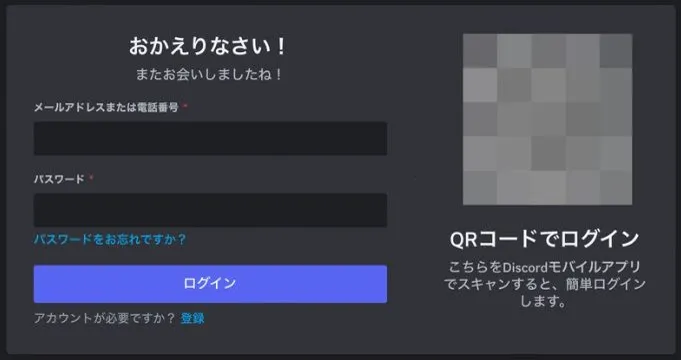
4.以下画面が表示された場合、Discordアカウントでログインしてください。
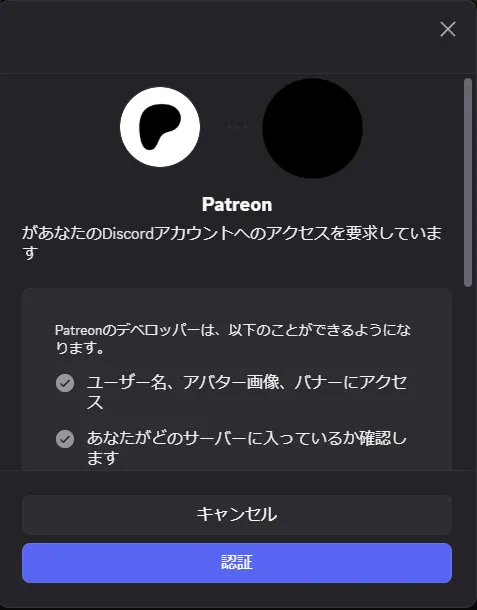
5. PatreonとDiscordの連携。以下のような画面がでたら承認ボタンを押してください。
6.Discordサーバーに接続&参加することが出来ます。
もし参加できない、投稿が見れないなどの問題がありましたら、少し時間を置いて頂くか、私にPatreonでメッセージを送っていただければ対応いたします!
I’ve opened a Discord server.
I’ll be posting works there that may be difficult to share on Patreon, as well as works featuring characters I haven’t posted before.
I’ve already uploaded a few posts, so please feel free to join if you’d like.
If you join the server with your Patreon and Discord accounts linked, you’ll automatically be assigned a role and gain access to view the content.
From here, I’ll explain how to link your Discord account.
1. Install Discord and create an account
Please install Discord from the official website or your app store, then sign up for a new account.
2. Log in to Patreon in your browser and open my page
It seems the Patreon app version does not support linking. Please use the browser version to link your account.
3. Open the “Membership” tab, then select “Connect to Discord” under Quick Links
4. If the screen below appears, please log in with your Discord account
5. Link Patreon and Discord
When a screen like the one below appears, please click the Authorize button.
6. You can now connect to and join the Discord server
If you’re unable to join, can’t see the posts, or run into any other issues, please wait a little while and try again—or send me a message on Patreon and I’ll help you out!