


For Fun - H2D Tests and Impressions!
Hello all! I've been testing out a lot of different designs with my new H2D and thought it'd be fun to share what I've printed.
I'm doing a full write-up on my first impressions on the H2D that I'll be posting on MakerWorld, but before that I'll share my general thoughts.
It's real big, like huge
Same quality as A1 and X1 printers
More sensors and auto-calibrations
Dual Color prints are actually zero-waste
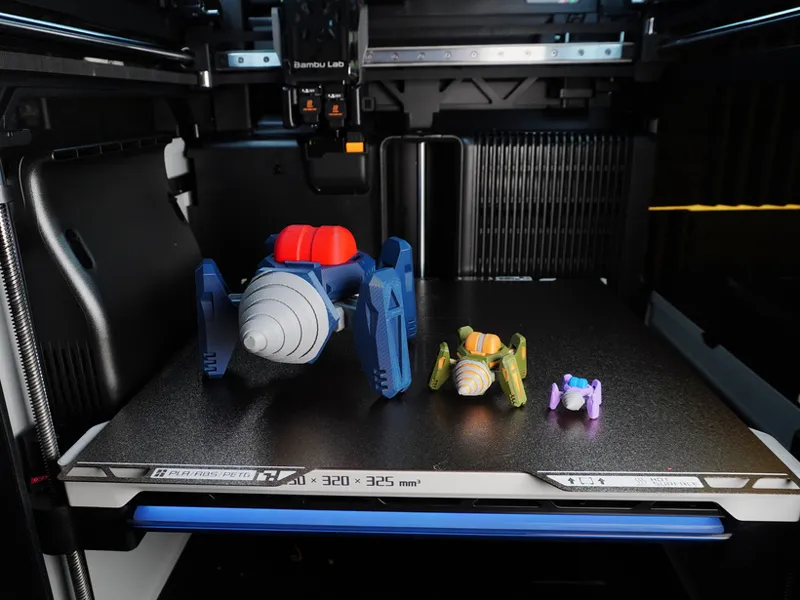
I printed two significant models to me, a fully multi-color Drill Mech and the biggest Drill Mech I could do (on one plate with Print By Object).
You can see the army green Drill Mech (regular sized) here:
For the big Drill Mech, I've always preferred printing all my models on one plate with Print By Object, so I wanted to see how big I could get it using the same settings. This is at 250% and printed in 5 hours.
I plan on doing some more multi-color prints of my old model kits, which ones would you want to see? If any of y'all are interested in painting one of my model kits in Bambu Studio for dual-color printing, I'd be down try it out too!
Thanks all! I'll have more models uploaded soon!
Comments (24)
Now that you have had it for a bit, what are the thoughts?
Best printer I have, I'm considering dropping my X1C or A1 for the new H2S
I would LOVE to see some lightning details on the thunder roller
Either of your kit cards would be neat in wood if you got the laser.
Agreed, I'm working on getting the Western Dragon Kit Card tested for laser
Did you get the cutter and laser ass well? The block head guy would be a great place for a face sticker. Or the shield mech could have stickers on the flat parts
I unfortunately did not, but when the cutter add-on becomes available I do plan on getting it for vinyl and paper
I want the H2D even more now haha.
Could you do a citadel walker or cargo hauler at 300%?
I think that is a miss too, having an easy compare slice line in studio. Where you could select other printers to see how long it would take. If I always saw a huge saving I would be more interesting in those savings.
My kids are all about that chicken banana song.. so I am printing this. Try it out in multicolor! I ended up splitting the face off to make it a reasonable ~34 hour print for 13. Would be curious how the h2d would do.
It seems like they made software adjustments to both the prime tower (the setting are different) and the default purge between colors amounts. Even files I have printed before have more bleed as it seems like a general reduction in the default purge between colors.
It looks like you were doing two colors at once? Have you tried 3+? From the things I have seen 2 colors is 2x the time and close to zero waste, but 3 colors or more start losing those efficiencies.
Yeah I was doing two colors at once, haven't tried 3+ for the reason mentione, you lose the zero waste
Can you run one 0.2 mm nozzle and one 0.4 mm? Or do they have to be the same?
From what I'm seeing in the slicer, the nozzles can be different, but you can't use both different nozzles in one print yet. The only reason to do so is for convenience if you do a lot of prints in different nozzle sizes
Interesting. I do wish Bambu had made it more clear about the AMS and multi head printing. Talking with other designers, it seems like you need two AMS pros if you really want to multi color print, since each head has its own feed tube. I also assume running multiple AMS, you can only have them go to a single head with a hub for each head. Seems like a missed opportunity for something like a dual AMS, where there are two spools so you could have two colors to each head.
It was confusing initially, but after set-up it made a lot more sense, especially with the auto-detect for the AMS. But yeah, you need 2 AMS to really get advantage of the dual nozzle
Excellent thanks so much for this :)
Holy printer space!
Also I second you on the bigger build area, crazy to think with both nozzles turned on you are only getting 1 gridfinity space wider than the other models of BL printers + 2mm. Yet that thing is massive! Not gunna lie I still want one though lol :)
It doesn't sound so much bigger, but I'll take some comparison pics and it's a big change from the X1/P1 plates. I can only imagine how big 350x350 would be, like most people wanted
These look awesome!! I have noticed in your photos you seem to have, really cool multiple sizes of the models printed. Am I missing where these are? If you are planning on releasing the different sizes as different profiles or have any guidance on % like 200 or 300% and if the parts still work as is or if tolerances need to change etc. I would like to make some larger versions at some point :) If not all good! But I am for sure interested if you are!
I haven't uploaded any profiles for larger model kits, however, in my testing and from other users who tried scaling up, the model kits work as-is when scaled up to 300%. The only suggestions I have are to increase walls to 3-4 and increase infill to at least 25%