


Wu Wa 3.5 fix
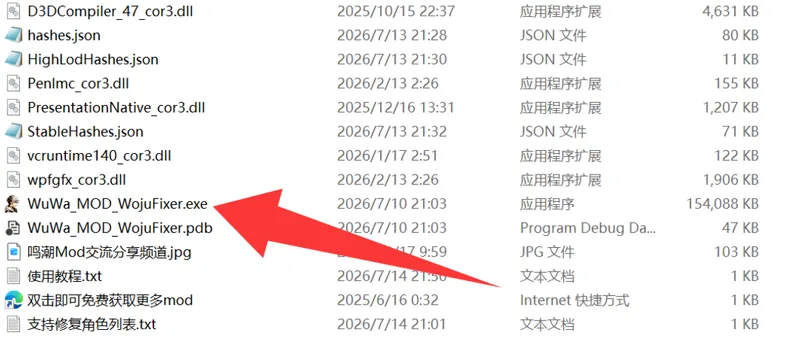
Download the file, extract it, and you will get the following directory structure
Double-click to open the program indicated by the red arrow, and you will see the following page:
1. Choose the mod folder path to fix,2. Run
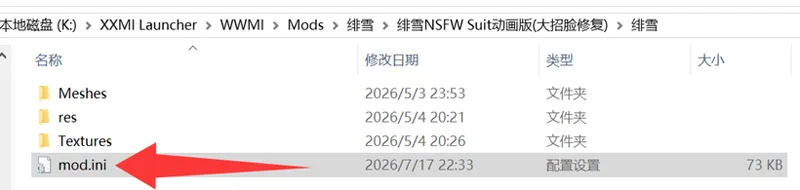
Generally speaking, that’s how the mod gets fixed. However, the directory structure inside the mod folders I create is mostly like this:
However, because my .ini file is named "mod1.ini" instead of "mod.ini" , the repair tool cannot recognize it. In this case, you'll need to rename "mod1.ini" to "mod.ini"
Then just run the fix tool again.
If the textures are still messed up, remember to go to the game's settings, open the Graphics section, and set "Lod Bias" to Ultra High
Comments (4)
Jinshi mod you made the tool does not work for it.
Okay, I found a problem. It seems that the characters in version 3.0 cannot be effectively repaired, and they will all be very bright after being repaired
I think you should fix Hiyuki's or Lucilla's mods yourself. Lucilla's mod has 4 mod.ini files and can't be fixed, and this fix doesn't work with any of your mods that I'm using.
That shouldn’t be the case, because I’ve tested it myself. If you follow the tutorial strictly, it should work without any issues. If you really do run into problems, I’ll look into it further later.