
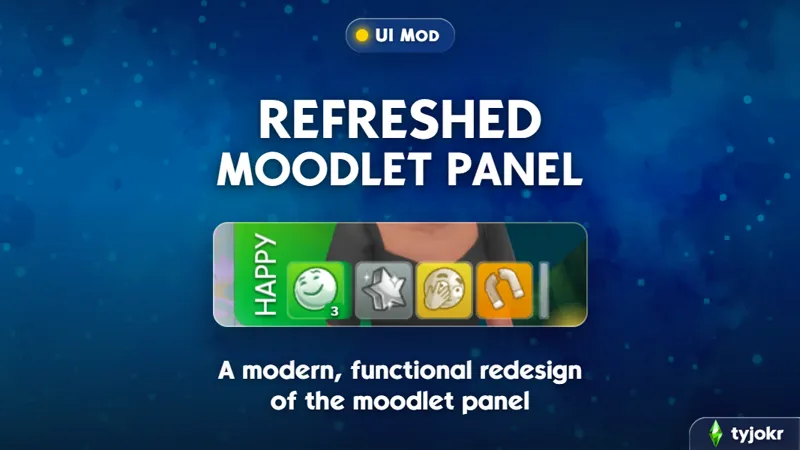
Refreshed Moodlet Panel
A modern, functional redesign of the moodlet panel.
🔽 Download: CurseForge / SFS
Supported Languages: All 🌍
Patch Resilience: Moderate ℹ️
If you’re anything like me, your Sims can end up with a ridiculous number of moodlets, especially once you start mixing in expansions and mods. After a while, the moodlet panel can get pretty cluttered and hard to read.
Refreshed Moodlet Panel gives it a cleaner look while making everything easier to keep organized. You can customize the panel’s style, group moodlets by mood, control how the expanded panel behaves, resize the strip depending on how much you want to see at once, and more.
See It In Action
Features
Refreshed style: The moodlet panel has been updated with a cleaner, more modern look.
Moodlets now use flat, softly shaded tiles in their mood’s original color, with a subtle rim and shadow.
Moodlet icons can inherit the color of their mood, helping the whole panel feel more vibrant.
The stronger the moodlet, the more contrast its gradient will now have.
Fine moodlets are more translucent than other moodlets, allowing them to fade into the background more.
The old godrays behind +3 positive moodlets have been replaced with a soft, light halo that hugs the tile.
The squiggly effect behind +3 negative moodlets has been replaced with a soft, moodier halo around the tile.
Prefer the original look? You can switch back to the base game’s tiles, effects, and icons while keeping the mod’s other functionality.
Grouped by mood: Moodlets of the same mood can stack behind one front tile with a count badge, keeping the row much cleaner. Grouping can also be turned off if you prefer one tile per moodlet.
Resizable: Hold and drag any primary moodlet left or right to resize the strip between 7, 6, 5, or 4 slots. Drag one step further right for a minimal row that shows only moodlets relevant to your Sim's current mood, the way the base game panel works. Your choice is remembered between saves.
Customizable panel behavior: Choose whether the expanded moodlet panel follows the base game’s behavior, stays open whenever there is overflow, or remains extended only while your Sim is awake.
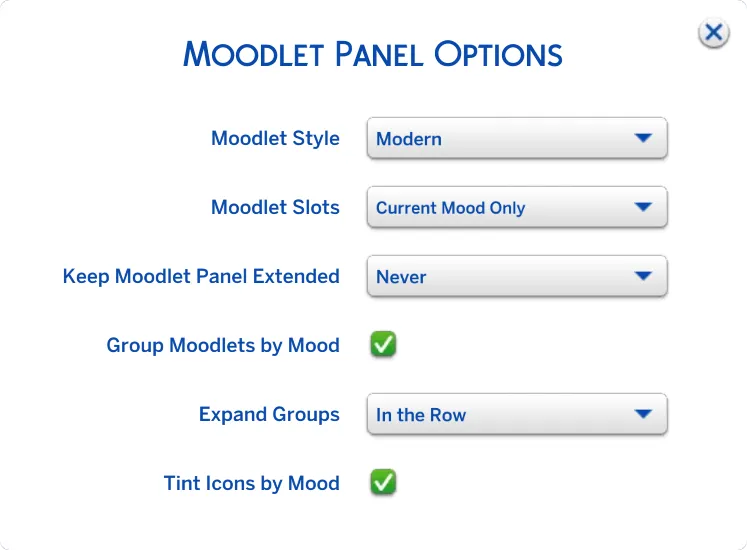
Moodlet Panel Options
Double-click any moodlet to open the new Moodlet Panel Options dialog. Changes apply instantly and are saved with your game options, so your preferences carry across saves and sessions.
The options dialog is translated into all 18 supported game languages.
Click here to see the full list of settings ↗️
Controls
Double-click any moodlet: Opens the Moodlet Panel Options dialog.
Click a stacked moodlet: Expands that mood group. Depending on your selected setting, the group can open in a separate row above the strip or expand directly within the row.
Hold + drag any moodlet left or right: Resizes the strip between 4, 5, 6, or 7 slots. Drag left for more slots and smaller tiles, or right for fewer slots and larger tiles. One step past 4 enables current-mood-only mode. The default number of slots shown is 4.
Click the overflow indicator: Opens the full moodlet panel. How long it remains open depends on your Keep Moodlet Panel Extended setting.
Compatibility
✅ Compatible with Better Simology Panel and Screen Reader.
✅ Compatible with Meaningful Stories and any custom moods.
✅ Compatible with UI Cheats Extension, as long as Refreshed Moodlet Panel is placed in a priority/override folder so it takes precedence.
⚠️ Conflicts with januksenkosketus' Keep Buff/Moodlet Panel Always Open and any other mods that override SimHub UI.
This mod was made possible by Sims 4 Studio. The “In the Row” expanded group setting was suggested and designed by SimMattically.
Comments (62)
en resumen tengo el mod pero no me sale en el juego me sigue igual que antes
juego con el mod por que tengo mucho cc pero no se cuql me impide que el mod funcione y se arregle el panel
yo tengo uin problema en el u
This mod was working fine in my game before but now I cant seem to get it to work no matter what I try
You must have a mod conflict somewhere.
you don't miss omg
when i clicked right click on a moodlet, it disappeared, but i dont use ui cheats, did this mod add this?
I'll check and fix if so.
Hi, it looks like my comment was deleted. I followed your steps exactly to create a priority folder and this mod will still not show up in my game. I know I did it correctly because I have another mod in the folder and it shows up but this mod will not. Any help would be appreciated because I really really want this mod, but I cannot seem to get it.
Hey. Not sure what happened. Can you reach out to me on discord with a list of the mods you’re using? @tyjokr
Tried this mod recently and it's honestly hard to imagine playing the game without it, love your work. One thing I would prefer though is to keep the colors of modded moodlets instead of them taking the color of the mood, hopefully a future toggle?
Hmm. They shouldn’t be taking the color of the mood. Are you able to send me a screenshot of what you’re seeing? My discord is @tyjokr
Hey tyjokr, thank you for this amazing mod!! I was wondering if you could make a separate version where the moodlet style isn’t refreshed, but instead stays the same as in the original game?
Potentially. Not a priority at this moment, but I've made a note of it.
i love you. thank you so much, i hate how cluttered my ui gets, this is EVERYTHING
The mod is working. It's just wonderful. I get to read the moodlet. Love your mods.
Hi tyjokr! I want to ask, can I create a dark mode compatible version of your refreshed moodlet mod? As you know the simhub file also modifies the tooltips text which I usually edit to make the texts white/readable on darker backgrounds. If you prefer hosting it I can also share which texts can be changed. I understand if not, thanks!
Of course! Go ahead. I don't mind.
it's not working, i followed the way to do it with resource.cfg tutorial but it didn't show up
Hmm. I'd have to see your setup in order to help. Feel free to message me on discord @tyjokr
Would a version with the original style be possible?
Probably. If there's enough demand I'll consider it.
This is a thoughtful UI redesign. Grouping moodlets while keeping the panel resizable should make busy saves much easier to read—great work! ✨
This is my favorite mod!
Merci ! Et merci pour vos créations :)
hi, i get 3000 moodlets still with the stacked ones. can get this also stop from repetitive moodlets?
This mod is only for the UI. Check out BrickLion’s mods for less moodlets.
can't wait to try it
Hi! I'm not sure if you have a discord to troubleshoot, but for some reason it's not working for me. I don't know if another mod could be conflicting, but I don't have the conflicting mods listed.
Do you have a priority/overrides folder? If you place my mod in one, that’d solve any potential conflict.
I absolutely LOVE this!
This mod is amazing! It really fixes the moodlet interface. Thank you. If I had any feedback it would be that it's hard for me to read the description for the second moodlet from the left in the list, usually the popup says something like "click to expand" (Cliquez pour agrandir in my game) instead of the actual moodlet description.
Fixed now! Redownload.
hey love, is there a reason why my sims moodlet colours are just black? :)
When have you last updated the mod? There were some custom moodlets that were appearing black, but it's been resolved in the recent update.
hi! when it’s released will it be compatible with luminou’s mood pack?
It’s compatible with it already.
So it conflicts with chalk’d ui?
Not sure. You can try placing my mod in a priority folder. That should resolve any conflicts.
this is such a cool idea ! can't wait for public release !
lol yasss Tyjokr! Wow! you keep making mods that people like and want!
Hey. Good idea! I wonder i s possible make version compatibile with "Keep Buff/Moodlet Panel Always Open"?
You don’t need that mod with this installed. You can just click once to keep it always open.
This is very cool. I use a mod by Janken...jan...i dont know her username directly, but I use a mod I requested by her to keep it always open. I'll tell you guys right now- THE GAME IS SO MUCH BETTER WITH THE PANEL ALWAYS OPEN. SO MUCH STORYTELLING HAPPENS IN THERE.
is this compatible with meaningful stories and mods that add custom moodlets and lumpinou Custom Moods for Some Game Moodlets?
Yes and yes
OMG I always disliked how the moodlets are shown, having them grouped is amazing. You are very talented and always have great ideas! I have a question though, is it possible to only have 1 moodlet open in the drawer instead of 4? It would be cool to see just the moodlets of the current emotion only.❤️
I’ll look into it
Works Great!
You seem to offer everything i ever wanted for the moodlets bar, thank you very much ! ♥
no freaking way... like.... i already love this mod
you are amazing! love all of your mods
LITERALLY what would we do without you thank you again as alwayss🙂↕️🫶🏽
Hi you're amazing and ily
The best cc creator ever ?
Is there a conflict with Meaningful Stories?
No conflicts with that mod
This is so cool, downloading now !! Tysm, love your work Ty !!
What would us players do without you Ty!!
Using a famous slogan... 'I'm lovin' it!' Thanks for your work!
Kudos!
how can you modders be so perfect thank youuuu