


RealmWalker V2.2– Android Version (Public)
Android: Pixeldrain, Gofile
Walkthrough - Gofile
📢 New Android version (JoiPlay) — please read before installing
Hey everyone! The Android version is moving to JoiPlay. The game outgrew the size limit of a normal .apk, and this switch means no more size problems as the game keeps growing - plus, going forward, your saves carry over between updates.
Please read the setup once; it's easy after that.
🟢 First-time setup (one time only):
Install JoiPlay and the RPG Maker Plugin from the official JoiPlay site.
Download the game.
Extract the file to a folder you'll remember (a file manager like ZArchiver works great).
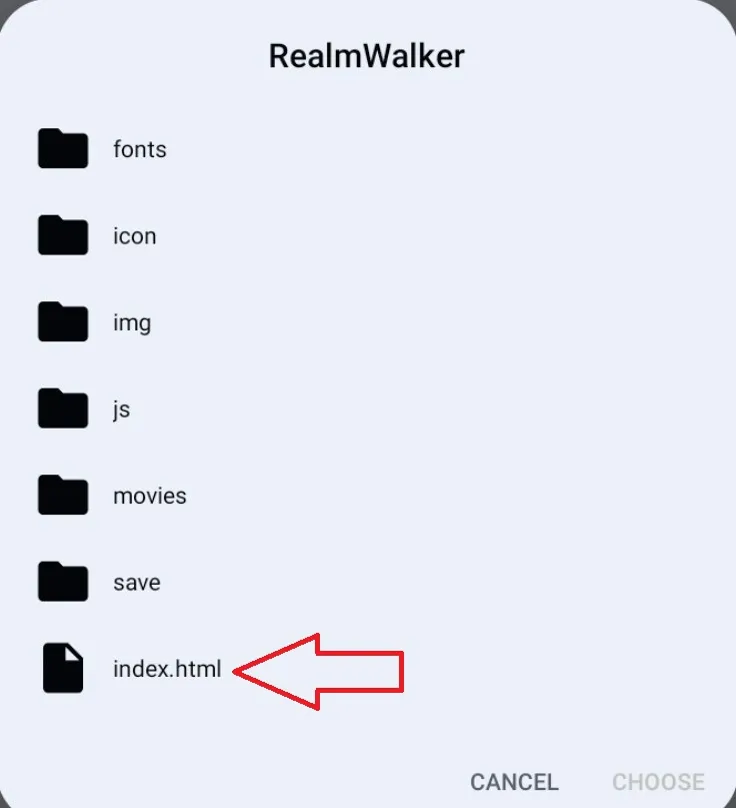
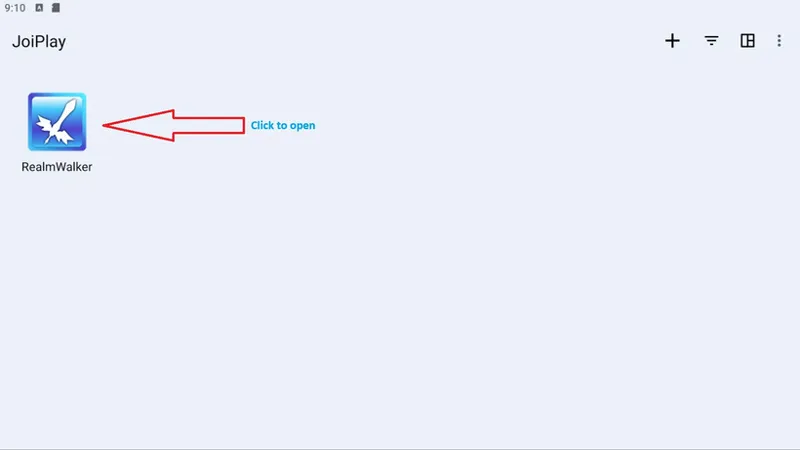
Open JoiPlay → + → Add Game → browse into your extracted folder and select the one containing index.html.
Play!
🔄 How to update each month (THIS keeps your saves):
Download the new version.
Extract it over your existing game folder. Choose Overwrite/Replace when asked.
Open JoiPlay and continue. Your save is still there. ✅
⚠️ Important: To update, always extract over your existing folder. Do NOT use "Import Archive File" to update. that makes a fresh copy and your saves will not follow. Overwrite your existing folder and you keep everything.
💾 About saves:
Coming from the old .apk? That save unfortunately can't transfer (totally different system). Sorry about the one-time reset. I've included a save that jumps you to the newest content so you're not starting over.
From now on, your saves are real files you control and carry over between updates as long as you update the right way above. You can even back up your save folder anytime for peace of mind or replace it. No more losing progress to an update. 🙌
Thanks so much for making the jump with me. This sets the game up to grow for a long time without hitting walls. If you have any problems installing the game or have any questions, feel free to leave a comment below or send me a DM on Discord. I'll be happy to help you get everything up and running. ❤️
Comments (1)
It's here