






Turn Any Hair into a Wig
I'm gonna give you a step-by-step guide of how I turn hairs into head accessories so they can be worn as "wigs".
It's actually pretty easy.
Requirements
Step 1 - Choose the hair
Open S4S and click on "CAS". Make sure the "Create CAS Standalone" option is selected.
Navigate the hairs and select the one you want to edit. Select all the swatches you want your wig to have. Remember you can hold shift to select all swatches for that part. S4S will ask you to input a name and choose a place for the new package.
Step 2 - Export all textures
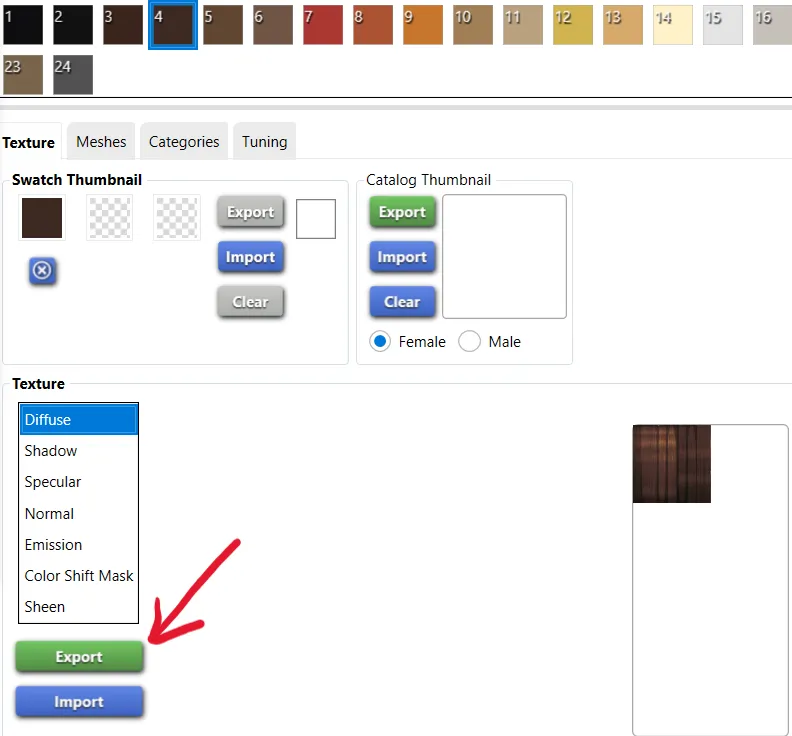
Go to the studio tab (upper left corner) and export the textures of all swatches except the first one. They need to be saved as png.
You should name each swatch according to the swatch number. Swatch number four? Name it "4.png". More on that later.
Step 3 - Setting up
Delete every swatch and leave just one.
Now we go over to "Categories" and change the type from hair to hat.
You can customize the Categories tab as you like. Something I recommend doing is going all the way to the bottom and disabling the "Allow for random". I also like to set the Hat Type to Head Decoration, but you can pick any type you want.
Now we're going over to the Warehouse tab (upper left corner). In the Data tab, you'll modify these values:
ExcludeModifierRegionFlags: 0000000000000000 → 0000000000000200
ExcludePartFlags: 0000000000000000 → 0000000000000404
ExcludePartFlags2: 0000000000000000 → 008000000000000
▼
Here you can also change the name of your wig. I like to just replace the "hair" with "wig".
Step 4 - Adding back the swatches
Back in the Studio tab, we'll add swatches until we're back to the same amount we started with.
Now we'll go to the Texture tab and import the textures to each one of them. That's when the naming we did earlier comes in handy: You know which swatch goes where!
You can edit the thumbnails if you want, but it's just added work that might not be worth it if you're making this for personal use.
Step 5 - All done!
Click Save (lower right corner) and we're done!
Now all you need to do is install the .package file you created like a normal CC and enjoy!
I have already turned some vanilla hairs into wigs it you want to check it out: My wigs
Comments (2)
Awesome tutorial, works flawlessly! Thank you very much! Just a question though: is there a way to leave earrings visible?
The hairs I was working on hid the ears so I didn't even think about the earings! I ran some tests and it seems that putting "0000000000000004" in the "ExcludePartFlags" value instead of "0000000000000404" keeps the earings. If that doesn't work, you can look for other hats that behave the way you want your wig to bahave (as in they make the hair dissapear, like the hijab and head wraps) and compare the "ExcludeModifierRegionFlags", "ExcludePartFlags" and "ExcludePartFlags2" values.