

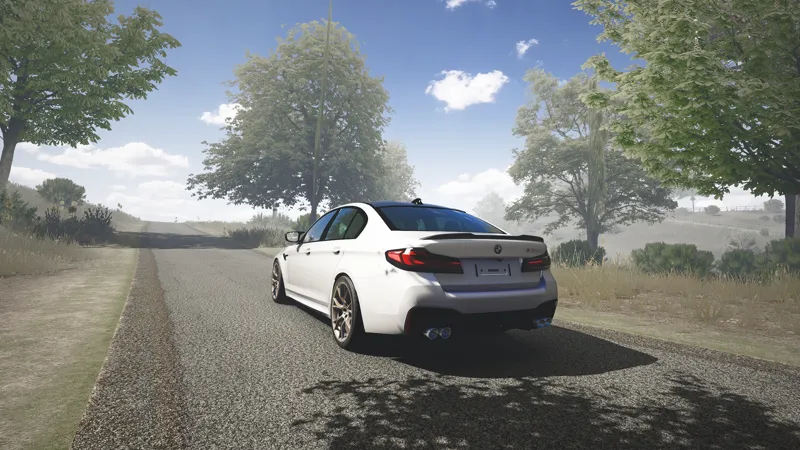
ASAP's EVO V2.3 Config+Script settings
Hi guys it's been a while but I hope you're all doing good. I've been experimenting with a few other filters and there's been a specific one that stood out to me and that is EVO's PPF. I'm sure there are many of you that may also be using this filter so I thought it was only right for me to drop some settings for it.
I like this filter because there are a range of graphic settings that you can adjust, this means that you can tweak little things that can make the filter look amazing in different scenarios.
This release comes with Config and Script settings for the EVO PPF which you can buy from EVO's Patreon (Link is further down). There may be more settings coming out for EVO PP Filters in the future but for now enjoy these.
THE LATEST CSP LIGHTS PATCH IS REQUIRED FOR MY CONFIG+SCRIPT SETTINGS
THE LATEST PURE IS REQUIRED (just for $1)
I DO NOT OWN CSP LIGHTS PATCH/PURE/EVO V2.3
These config settings will be based on:
Evo's Graphics V2.3 (PAID)
Latest Pure (PAID)
Latest CSP lights patch (PAID)
THE PPFILTER MUST BE DOWNLOADED BEFORE THE CONFIG SETTINGS
When you click the attachment link, the file will attempt to download but first you must click download the unverified file, this is located at the top right of your tab within the download section.
MAKE SURE THAT YOU ARE USING PURE GAMMA AND NOT PURE LCS
These settings only work for Pure Gamma, to find Pure Gamma go on to...
Content Manager
Settings
Custom Shaders Patch
Weather FX
HOW TO INSTALL THE CONFIG SETTINGS INTO CONTENT MANAGER:
CONFIG SETTINGS CAN NOT BE DRAGGED AND DROPPED INTO CONTENT MANAGER, PLEASE MANUALLY DROP ASAP'S EVO 2.3 CFG.ini INTO THE SPECIFIED FOLDER
C:\Program Files (x86)\Steam\steamapps\common\assettocorsa\extension\config-ext\Pure
HOW TO INSTALL THE SCRIPT SETTINGS:
SCRIPT SETTINGS CAN NOT BE DRAGGED AND DROPPED INTO CONTENT MANAGER, PLEASE MANUALLY DROP EvosFilter - V2.3_ScriptSettings.ini INTO THE SPECIFIED FOLDER
C:\Program Files (x86)\Steam\steamapps\common\assettocorsa\extension\config-ext\Pure\scriptsettings
HOW TO LOAD THE CONFIG SETTINGS IN-GAME:
1) When loaded into the game, hover your cursor on the right side of the screen and click on Pure config(Green sign).
2) Click on Import at the bottom right of the Pure config tab and click on either of the configs called &
IF YOU ARE UNABLE TO SEE THE NAME OF THE CONFIG SETTINGS THEN YOU HAVE DONE IT INCORRECTLY, PLEASE RE-CHECK THAT YOU HAVE DONE THE STEPS PROPERLY.
MY PC SPECS:
AMD RYZEN 5 4500
32GB 3600 MT/S RAM
NVIDIA RTX 3060 TI
MY UPDATED CSP AND VIDEO SETTINGS:
Recently for videos I have been using the maximum settings that I like to use so I can achieve the best quality possible, so if you would like to use them then do so at your own will.
https://acstuff.club/s/AV5n CSP (MAXED OUT SETTINGS)
https://acstuff.ru/s/QEbH VIDEO (MAXED OUT SETTINGS)
Thank you.
Comments (1)
Oh my god😩😩😩