


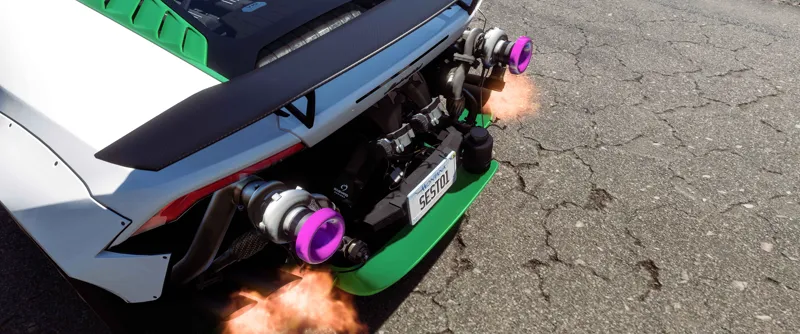

Improved version - Huracán twin-turbo by sash340i
At the request of one of my Discord members (join here!) I've brought one of the most popular old mods back to life - originally created by sash340i - for free for everyone.
This is a high-quality recreation of the mod which now works on the latest game version of Forza Horizon 5, with a few quality of life improvements too!
These features are retained from the original mod:
Exposed twin-turbo setup at the rear, permanently enabled across all bodykits
All rear bumpers are removed permanently and are replaced with the Liberty Walk rear diffuser across all bodykits
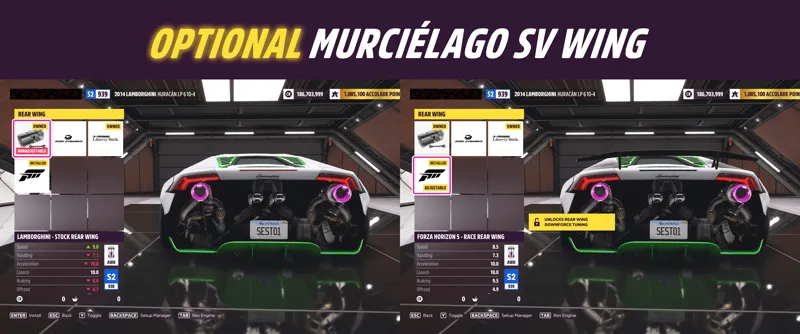
The stock wing from the 2010 Lamborghini Murciélago SV was supposed to be in the original mod but appeared to be missing, so this has been added now (install race wing to enable)
These features are new from me:
Rear diffuser and trunk window surround added to body advanced paint group 2 and can be painted any colour you like including carbon fibre (or more if you have Better Car Liveries!)
Twin-turbo end caps added to body advanced paint group 3, same as above
A new and optional exposed rear bumper frame for added realism (install roll cage to enable)
Please note: the Duke Dynamics front bumper option is no longer available in order to ensure compatibility with the latest game version, but all other options are working.
You can download the file from this post below and enjoy! Install instructions below.
Install instructions:
For Microsoft Store versions:
Make sure your game is installed to the XboxGames folder and not to the default location of Microsoft Store apps (if you're not sure how to do this, check out this handy YouTube video by AidanBenny)
Navigate to XboxGames\Forza Horizon 5\Content\media\cars
THIS STEP IS REALLY IMPORTANT! Back up "LAM_Huracan_15.zip" somewhere else on your PC in case you wish to restore the original car
Once you've backed up the original file somewhere else, replace it with the file included in this post
For Steam versions:
Find the game in your Steam library, right click on it, and choose Manage>Browse local files
Navigate to media\Cars
Follow the rest of the steps above for the Microsoft Store version, making sure to back up the original file somewhere else