
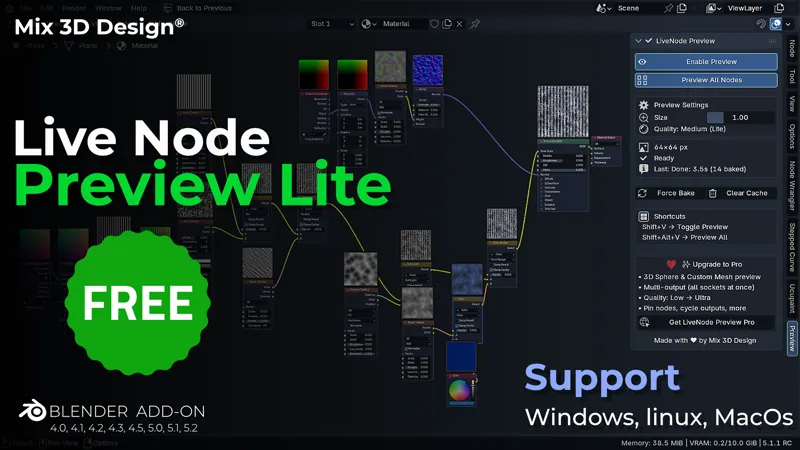
LiveNode Preview Lite — FREE Blender add-on
New Update V1.1.0
See every shader node in real-time. No more guessing, no more disconnect-and-reconnect just to peek at what a node outputs.
What it does
LiveNode Preview Lite shows a live thumbnail of every shader node as you work — directly in the node editor, right where you need it. Adjust a Noise Texture's scale? You see the result instantly. Tweak a Color Ramp? Watch it update in place. No more breaking your graph just to preview.
It's actually fast
Most "live preview" tools freeze Blender while they bake. Lite doesn't. Previews run in a background process so your UI stays responsive while textures bake. Drag sliders, pan the editor, keep working previews update in the background and pop in when ready.
What's included (free)
✓ Single node preview — Shift+V to toggle on any selected node ✓ Preview All Nodes — Shift+Alt+V to see thumbnails on every node at once ✓ Background baking — zero UI freeze, ever ✓ Medium quality previews (64×64 px) ✓ Customizable keyboard shortcuts ✓ Compatible with Blender 4.0 through 5.1 ✓ Works with EEVEE and Cycles ✓ Full support for node groups
How to install
Download the .zip below
In Blender: Edit → Preferences → Add-ons → Install
Select the .zip, enable the addon
Open any shader editor and press Shift+V on a node
The preview panel lives in the N-panel under "Preview". Toggle the addon on, click any node, and you'll see its output rendered live.
Want more? Check out LiveNode Preview Pro
If Lite saves you time, Pro takes it further:
★ 3D sphere preview — see your material rendered on an actual sphere with lighting, not just a flat thumbnail ★ Custom preview object — pick any mesh in your scene (Suzanne, your character head, a car body) and preview your material wrapped on it with auto-camera framing ★ Multi-output preview — see every output socket of a node at once (Voronoi's Distance, Color, and Position simultaneously) ★ Pin nodes — keep specific previews visible while you work on other parts of the graph ★ Cycle outputs — quickly switch which output gets previewed ★ Quality up to 256×256 — Low/Medium/High/Ultra presets for sharp final previews ★ Per-node sphere quality — Low for snappy feedback, High for sharp finals
Pro is available on the paid tiers below. Lite users who upgrade get instant access.
Tech notes for the curious
The addon spawns one background Blender process at startup that handles all baking via file-based IPC. The main Blender UI is never blocked. The background worker has heartbeat monitoring, orphan cleanup (no zombie processes if Blender crashes), and aggressive memory purging between bakes so your RAM stays sane during long sessions. Works on Windows, macOS, and Linux.
Known limitations of Lite
No live preview of shader-producing outputs on a 3D surface (that's a Pro feature — Lite shows a flat plane bake)
One output per node visible at a time
Quality fixed at 64px (Pro unlocks Low/High/Ultra)
Support
Found a bug or have a feature request? Drop a comment on this post or DM me. I read every message. If Lite works well for you, please consider supporting Mix 3D Design by checking out the Pro tier — your support keeps both versions alive and updated.
Compatibility
Blender 4.0, 4.1, 4.2, 4.3, 4.5
Blender 5.0, 5.1
Cycles + EEVEE (including EEVEE Next)
Windows, macOS, Linux
Thanks for being here ♥ — Mix 3D Design
Changlog - Updates
v1.1.0
Sharper previews Preview resolution increased from 64px to 128px. Subtle effects that were hard to see before — coordinate distortion, Soft Light and other low-contrast blend modes, and fine procedural detail — now show up clearly in the thumbnail.
Fixed
Mix Color previews using low-contrast blend modes (e.g. Soft Light) no longer appeared unchanged when distorting upstream coordinates. The preview was updating correctly, but the old 64px resolution made the difference nearly invisible. Higher resolution resolves this.
Notes
Slightly longer bake time per node at the new resolution. Baking still runs in the background, so the UI stays responsive.
Comments (4)
Great stuff! I think I found a bug. Idk what's preferred method of contacting you, but so far I DMed you on IG showing the bug.
tyvm!
It looks great!
Thank you. SaTales