
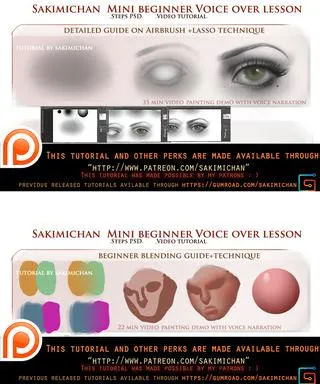
mini voice over lesson for beginners (term 30-31)
Hey guys, This term I wanted to try doing something new: releasing 2 mini voice over tutorials instead of 1 long one with other video tutorial. The reason being I didn't have much time to work on the usual tutorials, but I still wanted to make something that'd be helpful with the time I had. I made some pretty beginner and basic tutorial since alot of you have requested them :)
1st tutorial (Airbrush Lasso technique)
a simple 35 min voice over guide on how lasso can be used with airbrush to paint . One of my favorite and most used techniques :)
2ed tutorial ( Blending techniques)
a simple 22 min voice over tutorial on basic blending technique :)
you can say these tutorials are for those of you who don't have a lot of time to learn and just wants a quick session, anyways let me know what you guys think about it, do you think shorter tutorials on more specific subject are better then the longer ones that focused on many things?
►This is a term 30-31, tier 3+ reward ◄
(will be send out 1-10th of March with the other rewards for term 30 rewards ^_^)
This tutorial pack comes with
High res jpg
PSD
Voice over video tutorial
Comments (26)
When do I get my prizes? I bought the $20 so I could pick one, but when do I get to actually pick one?
Sakimichan will email you the download link for this term and then she will give you a passcode to use for the term you want. She just has to wait until all the payments are done before sending the terms!
hi sakimi , please , the term 25 and 26 in gumroad? i need to buy it please T___T
that's weird term 25 and 26 should be up on gumroad. *_*
Thank you for this tutorial (and every tutorial) very kind of you!
haha. thank you XD
How/when do we get the tutorials if we pledged for the rewards? I have never used this site, I am so confused T-T
around this week I'll send the rewards out, usually on the first week of the month after patreon finishes processing the pledge. :)
thisll be super helpful, thank you for the tutorial! ( = 3 = )
you are welcome. :)
hello Sakimichan would you consider doing a environmental tutorial one day?
sure! thank you for the suggestion. :)
I like the idea, it would be so much easier to find the specific elements instead of trying to find in which long lesson it was included :)
thank you for the input. :)
thank u .. can u give the full name of it please ?
Adobe photoshop <a href="http://www.adobe.com/products/photoshop.html" rel="nofollow noopener" target="_blank">http://www.adobe.com/products/photoshop.html</a> Wacom tablet: She use one of the cintiq model : <a href="http://www.wacom.com/en-us/products/pen-displays" rel="nofollow noopener" target="_blank">http://www.wacom.com/en-us/products/pen-displays</a>
How do u get to watch the videos. Like what do I click on?
You buy the videos by pledging to her patreon.
Sakimi san .. what name of this programm ? I am a novice in the drawing by computer..
The program is photoshop
I love the idea, looking forward to watching them!
thank you. :)
A very good idea, I adore the tutoriel of this style
thank you. :D
... cool.
thanks. :)