




Exilitay Graphics Pack 2025 (Public Preview)
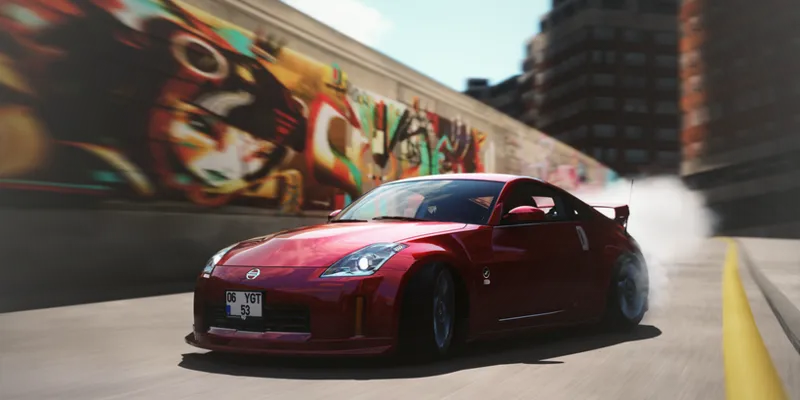
This is my official Graphics Pack of 2025. Packed with my latest & greatest content/mods. This is a public preview post, sharing what's been updated and release info.
This will be the final post of this year from me, so I wanted to put all of my best content in one place for you guys. I want to thank everyone for all the support this year. We've grown to be the no.1 graphics community in Assetto Corsa! This is only the beginning of Exilitay Realism, expect a lot of big things for 2026... Merry Christmas & Happy New Year, everyone! 🤍🎉
Download Post: https://www.patreon.com/posts/exilitays-2025-146384152
This Graphics Pack includes:
‣ Exilitay Realism v1.08 (ppfilter)
‣ Exilitay FX (included in the ppfilter)
‣ Exilitay Cam (chase camera)
‣ Exilitay Neck FX (realistic neck fx script)
‣ New CSP & Video Settings (3 presets: medium, high, & ultra)
‣ My SRP Lights Config (SRP trees skin coming in the next pack)
Exilitay Realism v1.08 (ppfilter):
This pack includes my latest v1.08 ppfilter, it's compatible with Pure Gamma, LCS & has VR compatibility. My next v1.09 ppfilter will have HDR support.
Also, a lot of you asked about where to find the Pure Config for my latest ppfilters. However, the config is implemented into the script of the ppfilter, so you don't have to manually import it. It just loads every time you're running my v1.08 ppfilter. Just make sure you have reset the Pure Config to defaults to avoid any overriding settings.
Exilitay FX (ReShade Replacement):
Included in the Pure PP App settings for 'Exilitay Realism v1.08', you will find a new tab 'exilitay fx'. This replaces the need to use ReShade, saves you a lot of time installing it and most importantly, saves you a lot of FPS and is very user-friendly to navigate the UI and adjust the effects.
List of current effects:
Luma Sharpening, Clarity Effect, Chromatic Aberration, Lens Dirt Overlay, Cinematic Black Bars, GoPro Lens Distortion, VHS Effects: Film Noise Grain, Scanline Effect, Vertical Jitter Effect (Most of these effects come with advanced slider adjustments)
You can find out more about my v1.08 ppfilter & exilitay fx here: https://www.patreon.com/posts/exilitay-realism-141036286
Exilitay Cam (Chase Camera):
I've designed and coded this chase camera for a more dynamic and smooth look. This chase camera comes with 7 different settings, and the default settings work great for both drifting and traffic weaving. I am also developing a separate, dedicated camera specifically optimised for racing.
You can find out more about the all-new Exilitay Cam here: https://www.patreon.com/posts/exilitay-cam-145600712
Exilitay Neck FX (Realistic Script):
Introducing my own Neck FX script. Exilitay Neck FX delivers unparalleled cockpit immersion while keeping things balanced & realistic. This script is uniquely optimised for all sorts of driving, ensuring your first-person view feels alive and responsive.
There are now over 20 different settings to adjust the neck physics, making it easy to fine-tune the head movement to your exact preference. For the future, I plan to integrate the Neck FX into its own in-game app for easy, instant access to all these customisation options.
You can find out more about the all-new Exilitay Realistic Neck FX here: https://www.patreon.com/posts/exilitay-neck-fx-145604048
New CSP & Video Settings (3 presets):
I have mainly updated the CSP settings. All 3 presets have slightly different settings & optimisations. They're fairly self-explanatory; medium settings, high settings & ultra for those who want the maxed out graphics. I would recommend testing the CSP settings to see which one runs best for you, as everyone has different PC specs & resolutions.
Note: I haven't optimised my CSP settings for VR or triple screen (settings are set to default)
Changes:
‣ Better particle fx (smoke settings). The higher the preset, the more smoke particles.
‣ More optimised settings, including: lighting fx, extra fx & graphics adjustments tweaks.
‣ Better shadow settings without fps drop: Shadows have been tweaked for sharper shadows
‣ Ultra CSPs have higher local reflections (SSLR) & small optimisation tweaks for lighting fx
‣ Better screenshot settings for all presets, fine-tuned & tested for the most realistic photos
‣ General & other optimisation tweaks here and there have been changed too.
Also, it is advised that you use your monitor's native resolution, unless you wish to use AMD or NVIDIA's upscaling for more performance. More on that here in my Discord Server.
SRP Lights Config:
This is the only thing that hasn't changed in my graphics pack. However, I am working on big things. I'm going to make my own SRP skin in the future, including track/tunnels tweaks and vegetation (3d trees). For now, my current lights config has white street lights & blue-tinted tunnel lights.
Once again, I want to thank all of my members. We've built an amazing community for graphics, modding and even irl car content. I'm going to be making a list for my plans for 2026 soon. Stay tuned for that. One of my main goals is to update my ppfilter monthly and release more tutorials on how to get your game looking the most realistic.
The reason I started making Graphics Packs was to make it as easy/plug-and-play for you guys to get the best visuals without doing the hard part of tweaking settings. That's been one of my main goals and will always be my main goal, to provide you guys with the best content, easiest installations and tutorials.
Support:
If you have any questions or need any support, message in one of the Patreon chats or private message me. Or you can open a ticket on my Discord server; we have a great staff team and aim to get your issue resolved as soon as possible :)
Current CSP: v0.3.0-preview 212
Current Pure: v3.10



Comments (8)
I followed all the steps in your tutorial, but the colors still look washed out/dull. I’m using the full versions of Content Manager and CSP, along with Pure 3.1. Any idea what might be causing this?
Hi! Your work looks impressive! I tried it today in VR, but unfortunately I get a lot of stuttering (I tried both medium and high quality), despite having a good gaming PC (AMD 9800x3D and Nvidia 5070 Ti). I use DLAA with the Snowymoon mod, that might be the reason. I will try with MSAA in order to do a comparison (however, I am very happy with DLAA with the Snowymoon mod, as it runs smoothly and eliminates aliasing better than MSAA).
I have an issue that in day time on SRP tunnel it's very bright and annoying, how do I fix it? :)
does this work in vr and can a 7800xt manage it ? quest 3 VD
Nighttime looks amazing but daytime, it looks nothing close, did the same like James
same here for me, did u end up fixing this?
I have the exilitay realism v1.08 and am running pure gamma with your csp and video settings yet my game looks nothing like your videos even with the same maps and cars how can i fix that?
same with me