





The Game has been Updated to 1.10! Detection is Back...
DSTool Patcher has been updated!
You can no longer play as you'd like with custom assets without triggering the detection, but there's a workaround!
You can Downgrade your game to v1.09 or wait an update of DSTool Patcher
IT MEAN SOLO PLAY ONLY
First start by manually backup your save game so. then if you feel adventurous :
Opening the Console
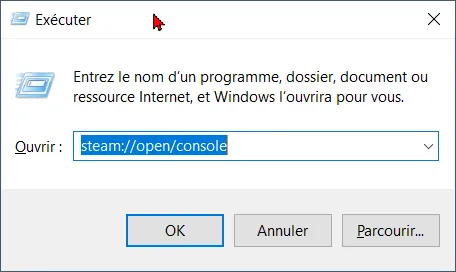
Press Windows Key + R to open the Run dialog.
Type steam://open/console and click OK to reveal the Console tab in Steam.
Executing the Command
Type the following command in the bottom input box of the Steam console and press Enter:
Main Game Content & Assets Depot (1.09)
download_depot 4570720 4570721 8805763328735510328
Wait for the console text to say the download is complete and give you a file path
You don't have any progress bar so be patient
Replacing the Files
Copy all files from that downloaded folder.
Paste and overwrite the files inside your main game installation folder (steamapps/common/[game name]).
Once it's done go to game properties ,disable auto update and re-patch the
DSClient-Win64-Shipping.exe with DSTool Patcher.
This is the only way to keep playing with Detection disabled until DSTool Patcher update, but it mean solo only!
To update your game to the latest build, simply verify the game's integrity files.
I'm currently working on two new custom mods for DragonSword Awakening.
I'm also continuing to update the DSMS Mod Loader, which will be released after the DSTool Patcher, and I'm developing a new application called DSMS Preset Studio to make it easier to create mods using JSON. (This application will be exclusively for modders; if you just want to enjoy the best mods using the DSMS Mod Loader, all you have to do is wait patiently until it's ready.)