


How to Add Breasts to Male Sims: 2 Ways (CAS Gender Breast Option & Pregnancy Both Mod + Cheats traits.equip_trait trait_Breasts_ForceOn)
"English is my second language, so I'll do my best to explain clearly 🥺"
"สำหรับคนไทย คำอธิบายภาษาไทยอยู่ข้างล่างนะคะ ⬇️ "
This post shows you 2 ways to add and remove breasts on male Sims: the cheat traits.equip_trait trait_Breasts_ForceOn, and the CAS Gender Breast Option & Pregnancy Both mod. Both methods work effectively, though each comes with a few small differences worth noting. Feel free to choose whichever suits you best!
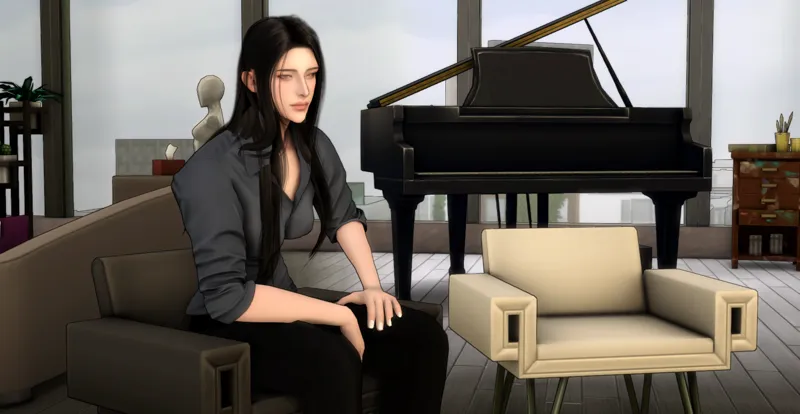
Let's get started! Create the Sim character you want for adding breasts. For this one, I wanted to create a Sim with a masculine personality but a feminine appearance, while still keeping male genitals. This Sim was made from a male base
Since the body is still built on a male frame, it can look a bit off at first. This is where your Sim-creation skills really come in, using slider mods, body presets, and skins to adjust the shape until it looks more natural
Note: In this video, I already adjusted the body while it was still male, before adding the cheat, so I didn't need to change much in CAS mode
Method 1: CAS Gender Breast Option & Pregnancy Both Mod
This is the easiest of the two methods. You can add or remove breasts instantly right from CAS mode (just switch outfits afterward to apply the change), just be sure to check for conflicting mods first, or it won't work properly. More details here: [Click]
Method 2: The Cheat Method (traits.equip_trait trait_Breasts_ForceOn)
This part only covers adding and removing breasts for male Sims. For female Sims, you'd use traits.equip_trait trait_Breasts_ForceOff to remove breasts instead. You can learn more about doing this for female Sims here: [Click]
▪️Steps to add breasts to male Sims using cheats:
Open your game. You'll start in Live Mode
Press Ctrl/Command + Shift + C to open the cheats box
Type testingcheats true and press enter
Type cas.fulleditmode and press enter
Select your Sim and enter: traits.equip_trait trait_Breasts_ForceOn
Shift-click that Sim and choose Modify in CAS
You'll see your Sim already has breasts. Adjust the size however you like, then click Done. Back in Live Mode, you'll see the change reflected on your Sim
▪️Reverting Male Sims Back to a Flat Chest by Removing the ForceOn Trait with MCCC
One issue I ran into is that some nose sliders don't work while breasts are equipped, so I couldn't get the nose shape right
To fix this, you'll first need to get your male Sim back to a flat chest. You can use the mod mentioned above, which is actually the method we recommend since it's the easiest
But if you'd rather use the cheat to remove the breasts, you might think traits.equip_trait trait_Breasts_ForceOff would do the trick, but it doesn't actually work here. Instead, you'll need to use MC Command Center (MCCC) to remove the ForceOn trait. Once that's done, the nose sliders will work as usual
How to remove the trait_Breasts_ForceOn using MCCC:
Install MCCC and open your game
Click your Sim, select MC Command Center
Select MC CAS > Manage Traits > Remove Trait
Type or paste "breasts" and click OK
Select trait_Breasts_ForceOn from the list, then click OK
Exit the MCCC menu
Shift-click your Sim and choose Modify in CAS
Adjust the nose (and anything else), then click Done. Once that's done, reapply the breast-adding method the same way as before
Credits:
Breast cheat tutorial: Sims 4 Cheat for Adding Breasts to Male Sims
Trait removal guide: S4 Troubleshooting: How to (undo) Traits.equip_trait Breasts_ForceOn/Off with MC Command Center by Sejian
MC Command Center by Deaderpool
─── ⋆⋅☆⋅⋆ ──
วิธีเพิ่มและลดหน้าอกในซิมส์ผู้ชายด้วยมอด CAS Gender Breast Option และใช้สูตร traits.equip_trait trait_Breasts_ForceOn
ในโพสต์นี้จะเป็นการรวบรวม 2 วิธี สำหรับการเพิ่ม-ลดหน้าอกให้ซิมส์เพศชายค่ะ ไม่ว่าจะเป็นมอด CAS Gender Breast Option & Pregnancy Both และสูตร traits.equip_trait trait_Breasts_ForceOn ทั้งสองวิธีสามารถเพิ่มหน้าอกซิมส์ได้จริง แต่จะมีข้อแตกต่างและข้อสังเกตเล็ก ๆ น้อย เพื่อน ๆ สามารถเลือกใช้ตามที่สะดวกได้เลยค่ะ
งั้นมาเริ่มกันเลย ให้คุณสร้างตัวละครที่ต้องการขึ้นมา สำหรับเราต้องการสร้างซิมส์ที่มีบุคลิกเป็นผู้ชาย โดยภายนอกให้ดูเป็นผู้หญิง และมีอวัยวะเพศชายอยู่ ดังนั้นเราจึงตั้งใจสร้างซิมส์ที่สร้างจากพื้นฐานเพศชาย แต่ด้วยโครงสร้างร่างกายยังคงเป็นผู้ชายอยู่ หุ่นอาจทำให้ดูแปลกๆ นิดหน่อย ในขั้นตอนนี้พวกเราต้องงัดสกิลการปั้นซิมส์ของตัวเองออกมาก โดยใช้มอด slider, body preset และสกิน ในการปรับหุ่นให้ดูเป็นธรรมชาติมากขึ้น
(Note: ในวีดีโอเราปรับหุ่นในร่างชายเรียบร้อยก่อนใส่สูตรแล้ว เลยไม่ได้ปรับอะไรมากมายในโหมด CAS)
วิธีที่ 1: มอด CAS Gender Breast Option & Pregnancy Both
เป็นวิธีที่ง่ายที่สุดเลยค่ะ เราสามารถคลิกปรับเพิ่มลดหน้าอกทันทีในโหมด CAS (จะเห็นหน้าอกเปลี่ยนแปลงต้องให้ซิมส์ใส่หรือเปลี่ยนเสื้อผ้าก่อน) แต่ข้อระวังเวลาใช้จะต้องเช็คมอดที่ขัดแย้งกันก่อนด้วย ไม่งั้นมอดจะไม่ทำงาน รายละเอียดเพิ่มเติมอ่านตามนี้ได้เลยค่ะ [Click]
วีธีที่ 2: ใช้สูตร (traits.equip_trait trait_Breasts_ForceOn)
ในส่วนนี้จะพูดถึงการเพิ่มหน้าอก - ลดหน้าสำหรับซิมส์เพศชายเท่านั้น สำหรับซิมส์ผู้หญิงในการเอาหน้าอกออกจะใช้สูตร traits.equip_trait trait_Breasts_ForceOff แทน ใด ๆ เพื่อนสามารถทำความเข้าใจและอ่านเพิ่มเติมของซิมส์ผู้หญิงที่นี่ [Click]
▪️ขั้นตอนการเพิ่มหน้าอกในซิมส์ผู้ชายด้วยสูตร
เข้าโหมดเล่นเกม
กด Ctrl/Command + Shift + C พร้อมกันเพื่อเปิดกล่องข้อความ
เปิดใช้งานสูตร: พิมพ์ testingcheats true แล้ว enter
จากนั้นพิมพ์ cas.fulleditmode แล้ว enter อีกครั้ง
เลือกซิมส์ แล้วพิมพ์: traits.equip_trait trait_Breasts_ForceOn
คลิกที่ซิมส์ตัวนั้นพร้อมกดปุ่ม Shift ค้างไว้ แล้วเลือก Modify in CAS
เมื่อเข้าสู่โหมด CAS จะเห็นว่าหน้าอกของซิมส์มีการเปลี่ยนแปลง สามารถปรับขนาดหน้าอกได้ตามความต้องการ เมื่อปรับเสร็จแล้ว และเข้าโหมดเล่นเกมอีกครั้ง จะเห็นว่าซิมส์ของเรามีหน้าอกแล้วต่างจากตอนเริ่มใส่สูตรที่หน้าอกยังแบนอยู่
▪️การทำให้ซิมส์ผู้ชายกลับไปอกแบนเหมือนเดิมด้วยการใช้มอด MCCC ลบ ForceOn trait
ปัญหาหนึ่งที่เราเจอคือ มอดสไลด์เดอร์สำหรับปรับจมูกบางอันไม่ทำงาน ทำให้ปรับจมูกแบบปกติไม่ได้ขณะที่สูตรยังเปิดอยู่ ดังนั้นถ้าเราต้องการปรับจมูก เราจะต้องเปลี่ยนให้ซิมส์เป็นผู้ชายอกแบนเหมือนเดิมก่อน โดยคุณสามารเลือกใช้มอดข้างบนก็ได้ ส่วนตัวเราแนะนำวิธีนี้นะ เพราะวิธีทำที่สุดแล้ว
แต่ถ้าคุณต้องการเลือกที่จะใช้สูตรลดหน้าอกอย่าง traits.equip_trait trait_Breasts_ForceOff ในช่องใส่สูตรล่ะก็ เราลองใช้ให้แล้ว สรุปตัวสูตรมันไม่ทำงานค่ะ ดังนั้นเราจึงต้องใช้ MC Command Center (MCCC) เข้ามาช่วยลบ trait ForceOn เราก็จะสามารถเข้าไปปรับจมูกได้ปกติค่ะ
วิธีลบ Trait ForceOn ในซิมส์ผู้ชายโดยใช้ MCCC:
ติดตั้ง MCCC แล้วเปิดเกม
คลิกที่ซิมของคุณแล้วเลือก MC Command Center
เลือก MC CAS > Manage Traits > Remove Trait
พิมพ์หรือคัดลอกวาง "breasts" และคลิก OK
คุณจะเห็น trait_Breasts_ForceOn ให้คลิกและลบออก และคลิก OK
ออกจากเมนู MCCC
คลิกที่ซิมส์ตัวพร้อมกดปุ่ม Shift ค้างไว้ แล้วเลือก Modify in CAS
ซิมส์จะเข้าสู่โหมด CAS เราก็จะสามารถปรับจมูกและทุกสิ่งที่ต้องการตามปกติแล้วค่ะ เมื่อปรับเสร็จแล้ว ถ้าอยากเพิ่มหน้าอกอีกครั้ง ก็คอยใช้วิธีตามที่บอกไปเหมือนเดิม
เครดิต:
Breast cheat tutorial: Sims 4 Cheat for Adding Breasts to Male Sims
Trait removal guide: S4 Troubleshooting: How to (undo) Traits.equip_trait Breasts_ForceOn/Off with MC Command Center by Sejian
MCCC mod: MC Command Center by Deaderpool
─── ⋆⋅☆⋅⋆ ──