
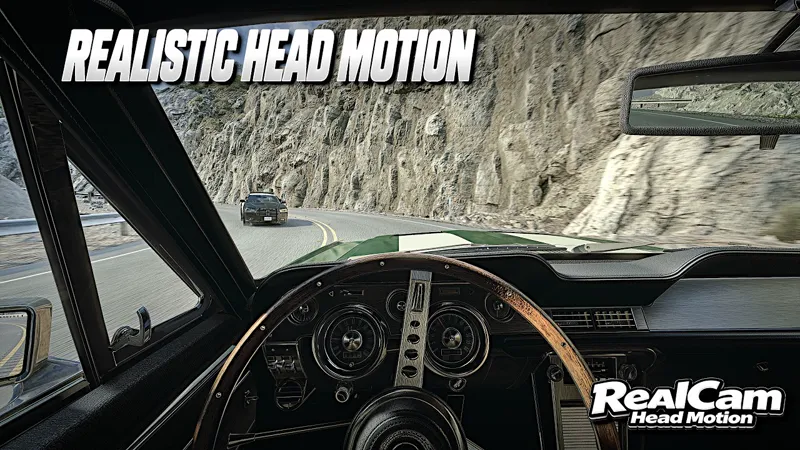
RealCam HeadMotion v0.1 for ETS2 and ATS - Now Available
RealCam HeadMotion is now available for ETS2 and ATS on Project Ultimate Patreon and Boosty.
RealCam HeadMotion is a standalone app designed to simulate more realistic head and camera movement while driving, without the need for a physical head tracker.
The app reacts to driving telemetry and adds:
natural head movement
acceleration and braking response
cornering movement
automatic indicator glances
The default settings are designed to give a natural experience straight away, while the sliders and movement options are fully customizable, allowing you to adjust the strength and behaviour of the different movements to your own preference.
IMPORTANT
The OpenTrack setup must be completed before using RealCam HeadMotion.
Please follow the OpenTrack setup exactly as shown in the tutorial video or use the instructions included in the download pack.
Opentrack Download Link:
https://github.com/opentrack/opentrack/releases
For the game to accept the camera data, make sure TrackIR support is enabled in the game
Config file:
uset g_trackir "1"
If Tobii is installed, it is also recommended to disable the in-game Tobii integration to avoid
conflicts:
uset g_tobii "0"
This is required for RealCam HeadMotion to work correctly with ETS2 and ATS.
As this is the first beta release, there may still be some limitations and further tuning will continue based on feedback.
RealCam HeadMotion for ETS2 & ATS - Now Released | Gameplay & Tutorial (YouTube)
Comments (90)
Hey Angus, thank you so much for your recent work on RealCam HeadMotion! The plugin works fantastically and adds a whole new level of immersion to ATS without needing any head tracking hardware. Really appreciate it! This is some next level sh*t....
Thank you a lot man🙌
i cant find the tracker and toggle in my config,cfg
Hey, please have a look at the tutorial in this video, as i show where this is placed exactly
in wich folder should they be in
Hey, Reshade presets need to be in win64 or win64/reshade and Project Ultimate Weather 2.5 in the mod folder in Documents
Great work! It adds a huge amount of realism. Is it possible to disable the steering rotation effect when using the turn signals?
Hey, yes the next version will have more options and customization of the view and motions
the camera doesnt going to right i turn on right turn signal
Hey, that would mean that the app might not be on or that thate has been a stepped missed on the setup
Job well done my friend 🔥🔥🔥🔥
Hey man, I really appreciate all the work you’ve done, from Project Ultimate to Real Cam Head Motion. It’s honestly incredible what you’ve done to ATS community. Keep up the great work! I just installed the beta version of Real Cam Head Motion but when I’m in the truck the camera starts shaking violently. I’m not sure if I installed something incorrectly, if it’s a bug or if something on my end is causing it. Any help would be greatly appreciated. Thanks again for everything you do man
Hey, thank you a lot. Also the issue you described is sloved with closing Opentrack as the camera will shake a lot with it on
Hi, first of all, congratulations on the work! I also use Tobby. I wanted to know if there's a way to disable the camera effect when the turn signals are on. Thanks and congratulations again!
It's a shame I can't also look around using the mouse or controller. Is there any way to configure that? Otherwise, it doesn't compare to a real eye tracker.
Hey, this would never compare to a headtracker as it also not made for people that use a headtracker but more of some sort of camera movement rather than a static camera, also mouse or button movement will be added in the next version
HI, I tried it but I get sick unfortunately. I uninstalled everything but now I can move the camera anymore with my right joystick or mouse? Any idea?
Hey, you need to set trackir back to 0 in the config as youre running the game in a headtracker mode
Love it but i would like to be able to use it at the same time with my joystick for looking left and right. This is standard when uset g_trackir "1" you cannot look left or right in the cabin - please give us this option.
Hey, that is coming in the next version
Quick question… is it game limitation that prevents left/right/up/down movement with mouse or controller in cab while using this setup?
Hey, yes however that will be introduced with the next version
Only issue I have mate is when you try and reverse you are just looking direct left and can’t see your trailer whilst backing up! Other than that great work 👏🏻
Hey, thank you for the feedback, i have already prepped a lot of the suggestions to be introduced in the next version
Like the idea but it’s not great for me, gives me motion sickness unfortunately. I’ve uninstalled but now I can’t use left & right on my little joystick on my wheel.
Hey, until you wont switch the trackir commend to 0 you wont be able to use it as this is still in the track ir mode. So just need to set track ir to 0
You are the best, excellent job
Thank you a lot
Absolutely magnificent mod, great work, I will definitely be using this 24/7 after some issues are resolved. Of course as some mentioned, we can't look both ways at intersections which easily causes constant accidents, and I am unable to reverse at all with a trailer as I like to have more control over my camera, looking at both mirrors. Perhaps being able to take control over the camera with our own buttons or mouse would be ideal. Thank you for your hard work.
Hey, really appreciate the feedback
Finally! Figured it out! I'm noob Mr. Angus! Was doing the without watching your instructions from the master himself! And it worked like a charm! You are one of the best!
Thank you a lot man💯
https://1drv.ms/t/c/1d81a07798d11b92/IQD3WchZvvNiTK9rvBW0lNFXAdjAyn4r54Qo-bXxseJYdgo?e=4PxWoV
SENT
How can I share it to you
You can send it to my DM
I think it’s conflicting with Pizzster modding
Where can I find crash log
In the Documents/Euro Truck Simulator 2 - you ned the game.log
tena mety ilay izy, tena tsara, fa irariana ny version manaraka mba ahafahana manetsika ilay camera amin'ny alalan'ny manette xbox, lasa clignotant no ahafahana mijery ny retroviseur gauche sy droite fa tsy mety assigné ilay camera libre, from Madagascar
Here is the adjusted message, perfectly formatted for a Patreon DM or comment: Hi! First of all, I genuinely love using your Real Cam Head Motion app in American Truck Simulator. It is an amazing product, and I really appreciate the hard work you’ve put into it. As always, your work is 100% spot on! I wanted to share some quick constructive feedback regarding a couple of tracking issues I’ve noticed while playing: 1. Looking left and right at intersections: When making a turn, I naturally need to check both sides for traffic, but the motion capture doesn't seem to allow my in-game head to turn freely in both directions. If I am taking a right turn, it only lets me look to the right, but it won't track my head when I try to look back to the left. Additionally, the app completely overrides the game's default manual "look left/right" hotkeys, meaning I can’t even use the keyboard as a backup to check my blind spots. 2. Extreme camera movement while reversing: When putting the vehicle in reverse, the head tracking forces the in-game camera to turn completely backward. This isn't always practical because players usually rely on their side mirrors. Also, many modded vehicles in ATS now feature built-in rearview camera displays right on the dashboard. It would be great if the tracking could be adjusted so it doesn't force a full backward turn, allowing us to comfortably look at our mirrors or interior screens instead. It would be incredibly helpful if you could look into tweaking these restrictions, or at least allow the game's manual look keys to function simultaneously while the tracker is active. This is just my personal opinion to help refine things. Genuinely, it is a fantastic app and you have done a great job!
Got it, thank you a lot for the feedback. This is really helpful for the next version of it
Trying it without tobii changed to 0 and it didn’t crash so I’m seeing if it works ones my game loads
Unfortunately, I encountered error 4551 on my Windows 11 system... Is there a way to fix it? It seems this error occurs simply because the program lacks a signature.
Hey, i did encounter that issue with my setup or any other setups yet. Thanks for letting me know. RealCam HeadMotion is currently an unsigned beta application, so some Windows 11 systems with stricter SmartScreen or Smart App Control settings may block it. I’m looking into code signing for future releases. If you can send me a screenshot of the exact error/message you’re seeing, I can confirm whether this is what’s causing error 4551.
My game keeps crashing
Hey, it is 99% not app related but if youd send me your game log i can have a look
The mod is awesome! But i play with Xbox controller, and the mod disable the looking manual view with the joystick in the cabin View! That’s the Only one problem that i have!
Hey, i will try to implement this in the next version
Where can I send a video of the issue im having
Hey, you can send it to my DM
Interesting mod, but I don't understand why you'd install Opentrack if you aren't using it with this mod—or am I missing something? I installed everything according to the instructions... but nothing happens... the camera doesn't track my head... what's the point?
Hey, the mod is not a headtracker but a headmotion app. The opentrack has the structure for the app to intercept a headtracker like behaviour. The mod is to introduce more movements within the cabin over the default static camera
Awesome work!
🙌🙌🙌
Hello ! I'am getting a failed to open camera error pop-up any suggestion ?
Hey, you would need to send me a picture of the error
Hey Angus! Great job! Is this compatible with Beam Eye Tracker? Is it the same configuration as the PDF?
Hey, it could be yes. But i have tries it with opentrack as that is more widely available
Great work once again mate! I won't be able to use it properly until we have glancing controls, but I saw you mention that was coming in another comment, so I'm hyped for that! Feedback: - Can we have a slider for how far the glancing is for the blinkers? Or perhaps even a toggle on/off for blinker glancing? Maybe also the speed of the glance? I know there is a speed slider, but I feel like the acceleration of the glance is quite fast. - Installation was simple and easy to follow. - To me the default values seem too high, but that could just be personal preference. - The default zoom key still worked, which came in handy. - I wonder if its possible to simulate an air ride seat? Or in general, simulate the head movement after going over bumps. Overall, I really enjoyed it!
Hey, thank you a lot for valid points..a lot of it is on the to do list for the nexr versions and almost all ar realistic to achieve
Hey can you make reverse movement optional in app. And hand movement on steering wheel and on shifter has well. Because my shifter move went is shif gears in the future update 🙂😉🫡
Hey, will see what we can do for the next update
First of all: great work, and thank you very much for your time and effort! One question: Unfortunately, the plugin disables the camera control/view. However, this would be very helpful when turning or changing lanes. Is there a way to re-enable it?
Hey, yes however with this beta you can control slight yaws when changing lanes with the blinkers, also next versions will come with more options
Hey. Like it so far. Couple of things though. Can you disable it in the reversing (button 5) view as it keeps trying to look forward making reversing impossible? Also, can you add a slider to turn off the indicator looking. It's counter-intuitive everywhere except joining a motorway. ie at a junction I want to look left if I'm turning right. So I'd rather be able to turn it off.
Hey, yes there is more options coming with the 0.2v, firstly i wanted to gather feedback to which is great that you have shared it
ok thx bro
i get an Virus Alert when i start to install the RCM
Hey, it is a false positive but if you feel taht is unsafe then you can run it through the quarantine or not install it. as the only content installing there is the Telemetyr, the exe and config file in the users
Finally i can feel like i own a head tracker, great work Angus!
Thank you mate❤️
can the screenshot from ats config change?
Hey, i would have to check that
how to change from f10 because f10 for me is screenshot?
Hey, i might need to adjust the key in the 0.2 as i gathered that most people make screenshots through reshade, so a valid suggestion
Hello, i wanted to test the plugin for now, but i will use it later. Question: How do i uninstall it for now?
Hey, you just delete the exe and plugin from the win64/plugin
Thanks for this beta—for a first version, it's not bad at all. I like it, except when I use the right turn signal—it turns the camera to the right a little too much for my taste. Can't wait to try out the rest! (Translated by Deepl)
Thank you a lot for the feedback
Hi. its looks amazing. does it work with beam eye tracker too if i don't wanna use opentrack?
Hey, if you have got beameyetracker installed you might not need to download opentrack
Hi, glad to be using this plugin. I have a question: when driving a right-hand drive truck, if I turn on the left indicator I can’t see the left mirror — is there any parameter I should adjust?
Hmmm...that is a valid point and i will be making a fix for that
Hi, What are the recommendations for Beam Eye Tracker? Because this tracker doesn't require OpenTrack.
Hey, you could run this if you have installed beam eye tracker before however that RealCam Headmotion is to work without headtracking
Already Installed it! Bro you're god.. thanks for your work, all the stuff is awesome, i also ask, this camera motion blocks you the camera rotation in cabin or i made something wrong in installation?
Hey, thank you a lot. Yes it works the same as a headtracker where youre unable to use the mouse to look around. Next version should have some fix for that.
Does this work with ets2?
Hey, yes it works for ets2 and ats