
Project Ultimate - Main Release Post
Hi all,
This post will be used as the main pinned release post for all currently available Project Ultimate presets and mods.
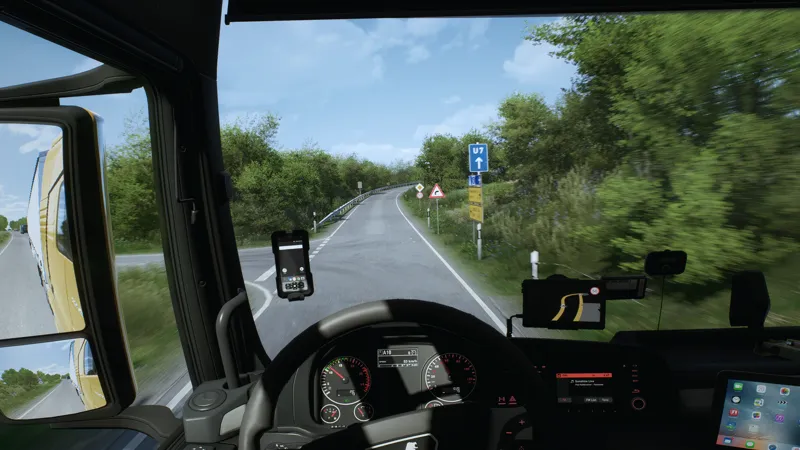
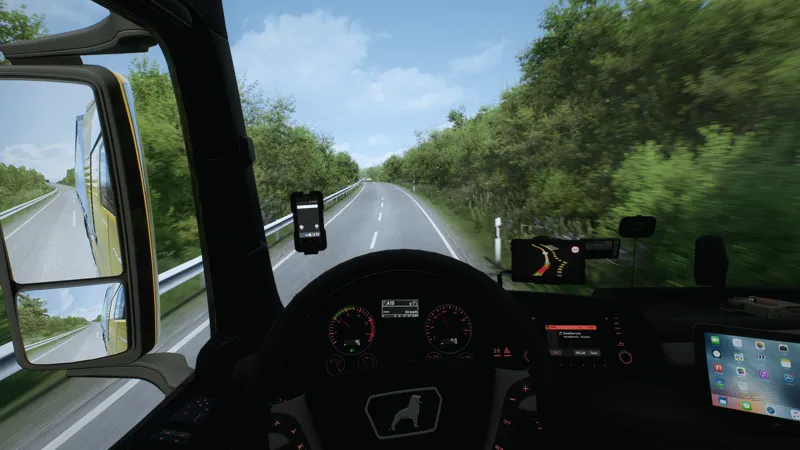
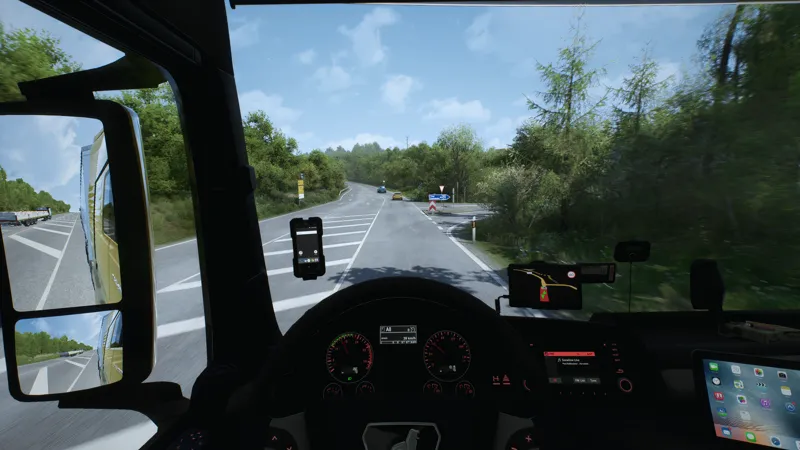
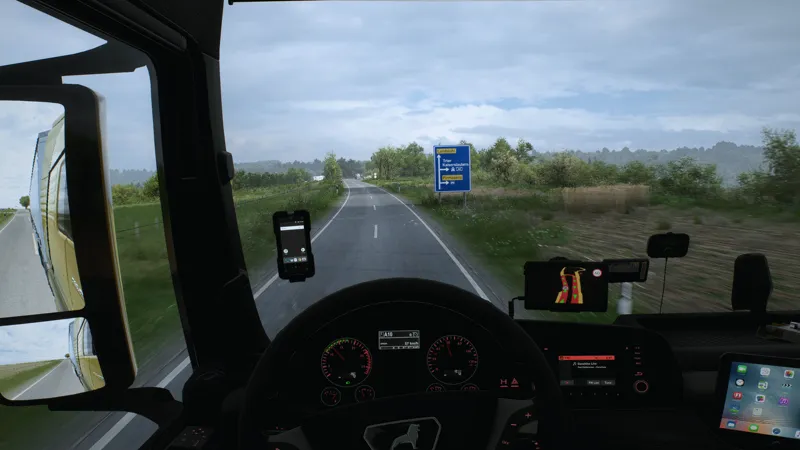
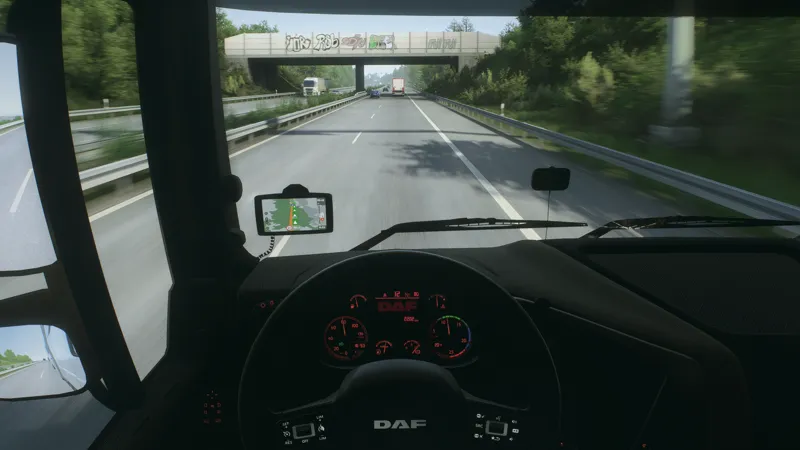
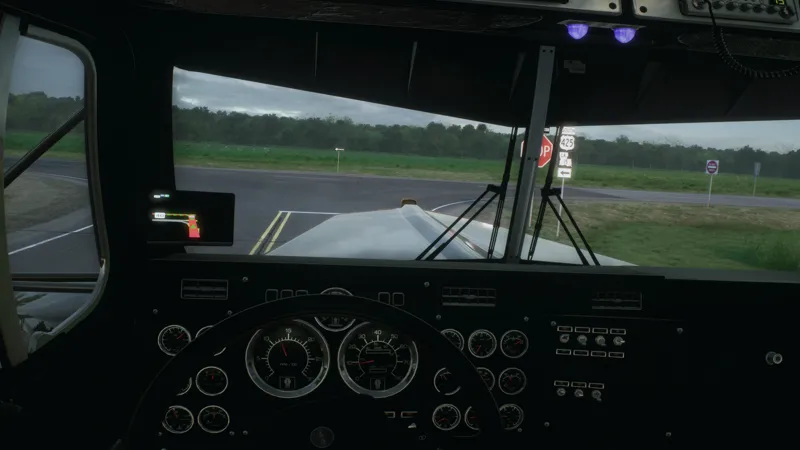
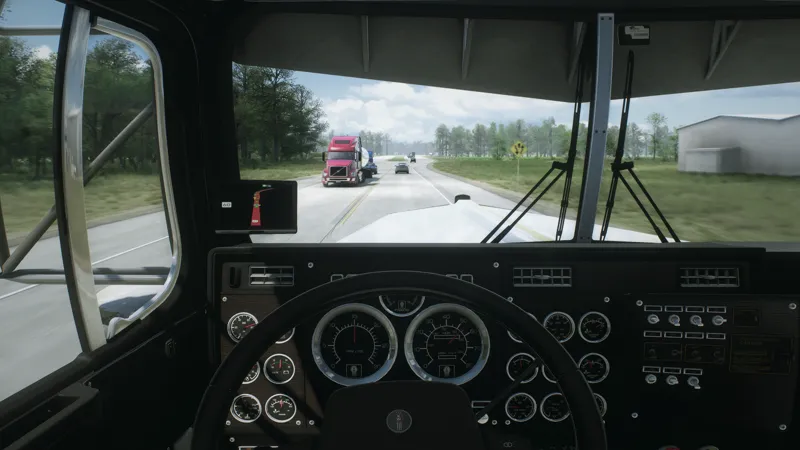
Here you can find the latest released versions of RealCam, RealEye, Project Ultimate Weather, and other Project Ultimate content for Euro Truck Simulator 2 and American Truck Simulator.
Available Releases
Project Ultimate RealCam
Camera-style ReShade presets focused on realistic POV driving, lens effects, colour grading, clarity, and a more camera-like view.
Project Ultimate RealEye
Clarity-focused ReShade presets designed for a cleaner, sharper, and more natural image, with multiple sharpness and colourway options.
Project Ultimate Weather
Weather mod for ETS2 and ATS, focused on improved weather balance, fog, exposure, contrast, rain atmosphere, skybox colourways, and a more natural driving environment.
Notes
This post will be updated whenever a new version, preset, or mod is released.
Please always use the latest files from this post to make sure you have the newest versions and fixes.
Thank you again for the continued support.
Comments (216)
Good evening, could you send an installation tutorial?
Hey, all sent to you 5 days ago
Buenas tienes la guia de intalacion xfabor
Hey, all sent
Hello how can i install the realcam
Hey, have sent you instructions to your DM
can i have the install instructions
Hey, all sent
can i get the install guide?
Hey, all sent
Hey im new here, is there a Read Me or something similar where I can see how to install everything (SnowyMoon, PNG and Project Ultimate) combined with the settings?
Hey, i have sent you instructions to your DM
How can we use this with DLSS5? (When i try to use RealCam in Reshade menu the DLSS 5 is gone)
Hey, is it when youre selecting the presets that dlss5 switches off?
Is there a setting planned for Project Ultimate RealCam for the cars from the Road Trip DLC? :)
Hey, sent you a message back
I need an installation guide....
can i have the install instructions
Hey, all in your dM
hey how about snowymoon settings for 3.5?
Okay im dumb i see it
Hi Man i have just purchased the project ultimate but i have no clue why it does not look rich and real like yours kindly send the best installation tutorial and also tell me your best recommendation combination you use. i see multiple files. i use png + reshade + snowymoon v2 + puw 2.5 + trees 4k
Hey, i have sent you the instructions on your DM. Send some pics of your game to my DM to so i can have a look
What should the FOV be set to?
Hey, at the moment i use anywhere from 62 to 75
Installation guide please!!
Hey, all sent
Hello, could i please have a video of how to install this and how to apply it in game? and what version of reshade should i use if i use snowymoon aswell, thank you in advance
Hey, all sent to your DM
iv just downloaded it but i dont no how to install it please help
Hey, have sent you instructions to your DM
I need an install guide
Hey, all sent
Hello there! Thanks for your work pal, I love the looks of the game <3 Can I have as well the screenshot of what exactly does the mod load order look like when using PNG? Cheers
Hey, you can load PNG according to its mod order and replace PNG Weather files with PUW 2.1
hey can i get the guide how to do it...
Hey, all sent to your DM
Pourriez-vous me fournir la procédure d'installation, s'il vous plaît ?
Hey, all in your DM
Hey, can you send me the install process please
Hey, all sent
buenas, me podrías enviar porfavorla guía de instalación
Hey, all sent
can i use this with both png and jbx 3
Hey, yes you can use the presets with any graphics combo you want
can i have the tutorial plz
您好。请问2.5版本什么时候发布
Hey, it releases today
great job!! i have a installation guide?thank you
Hey, yes all sent
Hola, me podrías enviar una guia de instalacion por md ? thanks.
Hey, all sent
cant wait to try this, could you please send me the install instructions ? And i have a question, what version of snowymoon v2 i need? There is one for Older Versions and one DLSS/DLAA version. i run game version v1.61.2.0.
Hey, all sent to your DM. I would also say to use the latest Snowymoon v2 2.5.9 if im not mistaken.
Hi there! Can I have the tutorial, please?
Hey, all sent
hello can i get tutorial please
Hey, all sent to you
Hi, I'm new and I would have liked to have the installation guide. Thanks in advance
Hey, all sent🙌
Could you clear something up for me? Is the project only compatible with PNG, or does it also work with JBX Graphics 3?
Hey, PUW is compatible with any texture mods and not compatible with any other weather mods as you can only have 1 weather mod enabled at time
Hey, could u please send me the installation guide? thx
Hey, all in your DM since the 18th sep🙌
Could you please forward the tutorial to me?
Hey, all sent
Could you send me the installation guide? Thank you.
Hey, all sent to your DM
could you please send me the installation guide? Thank you
Hey, all in your DM
Can you send me an installation guide for Realcam?
Hey, all sent to your DM
hi could i get install guide please
Hey, all sent
Have a nice day. Could you send a video regarding the installation?
Hey, all sent
Hey, its possible help for install thank you
Hey, all sent to your DM
Hi i would like to know what are your snowymoon setting ?
Hey, i use the same ones as in the snowymoon config provided in the RealCam 3.5
Hi Angus i have been following you and i just want to say how amazing your work is, i am not new to this but i would like to fully take advantage of your graphics and the cameras, do you have a tutorial for installation and set up, also i use the trackIR5 so is not needed for this? Thank you for your work, new subscriber right here.
Hey, i have sent you a tutorial regardong the camera setup to your DM. Aslo you do not need a track ir to have custom camera angles
Hello could you please dm the instalation guide thanks
Hey, all in your DM
Hey Can i get installation tutorial also, i think im missing something! Thanks
Hey, all in your DM since 7th September🙌
Hi, could you also send me install guide?
hi can you tell me how to add project ultimate weather with png
Hey, you ca put it on top of all of your mods and youll be fine
hi,First of all, a huge thank you for your efforts... My question is: what exactly does the mod load order look like when using PNG, and which specific mods and settings do I need to use to make my image look like the photo above? I’d be really grateful if you could clear this up for me, as there are so many files here and I'm losing track... Thanks in advance!
Hey, DM'd you
Hello! Could you please send the installation tutorial?
Hey, sending now
Can you please guide me to install the camera mods,i have PNG,Snowymoon all set, the issue is with real cam, I want the dashboard camera shake, is it like a eye tracker effect?
Hi, could you also send me install guide?
Hey, all sent
can i have the install process please
Hey, all in your DM
Hey, can you send me the install process please
Hey, all sent
can you send me the install process please
Hey, all sent🙌
Hey Angus, just became a member. Could you send me the installation guide aswell?😊
Hey, all sent🙌
Hey I just bought this, is there any installation guide for all of these and also on how they integrate with other stuff like Snowymoon, etc?
Hey, have sent you instructioms for Snowymoon and Reshade. Latest Presets to use are RealCam v3.5 and RealEye. In addition you can use the latest Project Ultimate Weather 2.1
Hey, Can I have an installation guide? Thank you!
Hey, all sent to your DM
Hola, me podrias enviar el tutorial de instalacion?
Hey, all in your DM
can i have a tutorial video thank you
Hey, all sent to your DM
Out of all the RealCam v3 presets, which is the most realistic. And how do i change the weather because mines just all foggy and i don't want it like that. I want it to be like the pictures - thanks.
Hey, at the moment i am using the v3.5 version however from the v3 i would use any of the GoPros or Inverted GoPros Presets. Send some pictures of your game to my DM and we will have a look at it, as im not sure if that foggy look youre referencing should be there
Good afternoon, could you please send me the installation guide? Thank you in advance.
Hey, all in your DM
i need help trying to add real cam to look good as yours but idk the snowymoon settings looka bit off and looks kinda weird
Hey, send me some pics of your game to my DM and we will go from there
Hey, its possible help for install 🙌 thx
Hey, you have got the instructions on your DM. If you still struggle with it, please let me know
How do I install these mods in the game?
Hey, you have got the Reahade + Snowymoon istructions on your DM for Reshade presets and the Project Ultimate Weather goes into the mod folder as a traditional mod
how do I install and use the Real Cam
Can you send me a installation video?
Hey, resending it now
Can you send me tutorial too?
Hey, all in your DM
Boa Noite, poderia me enviar o guia de instalação, por favor? Agradeço desde já.
Hey, all sent to your dm
Hey a few questions! When using Weather 2.1, do I still use all five parts of PNG? I also noticed the Snowmoon lighting v1 config - is that only when using his V1 or is this V1 for this config to be used with V2 Lighting?
Hey, you can use all of the parts from the PNG apart from Weather and Autumn. Also the config is to be used along with it. The latest snowymoon config ca be found in the realcam v3.5
Hi Angus! can you send me the installation process please?
Hey, unable to DM yourself as you do not have a pledge with Project Ultimate
Good afternoon, could you please send me the installation guide? Thank you in advance.
Hey, i have resent the guide on your DM
Nice Work, Angus!
Thank you a lot
Hey brother, can I get install tutorial? Im so confused by all of this
Hey, all in your DM. If you need further help please let me know as well
Hi,may i ask how to install?thank you!
Hey, sent you instructions
Hi, my game still looks the same even after i apply all your mods in ats
Hey, drop me a message on DM with some pics and what you used in it
can you send me the install process please
Hey, all sent
where can i get the install process
can you send me the install process please
Hey, all sent
Is there a preview video of this
Since release, I am so much enjoying this. But as I play, I've noticed few things that were somewhat of a downgrade from the Realeye preset as that was the mosts realistic preset so far. The over exposure during the day especially when directly driving towards sunlight, headlights at night, signs with white light background were completely white, the grass were too bright-greenish and few other minor things. I really wanted to use RealCam V3, so I have tested so many different variants of it and finally came down to one combination and setting. Graphic Mods: Snowymoon + PNG + Project Ultimate WEather 2.1 + RealCam V3 Sharp Preset Instead of using the snowymoon cfg that cam with RealCam V3, I tweaked on my own and took out and/or tweaked most of bloom and exposure related effects with RealCam preset. I also tweaked so many times, couldn't decide whats closer to realism, so I took some photos around my town during the day and night, both in sunny and raining situation and tweaked one setting by one. Now, it's so perfect I can't fathom the beauty of this game. Thank you for your endless and countless hours of work for giving us the base to build our own game!
naviqator modunu nerden indire bilirim?
https://forum.scssoft.com/viewtopic.php?t=294139
superbe boulot bravo bravo
When using a preset it says missing textures
If those are on top of the presets in red then youre alll good
Hi, can I have the install tutorial plz thx!
Hey, all in your DM
Thank you for all the effort you put into ReShade and your weather mod. I tried the latest V3 with all the presets, but honestly, I don’t really like it. The colors look washed out, and what bothers me the most is that there is no true black — instead, it looks like some kind of greenish tint. I notice this especially because I use an OLED monitor. I’m not saying that it doesn’t look more realistic, but in my opinion, V2 combined with Ultimate Weather 2.1 is the best combination in every aspect. This is just my personal opinion and in no way a criticism. Once again, thank you for the regular updates and improvements. Best regards,
Thank you for your feedback, i appreciate it
Hello, Why low resolution SSAO is enabled by default ?
Hey, it shouldnt be. Il check and revise if needed
Always supporting brother tbh I’ve got a few payed reshades but I always come back to yours 🤣 best out their
Thank you a lot brother🙌
An installation guide please for this and RealCam? Thank you!
Hey, the guide is in your DM. You install it the same as any other presets
Hello, I noticed that the Snowymoon parameters for this update include Mode B and Mode C. Is Mode D still the recommended option?
Hey, yes i would use D as the main one
Hello, In Nvidia settings, negative LOD bias, do you use Allow or Clamp ?
Hey, i keep it all at default values
Cant wait to get home and try this! Screenshots looks amazing
🙌🙌🙌
Which specific realcam ini is being used in the youtube videos and here in the pictures?
Hey, the videos and pics were done with GoPro Sharp Cold, if that is too specific for you, you can try Neutral or Warm
When I use the default version of v3 with the neutral colour tone, it has a slightly greenish tint to it, whereas the GoPro and inverted versions don’t have this tint, is that intentional and is there a way I can use the default non lens version without the green tint? Thanks
Hey, all of the Neutral versions use the same colorway, i will check again however the Gopro should be the same as default colorway wise
Como lo instalo
hmm, Patreon DM doesn't allow me to attach any files, how do I send you my screenshots?
Hey, i sent you a pic sharing portal to your DM
I have been only using your Reshade presets even with a little lack of ultra resolution support, but this is in a league of its own. I cannot put in words how much more immersive and realistic the same game has become. Your minute details in color, contrast, exposure, the angle of fisheye effect, etc is all in perfection. Without exaggeration, my ETS2 feels as if I'm playing a brand new game. Because the fisheye effect is more drastic from top to bottom compared to left to right, even in my highest resolution of 5120*1440, your intended effect is spot on. Love your work, it's amazing. Thank you! I will DM you some screenshots of my display! You have no idea how much of cabin I can see without turning my head and how realistic this gets on ultra wide 4K monitor!
How do I install this?
Hey, sent you installation guide on your DM
💙💙💙💙💙
🙌🙌🙌
awesome, thank yooou
Thank you a lot🫡
Hello, in the ETS2 package, the INI files located in the Inverted GoPro_Sharp and Inverted GoPro_Smooth folders are identical.
Hey, yes. I will be fixing this shortly. Thank you for letting me know
How do I setup the shaders with Reshade in combination with my HDR monitor without getting over lighting?
Hey, it depends what kind of an HDR overdrive you use but ultimately ets2 and ats should not be used with hdr and snowymoon as it will result in overexposure. If you would want to run ets2 with snowymoon and presets that have somewhat of fake hdrs in then go over to the tonememaps in snowymoon and adjust the exposure down
In brighter day conditions like late morning through early evening the green filter is more pronounced, also the trees get very green almost cartoonish during those brighter conditions. In the darker settings like sunrise and sunset this preset really shines
Hey, thank for letting me know, if you have some direct examples please drop me some pics on the DM, also youre able to use Neutral and Warm presets as an option
Looks amazing as always, I needed some time to get used to the greenish look of the filter, but it looks amazing, thank you so much!
Hey, 100%. It does take a bit of time but its worth in my opinion. Also you also have natural and warm presets to choose from
Good job well done
Thank you a lot🙌
Hey, pls can i have ur cam setting fov etc looks sick bro!
Hey, Fov of 76 and then work your camera around with the Gopro preset
Yessirrr
🙌🙌🙌
setting this up now! cant wait....Question, what FOV are you using
Hey, thank you. I use an fov of 70-76 with this however higher Fovs sould look alright. However with the curve of the GoPro 70-76 goes well
Let's go!!!!
🙌🙌🙌
Let's gooooooo... I hope i can setup or put the correct files in the right place lol....
Yes Niceeee
100%🙌🙌🙌
🔥🔥
🙌🙌🙌
Yessssssss, Thank You Angus!!!!!
🙌🙌🙌
On my way back to Atl from texas excited to get home to the setup for this🔥🔥
Sounds amazing man, have fun with it🙌
This is why you’re the goat!!! Gonna download this right away!
Thank you mate, have fun with it
🫡💚💚💚💚💚💚💚💚💚💚💚
🙌🙌🙌