
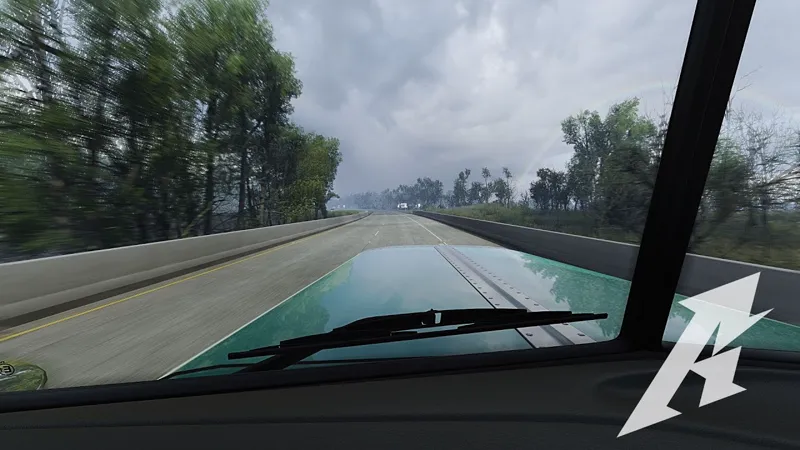
✨ Project Ultimate ReShade v3 — Third Preview (First ATS Showcase) 🚛🇺🇸
I’m happy to share the third preview of Project Ultimate ReShade v3, and this one is a special milestone — it’s the first time v3 is being showcased in American Truck Simulator.
This preview focuses on showing how v3 performs in real ATS gameplay, using the new Louisiana DLC as a testing ground. The goal with v3 has always been to deliver a cleaner, more stable, and easier-to-use preset compared to earlier versions, while still maintaining strong visual depth and natural lighting.
With this third preview, the previous preview phase is now complete.
📅 Release Window
The current plan is to release Project Ultimate ReShade v3 around next weekend, or early to mid-week following next weekend, depending on final testing and adjustments.
Thank you all for the continued support and feedback — it genuinely helps shape the final release. 💙🚛
Comments (23)
What is the name of this reshade? I bought it. And what settings do I need to configure via Snowmoon?
Hey, this exact one is V3 with Lighting C settings
Ahoj chtěl jsem se zeptat jestli bych to rozjel na PC AMD a na grafice AMD Radeon 6750 XT, 12 GB ,a jestli dostanu pak návod jak to zprovoznit .samozřejmě na členství.
i know you already mentioned that it's made for 4K but is it possible to use in 1080p with a rtx 3080 ?
Hey, rtx 3080 will not have any issues with 1080p with it but to get more clarity you might want to use DLAA with higher scaling not DLSS as with 1080p DLSS might blur it out to much
How bad does this kill fps and does it work well with snowy moon?
Hey, Snowymoon's plugin would have the biggest hit due to the rendering tweaks and the reshade will slighlty affect it but it is not a massive GPU hit. On a 5080 it takes aroun 3% GPU load and on a 3080 it should take around 4-6%
hi, i have rtx 3060 12gb and i play 1080p, can i run this mod?
Hey, in 1080 yes but need to understand that it will not look the same as 4k and aslo DLSS will have to much of a blur effect on 1080p, so might need to go for TAA instead of DLSS. In a short - could run it but with adjustments
I have actually worked out a way to turn hdr off in game without disabling it in windows! Type in: -color_mode sdr In steam launch preferences and it works! I would include this in your install instructions, it allows you to use dlss and dlaa in game on 1.57 with no issues!
Hey, got it. Never had an issut with it would be a sensible and useful tpuch in the instructions if someone has the same kind of issue. Thank you for sharing this
When I launch reshade and select your preset, momentarily the screen looks perfect but then it all fades, it’s as if something is putting a greyish filter across the screen?
Still having issues with hdr with this mod mate, I know dlss/dlaa don’t work with 1.57, but I cannot find a way to make the screen brighter, it’s just very odd, the settings for the hdr in game seem to have no impact on the image
Hey, snowymoon v2 is not compatible with HDR and also DLSS should work fine. Would you be able to send me some pics on DM? And also are you using V1 or V2? As i am mostly using the V1 presets
I’m ready for v3 to be released yesterday lol
😄😎🙌
Hi, is it possible to get good results with the Weather_3.5.1 mod by Dirceu Junior? If so, it would be great to see a video on your YouTube channel, as I believe not everyone has access to PNG and JBX . Thanks
Hey, you could get a good result however, the 3.5 skyboxes and lighting defs are not as streamlined across all skyboxes as in PNG or JBX, you could 100% use the 3.5 but with some contrast adjustemtns as some of the 3.5 skyboxes and lightings are overcontrasted - https://youtu.be/M6ECuazpJQ4?si=5QEDPZRmZwjNKV4C - this is a video i made some time ago with the 3.4
Hello, i've got a question. I am looking to get Project Ultimate this Christmas, but i am not sure about this 1 point. To access the file, Do i need to just upgrade to Paid Member ? And if i want to access future files do i need a subscription every month or is there like a 3 month (or 1 year) subscription. Thanks
Hey Jason, Thank you for showing intrest in it. just to clear it up. When you sub to the project you get access to whatever is released at the point. You can choose to stay for longer with the project or cancel and only sub when an bigger update drops🙌
👏
You use Snowymoon in this video right? Does the V3 preset adjust reflections somehow? Because when I use Snowymoon I always have the front of the truck completely bright and without colors and here it looks really good
Hey, the reflection scale is set to 2 and also each truck will have different materials on the textures. This will also depend on the time of the day. Have a look at it in different timing as well.🙌