




Garry's Skydome App V0.10 Release
This is the first release of by far my most ambitious project yet. It's taken me around five months to build what I'm calling the GR ecosystem, which so far consists of five apps covering different parts of AC, from skydomes and PP-filters to Neck FX and car customisation, two Spice effects (one of which fixes major issues like cockpit lighting), and GarryReal V2.0. All of it will be releasing within the next 30 days.
Garry's Skydome App V0.10 can be downloaded here - https://www.patreon.com/posts/garrys-skydome-150932694?utm_medium=clipboard_copy&utm_source=copyLink&utm_campaign=postshare_creator&utm_content=join_link
Video guide can be found here: https://youtu.be/JBPVnm5W7rs
If you have any feedback or features you want adding, please let me know here - https://forms.gle/T77SUPvWb4fQFyeh7
What is it?
Garry's Skydome App is a in-game app that replaces the method in which your skydome textures are selected and displayed. Instead of being locked to whatever Pure gives you, this app lets you assign specific sky textures to specific times of day and weather types and gives you full control over transitions speed, colour grading, fog, wind animation, brightness, contrast, and more. The app also works in online, single player and replays.
What has Changed vs Default Pure Skydome Handling?
The biggest difference is control. Pure's skydome system gives you very little say in what textures appear and when, which meant you couldn't mix creators skydome sets together. With this app, you can choose exactly which sky texture is displayed at midday, afternoon, sunset, twilight, and night and you can do it independently for every single weather type. That's 30 weather types, each with five time-of-day sections, each supporting up to five texture slots with adjustable sun angle transitions.
Core Features:
Setup Wizard & Interactive Tutorial
First-time users are greeted with a setup wizard that walks through initial configuration. There's also a full interactive tutorial with 22 guided steps covering every part of the app from presets, tabs, weather selection, texture picking, colour grading, fog, wind, and performance settings. Each step highlights the relevant UI element with a pulsating glow effect so you always know what you're looking at.
Preset System
You can save your complete configuration as a preset and load it back instantly. The app supports both user-created presets and built-in presets that come bundled with texture packs. Your last loaded preset is remembered automatically between sessions.
Texture Tab
Weather-Based Texture Configuration
Every one of AC's 30 weather types gets its own independent skydome configuration. Clear skies, overcast, rain, thunderstorms, fog, snow can now all have completely unique sky textures assigned across the full day/night cycle. The app automatically detects the in-game weather and applies the correct configuration in real-time.
Status Card
A live status card at the top of the Textures tab shows your current sun angle, simulation time, active weather, which time-of-day period is active, and the name of the currently displayed texture at a glance.
Undo/Redo System
Every change you make to weather configurations is tracked with a full undo/redo stack (up to 20 steps). Made a mistake swapping a texture? Just undo it.
Auto-Sync & Manual Modes
Sync mode automatically follows the in-game weather so the app always shows what's currently active. Manual mode lets you lock the view to a specific weather type for editing while the game runs different weather.
Copy Weather Configuration
If you've set up a weather type you're happy with, you can copy its entire configuration to any other weather type. This can save time when building out all 30 weather types since many share similar characteristics.
Weather Quick-Select Strip
A visual strip of weather icons lets you quickly jump between weather types for editing. Purple highlights show your current selection and green highlights show what's actually live in-game.
Time of Day Sections
Each weather config is split into five time-of-day periods, those being Midday (47°–90°), Afternoon (15°–46°), Sunset (5°–14°), Twilight (−9°–4°), and Night (−90°−10°). Within each section, you can add up to five texture slots and control exactly at which sun angle each texture becomes active. This gives you precise control over transitions throughout the day.
Quick Swap and Slot Duplication
The last three textures you've used are tracked per session for quick swapping and you can duplicate a entire texture section if needed.
Full Texture Picker with Previews
Selecting textures is done through a built-in texture picker with live thumbnail previews. You can browse all loaded texture packs, filter by pack name, time of day, or weather type, search by name, adjust thumbnail sizes between four options, favourite textures for quick access, and view recently used textures. Textures are grouped by pack with colour coding so it's easy to tell where each texture comes from.
Texture Pack System
The app loads textures from texture definition files, so third-party creators can build and distribute their own texture packs. Each pack supports its own encryption keys for both Gamma and LCS, custom texture paths, display labels, and built-in presets. The system validates all textures on load and reports any missing files.
Full Pure Gamma and LCS Support
The app fully supports both Pure Gamma and LCS. It detects which mode you're running automatically through the Pure shader link and applies the correct encryption keys in real-time.
Settings Tab
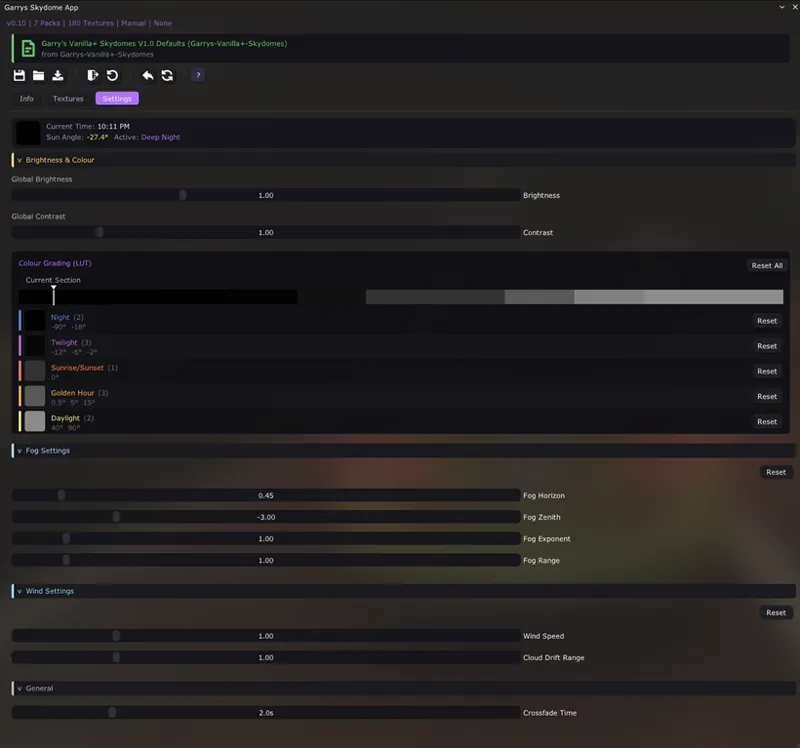
LUT Colour Grading
The Settings tab includes a full colour grading system based on a custom LUT that maps sun angle to HSV colour values. You get control over five categories, those being Night, Twilight, Sunrise/Sunset, Golden Hour, and Daylight. Each group has adjustable Hue, Saturation, and Value (which is brightness) with a live gradient bar showing the current colour profile and a marker indicating your current sun position. There's also a dedicated colour picker side window for adjustments.
Fog Controls
Four fog parameters are available directly in the app - Horizon density, Zenith density, Exponent, and Range Multiplier. These blend with Pure's fog system so you're adding on top of what's already there rather than fighting it.
Wind & Cloud Animation
Wind Speed and Cloud Drift Range controls let you adjust how clouds move across the sky. These are multipliers on top of the in-game wind conditions, so the animation responds naturally to weather changes while still giving you artistic control.
Brightness & Contrast
Global brightness and contrast sliders affect all skydome textures. Per-texture brightness values are also supported through the texture pack definitions, so pack creators can fine-tune individual textures.
Smooth Crossfade Transitions
When textures change between time periods, the app crossfades between them using a dual-cover system. The crossfade duration is adjustable in the settings so you can have instant snaps or slow blends.
Comments (7)
Hi sky dome not working for me
boa noite amigo eu instalei o ppfilter fica preto e branco teria alguma solução?
Please show a screenshot of the lua debug ingame app in my discord server
I've discovered your page not so long ago and from engineering point of view you have a very complex and diverse implementation. I'm wondering when you develop your app do you take into consideration triples? I'm not an expert and assumed that it should be irrelevant for pp-filter if its either of single or triple setup, but more I try different filters I end up to conclusion that for some reason I get different picture with single and triple setups. So looking forward to see your product and test it out (hopefully it's gonna be tested on triples during development). Your work looks very professional. Looking forward.
Actually yeah ppfilters and things like spice effects usually do need some adaptions for triples so i do try and take those into account during development but im not sure about apps i dont think there is any difference.
Insane work , bravo.
Bravo my friend. What a great idea