




Garrydashcamlow V1.1
THE PURE VERSION NEEDS TO BE 0.254 ANY VERSION BELOW WILL CAUSE YOUR GAME TO BE TOO BLURRY
If anyone has any problems or questions, please join the help discord at
https://discord.com/invite/2KG9uyMA3A
IF YOU USE C13 AEGIS 1.65 AND FIND THE IMAGE TO BE TOO BRIGHT PLEASE OPEN RESHADE AND CHANGE THE BRIGHTNESS IN THE BLOOMINGHDR. FX OPTION.
IF YOU WANT TO DISABLE BLUR, PLEASE DISABLE IN RESHADE: qUINT_dof (which is a the same thing as ADOF), CINEMATIC DOF AND LIGHT DOF FAR.
NEW feature:
Added option to change resolution and framerate ingame (guide on how to do that below): https://youtu.be/jvZzZJ3hF2M?si=gGodMrhAfy9B3v1k
Install guide for those who downloaded the last version:
If you have downloaded the last edition of garrydashcamlow and DID NOT download all effects please download the config and the new effects by running the reshade install again and selecting my new reshade config.
If you have downloaded the last edition of garrydashcamlow and DID download all effects please only drag and drop the reshade config in the assetto root folder.
This guide is written in ordered steps and each step must be complete in the correct order
Csp settings:
You can either use:
My dashcam csp that has the correct near clip plane but causes a pure error that can be ignored as it is mostly safe (may cause some bugs but i havnt found any personally) (does not include new dashcam neckfx): https://acstuff.ru/s/YEC2ZP
OR
My normal csp settings which does not get you the pure error but will cause you to clip through the windshield when setting up the cam (does not include the dashcam neck fx) : https://acstuff.ru/s/1ShWeW
Dashcam neck fx:
For the neck fx you can either use:
My dashcam neckfx (which has less movement on the x-axis and overall is much better than before) which you can find here- https://acstuff.ru/s/WmrVu8
OR
No neck fx which is done by disabling the neck fx extension (not really recommended)
Pp filter and config:
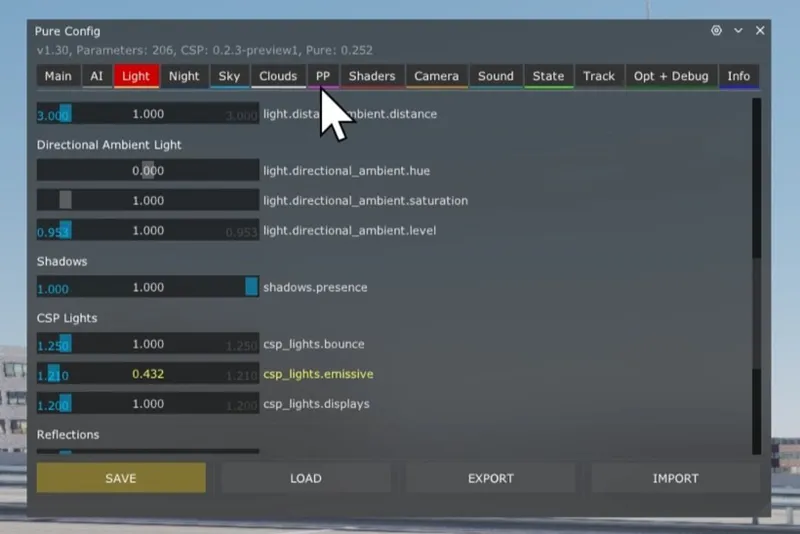
CSP LIGHT BOUNCED SHOULD BE SET AT 1.0 AS SHOWN IN THE SCREENSHOT
1.0 gives the cam a clearer image at night but if you want a worse looking cam use values from 0.410 to 0.600
The PP filter is c13 aegis (version 1.78 is recommended but other versions will work fine). You can use the paid version (1.78 or 1.74) or the free version (1.65).
For the free version (1.65) the PP filter config needed is still the same as in the previous post so please use that.
If you have the paid version of c13 aegis (1.78 or 1.74) please install the config and script settings from my newest post instead of the config for the free version.
Reshade config install:
If you have any version of c13 aegis with the camera style exposure and photo style brightness tickboxes then please use garrydashcamlowV1.1 (video guide for the tickboxes can be found in the 'setting up dashcam' step)
DO NOT drag and drop the reshade config (garrydashcamlowV1.1 .ini) in content manager. Instead drag and drop it into the assetto root folder.
Reshade install:
RESHADE VERSION 5.9.2 IS THE ONLY VERSION THAT WILL WORK WITH ASSETTO CORSA
DO NOT UPDATE THE RESHADE IF PROMPTED
Reshade 5.9.2 can be found here:
https://reshade.me/downloads/ReShade_Setup_5.9.2_Addon.exe
Run the exe and follow the guide on how to install it here: https://youtu.be/iRHBV2aO030?si=ybPrOEb2tbarMNLX
You can either:
Install all effects like in the video (this will stop you from having to install more effects when i update the reshade config)
OR
Install only the need effects by pressing the browse button and selecting the reshade config you downloaded (garrydashcamlowV1.1)
Setting up the dashcam ingame:
IF YOU USE C13 AEGIS 1.65 AND FIND THE IMAGE TO BE TOO BRIGHT PLEASE OPEN RESHADE AND CHANGE THE BRIGHTNESS IN THE BLOOMINGHDR. FX OPTION.
IF YOU WANT TO DISABLE BLUR, PLEASE DISABLE IN RESHADE: ADOF, CINEMATIC DOF AND LIGHT DOF FAR.
Video guide for this step can be found here (still the same method as 1.0): https://youtu.be/3VSwPxSfyh8?si=WpEqA_ddSIInmnkq
Pure config
Please make sure in the pure config pp tab dashcam mode and the c13 flat curve are both selected (as in the screenshot)
If you use 1.78 or any version of c13 aegis that includes camera style exposure and photo style brightness then please make sure these two options are ticked. Video guide for this is here: https://youtu.be/ggkTOu92ekg?si=P2uPAHdKliLwcoHD
Camera setup
Use the ingame onboard camera app to move the f1 1st person cam around.
Selecting reshade
Press the home button on your keyboard, skip the tutorial and press the arrows in the top left to select my reshade.
Comments (27)
i cant find the pp filter config
this is incredible wotk! thank you so much for let this free
some things failed to load in reshade: [CubeLUT1D.fx] failed to compile [CubeLUT3D.fx] failed to compile [cBlockMatching.fx] failed to compile [cMotionblur.fx] failed to compile [cOpticalFlow.fx] failed to compile [kDatamosh.fx] failed to compile [Perfect Perspective.fx] failed to compile i installed all effects and the version you put in this post
You dont need those effects its fine
for me its super blurry i just reinstalled pure, newest version
Turn the blur effects off as stated in the post
Hi dude, how did you make the interior reflections on the front window? It's just that you didn't tell us how to do it.
Its comes with my csp settings and not all cars have them
my game looks good with your reshade it just i have that black box around my game and it kinds of takes like 25% of my whole screen in game and its annoying
it crops out my screen
tried reinstalling c13 and the dashcam mode and everything else isnt popping up under the pp section in pure
Did you select c13 aegis as the ppfilter?
for everyone having a blurry screen issue: update your pure to 0.254
i have the dashcamlow filter in my reshade coming up put when i use the arrows to select it nothing changes at all
Please install all reshade effects by running the reshade install again
hey i did the whole tutorial but when i load in the reshade everything gets blurry and i cant find the settings that do it.
Turn off qUINT_dof (its also called adof), light dof and cinematic dof
it say the current pp filter has no script
did you find a fix?
Where can I make it vibrate less when accelerating and braking?
In Neck fx turn the z axis option down to 1%
Thing that is different is the reshade or?
Yes the reshade config is different
Hi can you pls make a full tutorial because many people are new to this
As in a video?
I can't get reshade to work on my end. I've tried your version as well as the latest one which is said to work with the ladies CSP. Most filters get me this grey overlay which fills in the bright parts of the image when turned on. I am not sure where is the problem.
Dm me on insta