




DevLog: Soaking with Productivity + Hamara Wallpaper
Quick reminder: You can follow development more closely on the Trello board.
TLDR;
The "portability project" is successful 🚀
Sneak peek on environments
Last Scene Progress (scroll down for render numbers)
✅ Last Week's Progress
What I accomplished since the last update:
Portability Project
Please take a look at the Technical Corner down below for details
Last Scene Progress
Don't get used to me announcing the "render count" - I don't typically care much for it (sorrynotsorry).
If my notes are correct, I started working on the last scene (scene 11) on Jan 2nd, 2026. As of writing this right now, I've got 130 images total ready (62 are completely rendered out in 4k). I'm strapped in, I'm laser focused, and I'm gonna get this scene done with no dillydallying! Okay, maybe a hint of dillydallying.
As I said in last week's DevLog, I super duper ballpark guesstimate at around a total of 300 to 500 images total will be needed; and currently I'm at 130, which I've gotten done in 3 weeks. So maybe you can also super duper ballpark guesstimate at around when this latest update will be released?
⚙️ Technical Corner
Portability Project - It's not that interesting, I promise.
This has been a stabbing thorn in my side. Whilst trying to balance life, as one does, I'd run out of development time at the end of the day - or put another way, I couldn't dev AND also watch TV; my development machine isn't portable. I've got a MacBook Pro (2023 model, M2, 16GB RAM) - which, by the way is not suitable for development work: I've done some extensive testing, made the entire Blender library available over the network, and opened one of the scenes on the MacBook. It took about 10 times longer just to open the scene, it also took about 20 times longer just to see a viewport preview. Needless to say: the current EoTC scenes are not small enough to be used on my current MacBook Pro. One option that I lightly entertained was purchasing an entirely new MacBook Pro - one that would handle the current scenes; it'd only run a couple of thousand 🥵 Instead of overspending for something, I thought of a better way of doing things; remotely controlling my development machine and using the MacBook Pro as a client.
"Obviously that's what you should do", you might say, but it's absolutely not that simple, in my opinion.
FIRST UP: Ubuntu Desktop (built-in Desktop Sharing) + MacBook Pro (Microsoft Windows App using RDP)
To me, this was the obvious choice; use the existing Ubuntu Desktop's built-in Desktop Sharing settings, which I believe uses (ironically) Microsoft's Remote Desktop Protocol or this current Desktop could be using VNC.
However, immediately, I noticed that the colors were off - it's like the gamma was shifted one step lower. And no matter how hard I looked, I was not able to find any way to fix or change this whatsoever.
A minor inconvenience also was the fact that I absolutely could not change to view the second monitor.SECOND: NoMachine - okay, I have to confess, 20 minutes after I posted the last DevLog, I started to have issues with NoMachine. I know that I stated that it was "neato" or great, but it's been downgraded in my book as, "mid".
While this fixed the color issue that I had with the above set-up, I noticed that every once in a while, NoMachine would for unknown reasons disconnect and reconnect the session. This would cause the server to believe that the client was constantly pushing down the SHIFT key or the CTRL key. Sometimes I could get out of this invalid state, but others, I had to completely just reboot the PC. And while this allowed for viewing the second monitor on my remotely connected MacBook Pro, it had a clunky user-interface leaving a little bit to be desired.
After dealing with these "invalid states" where I simply couldn't continue developing and the development PC was just in this awkward state... I just simply couldn't do it anymore.THIRD: xRDP - very long story short; I got it to work after about 45 mins of fiddling, however, it would LOG my entire user out and start a brand-new session. I ain't doing that.
FOURTH (Please, please, please): This should be it. I've used this set-up before and it's customizable, powerful, and free. It's Sunshine and Moonlight.
It's open source software (both of them) which were generally made for remote gaming, but highly capable of just general remote productivity.
This solution fixed my color issue, I can easily switch between both monitors, and it allows my productivity to continue even from a distance!
I'll give you a little insight as to what sparked all of this: If you'll remember, I was sick a few weeks back, you'll also remember that my productivity was through the roof! I realized just how productive I could be (and yes before you say, "don't overdo it!" I hear you, trust me, it's the last thing that I want to do is get burnt out and I'm very good at preventing that when I approach that point). Anyway, back to my point. While I won't be as productive as I was when I was sick, I can say that I will be consistently more productive thanks to being able to remotely control my workstation from my MacBook. 👍️
👀 Sneak Peek
Hamara sneak peek
I really want to thank Termz for his amazing work on Anya, Onessa, Raven, Ambrose, and now: Hamara.
I've said it before, but the "art-direction" in the first release is not exactly the desired look that I was going for; but thanks to Termz, future updates (including this upcoming one) are going to look much more like my vision.
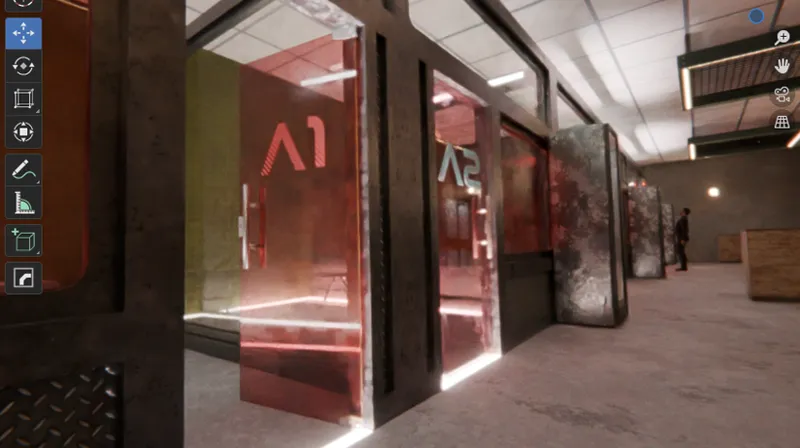
PAC Door Status Lights
If anyone EVER questions the status lights on my door locks, just remember that I've got this documented 😹:
() = Blinking
⚫ ⚫ ⚫ : Unlocked
🔴 ⚫ ⚫ : Locked
(🔴)(🟡) ⚫ : Card Read Error
🔴 (🟡) ⚫ : Card inserted - PENDING
(🔴) ⚫ ⚫ : Card inserted - DENIED
(🔴)(🟡)(🟢): System Error or Door Unlock Error
🔴 🟡 (🟢): Card accepted - UNLOCKING
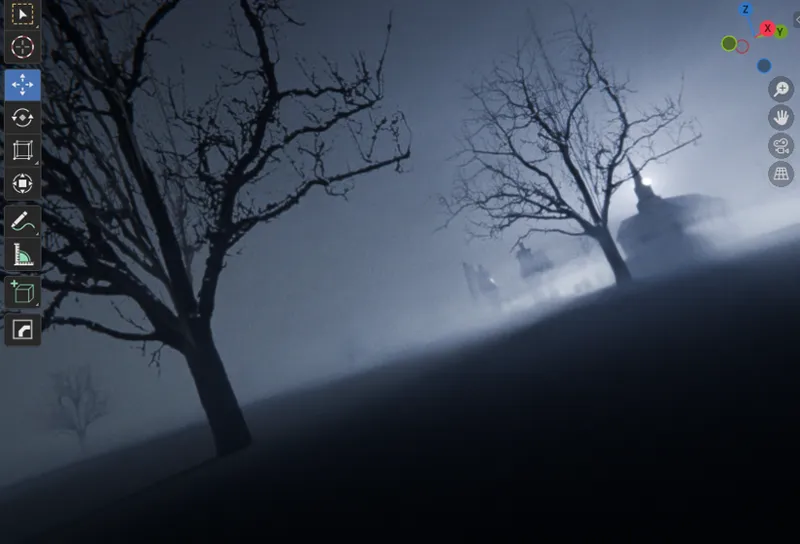
I promised some environment sneak peeks! I'm going to include the environments that I've already generated images with, but I'm going to have to be selective with what I include so as to not include spoilers
Snowstorm
Graveyard
💎 Hidden Gems
Quality games from fellow developers that deserve more attention:
Projekt: Passion - This developer is just starting out, so please go give him and his amazing game some love from me!
💬 Community Corner
I appreciate anyone and everyone reading this. I promise that this update is coming sooner rather than later; can't give a date yet, but shit, I'm excited.
See you in the next one! ™️
Don't forget to check out the Trello board for detailed progress updates! ❤️

Comments (2)
Thanks for the Environments! I shall now cease to bother you about them :) For now.
Thanks for the update and I agree with the not posting render counts etc and I almost never pay attention to that stuff when devs post them. Just gives people something else to pick at and complain about IMHO. I would have just put the TV next to the PC and been done with it!! (Joking!). Projekt: Passion is actually pretty good for anyone who is wondering, just FYI! Have a good week Nuii <3