

Chilling in the car WIP & behind the scenes
Here is a little sneak peek for an upcoming piece I am currently doing and a little trick I thought might be interesting to show. :>
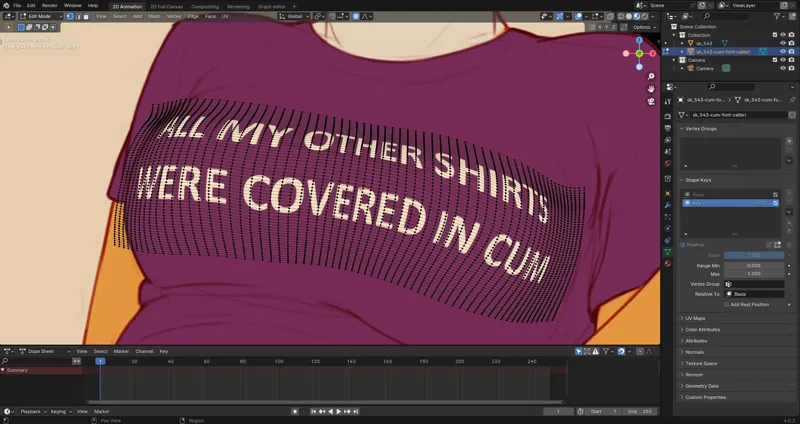
I wanted Lucy to wear a shirt with a silly slogan on it and that slogan to wrap a bit around her breasts. But the software I am using, Krita, only has a very limited liquify tool which is not really adequate for that task. So instead of using that I decided to just do it in Blender.
I imported the slogan and Lucy as separate PNGs with Blenders "Images as Planes" functionality. What that does is basically creating a 3D plane that faces the camera and using the image as a texture on that.
Next I positioned to slogan over Lucy's chest and subdivided the plane a couple of times. Then I used "Proportional Editing" (blue circle, upper middle of the Blender viewport) and pulled the vertices of the plane around till the plane somewhat looked like it wraps around Lucy's breasts. And because the slogan is sort of glued to that plane it deforms with it.
After that I just exported the slogan with a transparent background and imported it into Krita again.
That was me art nerding for now! :D
Comments (11)
OMG that’s Blender
It is! :V
THAT IS SO FREAKING COOL!!!
Blender is very cool! :D (when it works :S )
I might be partly at fault for that, but she kept putting on different shirts
Naughty foxy :) Cool to see how you make the text realistic!
Thank you! :>
That is absolutely fascinating, I had no idea blender could be used so seamlessly as a tool to help with 2d art in programs like Krita! Blender is still like a magical, arcane force to me that I can’t wrap my head around, but seeing it used in such a cool way really makes me want to try and learn again! Did it give you any issues with pixelation or blurriness when you deformed the slogan in blender? In Procreate I know liquifying leaves a bit to be desired. (Also this looks like a fantastic piece so far! ✨)
Blender is super useful when it comes to these niche needs because it is so versatile. :D I exported the slogan PNG in a very high resolution so I had no issues with pixelation or blurriness in Blender. I also think many liquify tools reduce the quality of what is being liquified because they work destructively. So if you, for example, move an area to the left and then to the right again, visual fidelity gets lost because you move and blend pixels directly. In Blender on the other hand, you do not move the pixels directly but the 3D object they are projected on. That way the pixels only get stretched and squashed a bit.
Nice lil' trick! Also... how long till that shirt is also covered in cum? XD
That shirt will not make it to the end of the day without getting covered in cum! :S