
Adult Visual Novel... what can you use to make something like that?
Hey there, everyone.
You know what? I’m kinda tired of all the writing (coding) and scene making... happens every now and then. So to clear my head for a moment and then get back to work, guess what I thought of doing... Yep, I’m gonna write 🤣
This might just be the longest post I’ve ever made. I say "might" because every time I post something on Patreon, it’s something that just came to me in the moment, no script written beforehand. I just think of something and write it down. I know what I’m gonna talk about right now, that’s all I know, and I have a feeling it’s gonna be reaaally long. Wanna know how an AVN is made? Wanna know what tools I use? If so, keep reading...
I’ll try to make it as non-technical as I can so no one gets bored with something that’s not only long but also complicated.
Ok, let’s start with the one thing where we just can’t skip the “technical” part... Physically, what do I have to work with to make “30 Days”?
My main computer, the one I use to create scenes and render, is mid-range with a strong lean toward the lower end (for this kind of work)...
Processor: AMD Ryzen 3 3200G (quite modest, but the CPU isn’t really crucial for this kind of work)
RAM: 2 sticks of 16 GB each (32 GB total)
GPU: Nvidia RTX 3060 with 12 GB VRAM (this is the key for rendering)
Hard Drive: regular 1 TB mechanical drive
Backups: 1 TB external mechanical hard drive (yeah, you gotta have backups or you’ll be screwed if something goes wrong)
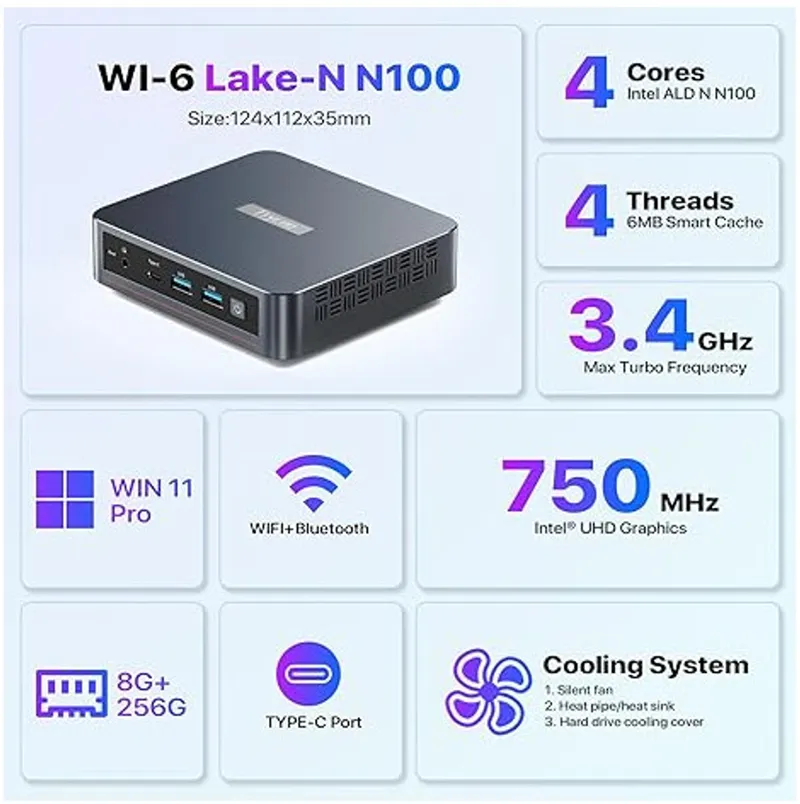
Very recently I got a second computer (actually a Mini PC), mainly to dedicate it to programming while the long process of rendering animations runs on the main PC. To avoid boring you with specs, it’s this one:
Just to add what’s missing: 16 GB RAM and a 500 GB SSD.
Both computers are connected to a single monitor via HDMI (main PC) and DVI-D (Mini PC). With just a button on the monitor, I can switch between the two signals if I want to use both at the same time.
The software and everything related.
I use DAZ 3D exclusively to create images and animations. While DAZ has its advantages, it also has its drawbacks, so you need some external tools that are very important (always staying within DAZ). All the tools I’m going to mention now are used in DAZ but aren’t included by default.
ManFriday's Render Queue: One of the most important things. Without this, you can’t survive unless you’re a masochist. Render Queue lets you create rendering queues (I know, shocking) and then run those queues whenever you want. Otherwise, you’d have to render one image after another manually, always sitting in front of the PC… Nobody wants that.
Scene Optimizer: Almost as important as the previous one, and my loyal friend since the beginning of this adventure. With this, you can lower the texture quality of whatever you have in your scenes. Thanks to Scene Optimizer, I was able to create scenes with up to 12 characters on screen at the same time using a GTX 1050 with 2 GB (also breaking the scenes into multiple layers). It has other very useful functions, but explaining everything would make this much longer than necessary.
Universal Hands and Feet Control: It’s wild that DAZ doesn’t include this by default, but it doesn’t. DAZ figures have hidden bones that occasionally need adjusting to get the correct pose, and this tool makes it simpler. Also, sometimes a morph can change those bones, and this lets you reset them to their original state quickly.
mcj Unanimate Whole Scene: This is a bit tricky to explain. It’s a script that with just a double-click saves you from sweating for several minutes. When making animations, I might later need to create a scene starting from the last frame of the animation, or I might want to make a new animation starting from the last frame, or from any other point… What this script does is completely clear the animation timeline. The timeline is super complex because if I move a character’s finger, it shows up somewhere on that timeline. With the script, I just select a frame on the timeline, double-click, and voila, everything else is deleted and the only thing left is the selected frame.
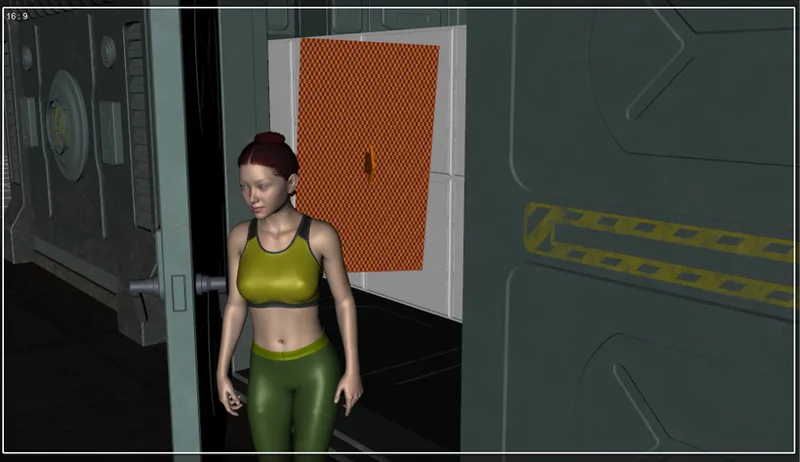
OH Ghost Light: A ghost light is simply an object that emits light, and it also doesn’t show up on camera... My favorite source for lighting interior scenes when I’m not using an HDRI (High Dynamic Range Image), and I also use them sometimes alongside an HDRI. Easy and fast to use. You can do the same in the recent versions of DAZ, but not as quickly.
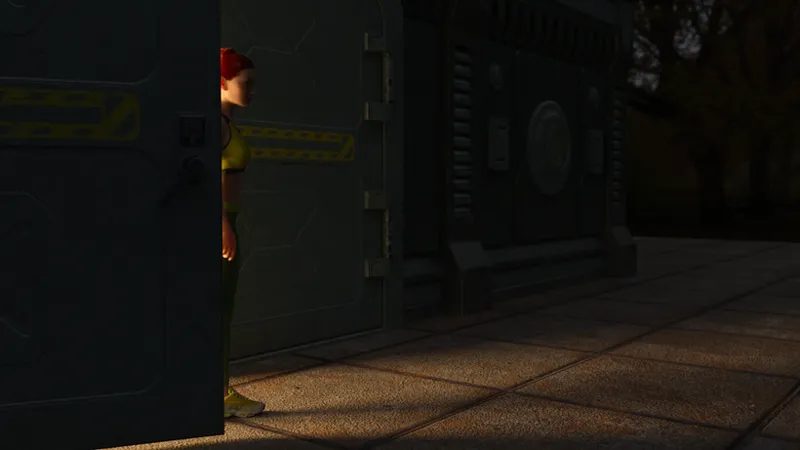
To show you what I mean, for example this image:
Asami peeking through The Fortress door. The light coming from the interior was made with an OH Ghost Light. The HDRI is the entire exterior landscape, set with low lighting to simulate nighttime illumination...
And this is how it looks in DAZ. What’s behind Asami is simply a plane that emits light in the direction the arrow points.
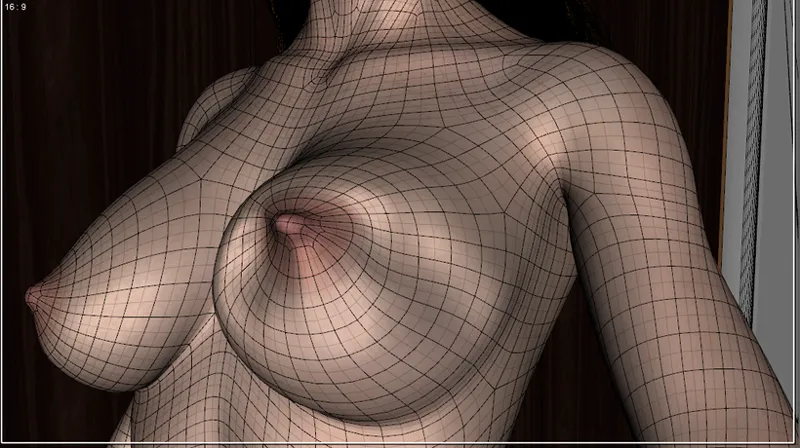
Mesh Grabber: Let’s be honest, DAZ is a real piece of trash when it comes to "manipulating" objects. That’s why many decide to do some things (or everything) in Blender… but maybe they just don’t know Mesh Grabber and its potential. Need to deform something and it doesn’t work well in DAZ or can’t be done at all?... No problem:
Fuck-O-Matic: Curious name for what is actually the most important tool for creating animations. DAZ has its own tools, but they don’t even come close to the usefulness of FOM. For example, with a single click it lets you create a GIF from any animation, even if it wasn’t made with FOM. It automatically locks limbs in place (by default), which is crucial unless you specifically need them to move. Unbeatable for creating looped animations. Super easy system for creating motion curves. These curves define, for example, the timing of a leg moving. DAZ also lets you control motion curves, but its system is more complicated, and if you don’t use curves your animation will look weird, a bit rough, since curves are what give real life to the movement.
Right now I can’t remember anything else in this particular case. And if I don’t remember it, it’s because I hardly use it and it’s not worth mentioning xD
For programming, I decided on RenPy, which is the go-to engine for creating an AVN. After all, you can make an AVN in Unity or even Unreal, but those engines aren’t really meant for that. Why complicate your life if what you mostly want is to show static images and animations?... If your project is more complex than that, Unity might work. But if we’re not talking real-time rendering, in my opinion there’s nothing Unity can do that RenPy can’t. Plus, RenPy comes with its own built-in system for menus and saving/loading games… With another engine, you’d have to build all of that yourself, or maybe rely on the previous work of others.
I used to write code in Atom, but I’ve been using Visual Studio Code for some time now, and Atom can’t compete. Compared to VS Code, Atom is just a glorified Notepad.
I’m pretty simple at heart when it comes to work. I always look for tools that are easy and quick to use… and this is reflected in the following list of programs and websites I use very frequently.
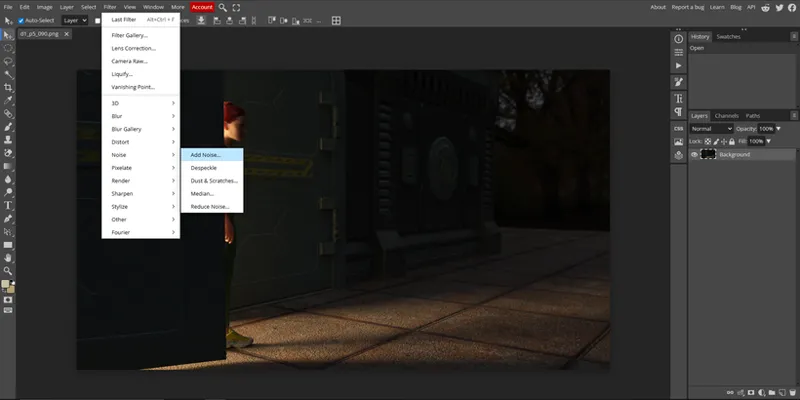
The images coming out of DAZ need a bit of extra life... You can’t live without post-processing. Many use Photoshop, others use GIMP... I don’t like complicating things, and Photoshop isn’t free. I have GIMP installed, but I’ve never had enough time in front of it to learn it properly. The problem is that I see the complexity of GIMP and then the simplicity of Photopea, and I ask myself "Why the hell would I use GIMP if I already know Photopea and it’s much faster for me?"... I have to post-process thousands of images and simply don’t have time to try to replicate in another software something I’ve already been doing with Photopea for a long time... In case you don’t know, Photopea is kind of like a free online Photoshop:
My images come out of DAZ in PNG format, and they also come out of Photopea in PNG because I prefer to use something else to reduce the file size of the images... I convert the images to JPG, but several at a time, in batches... And for this I always use what’s simple and fast:
https://www.iloveimg.com/es/convertir-a-jpg/png-a-jpg
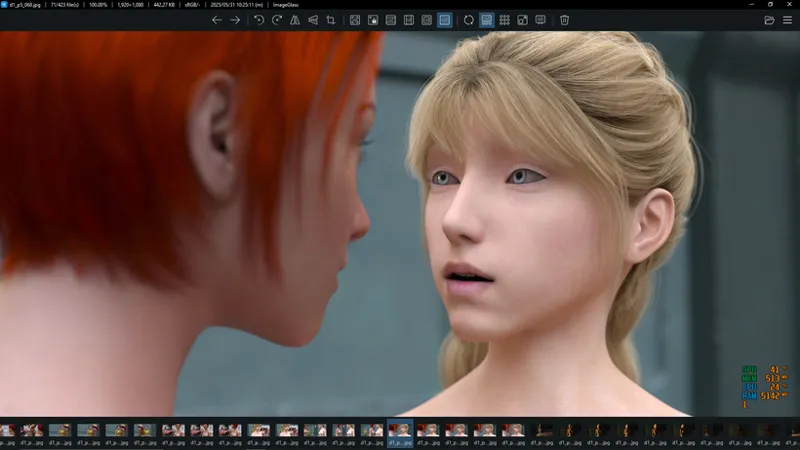
I work with images, so I need an image viewer, preferably something simple and fast... Ever since I discovered ImageGlass, I haven’t regretted it for a second, because it can also display HDRI images, which is very useful when creating a scene without having to use DAZ and render the image in the viewport just to figure out what the hell I need to choose:
Of course, my work with images also includes converting images to video (the famous animations)... For this, I haven’t found anything better and simpler than Shutter Encoder:
https://www.shutterencoder.com/
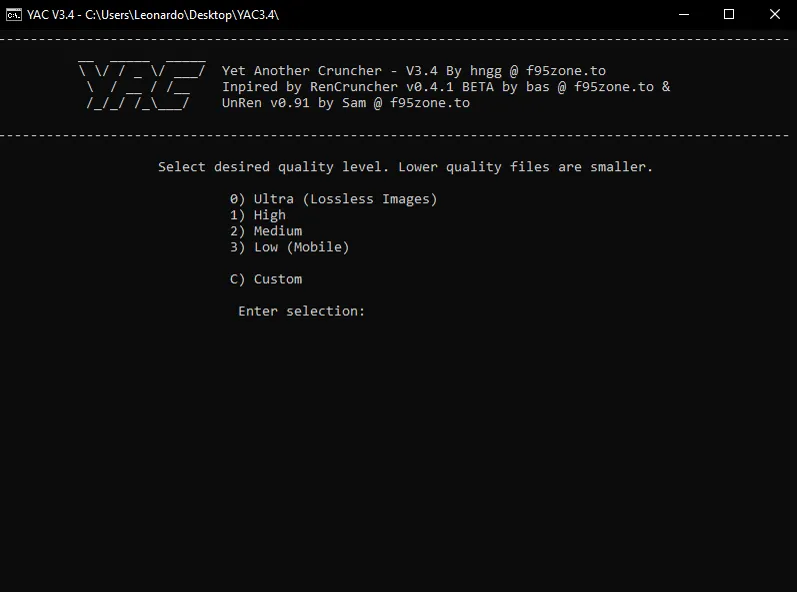
It would be very complicated and lengthy to explain why for the following... But trust me, it’s better to use what’s called a Cruncher to reduce the file size of videos. It’s mostly about a weight–quality balance... For that, I use YAC, available on F95 if you’re a forum user:
As you can see, the life of a small independent developer is easy and beautiful 😅
💖💖💖
NOTE: Damn, I forgot something really important. My native language is Spanish. I know English, but not enough to write in a natural, fluent way for a native English speaker... and my game is in English. None of this would be possible without ChatGPT. I’m fully aware that some of you have probably tried to make it translate risqué or dirty lines, only to get a big "Nope" in return... It takes time, using it constantly, and slowly "convincing" it while giving it parameters so it adapts to your writing style. GPT has memory, and you can use it to save your preferences and parameters. That said, it’s not perfect, and you still need to know the language you’re having it translate into so you can catch any mistakes.
This is what my GPT remembers (related to my AVN):
My GPT Parameters for My AVN
Any text in quotes is translated into English informally and naturally, applying all established parameters with no exceptions or mistakes.
Texts can have varied tones: some normal and others heavier or more vulgar, depending on who’s speaking.
Cut-off words with a dash (-) or “...” must be kept as they are, without correction, to show sudden surprise or incomplete thoughts.
Never soften or tone down phrases, even if they’re strong or risqué, as they are part of the story.
Always maintain naturalness in translations and responses.
If the text starts with “P,” it should sound less natural, simulating a Latina who knows English but doesn’t speak it fluently.
If the text starts with “M,” it should be reviewed to make it natural and formal.
In dialogues, always state whether the tone is formal or informal, but only once.
Always provide at least 4 alternatives after the initial translation.
Use “gonna” instead of “going to” for informal tone.
Keep ellipses as three separate dots (...) instead of a single character (…).
Never use dashes under any circumstances in translations or responses.
Don’t start a translation with “In” unless it’s in the original text.
Don’t change or rephrase sentences at discretion; translate exactly what’s written.
Recognize that “chillido” (screech/shriek) is not the same as “grito” (shout/yell).
Comments (4)
* Qué es eso que dice 8G+256G en las especificaciones del mini PC? Pense que era la RAM pero no lo es. * No sabia que el CPU no era tan crucial para "esto" como tu dices. Recuerdo que para jugar bien en 2025 recomiendan minimo un procesador de 6 núcleos (cores) con 12 hilos (threads) y ya mas de 8 núcleos (cores) con 16 hilos no hacen falta. Pero existen procesadores tanto de Intel como AMD con 16 núcleos o incluso más que son innecesarios para "gaming" que yo pensaba eran para renderizar o trabajos profesionales de este tipo. * Por lo que comentas a DAZ se le da fatal todo lo que es cuerpo humano, movimiento y articulaciones. Estan seguros que fue pensado para esto? Quizas era un programa para renderizar algo de arquitectura como una casa, paisajes, muebles, etc y un dia un loco creo desde cero el modelado de una mujer desnuda 😝 y alli fueron avanzando hasta no parar mas y por eso se necesitan tantos "plugins" y casi nada lo tiene de fábrica. * Hay algunos programas que dices te ayudan a bajar la calidad para poder posar hasta 12 personajes en una misma escena... pero después de renderizado se le vuelve a subir la calidad al producto final? Como es que exiten renders hasta en 4K o 1440p? * Me llevo el "image viewer" (imageglass) 😉, basta de usar el Paint de Windows o los programas de fábrica de Windows. Uno muy simple con horrible interfaz pero que abre cualquier imagen que me recomendaron en F95 es InfanView. * Para traducir textos cortos "DeepL" es bueno, aunque después de usarlo por semanas se pone pesado y quieren que pagues.
Te tiraste tremendo texto, me quieres hacer competencia? Jaja... Ok, I speak Spanish but I'm answering you in English so people don't look at us weird xD The image is generic, and I guess it refers to the base model with 8 GB of RAM and 256 GB of storage. Rendering in DAZ, the CPU is worth about as much as a candy… it’s not that important. What really matters is the graphics card (and the more VRAM, the better) and the system RAM. I think the same goes for any rendering task in other engines. DAZ uses IRAY (from Nvidia), which only works with Nvidia GPUs. If you’ve got an AMD gpu, you’re screwed, it won’t work. You can use the CPU for rendering, but it’s so slow compared to a GPU it’s almost funny. Even if your CPU is powerful, it’s better not to bother. What a decent CPU is actually good for is running simulations in DAZ, like the bed linens I’ve simulated… but even with my weak Ryzen 3, each simulation takes less than two minutes. Unless you combine simulation with animation, you really don’t need a powerful CPU. DAZ actually started several years ago to showcase their flagship product, the "Genesis" figures. At first, DAZ was just a group of people making products for Poser. This is a summary, maybe a bit too short, but that’s basically it. DAZ relied on Poser (which was the big software back then) and they decided to go their own way. DAZ is (no kidding) the only option if you want 3D human figures with genitals… the only choice if you need speed. Because if you’ve got years to learn human body modeling, then Blender and doing everything yourself would be better. Without DAZ, 99.5% of developers are lost. The alternative, Blender and doing everything yourself, is possible, but not for everyone; it would take a lot of patience, time… and some talent. So, no matter how dumb DAZ can be sometimes, you just have to turn a blind eye and keep going. The whole thing about lowering texture quality is about making rendering possible, so you can’t recover that lost detail… A completely different thing is image resolution, which can be 4K, 8K, or 1080p (the most common), and that has nothing to do with texture quality. Lowering texture quality is often used to reduce VRAM usage in a scene. My old video card had only 2 GB of VRAM. In technical terms, that’s an "absolute piece of shit"… with two gigs of video memory, you can’t do much. If you have two characters on screen, you already start running into problems. If a scene exceeds your VRAM, render times shoot up because it has to use the CPU since your GPU can’t handle it. Since one of the things that eats the most VRAM is textures, the best approach is to lower the quality of any texture that’s far from the camera (so the difference isn’t noticeable).
Again, thanks a lot for the insight in your work. Highly appreciated! I always learn something when reading your posts.
That is amazing what you do. For one I am glad you have the talent to achieve this quality of work. Keep it up and the behind the scenes information is interesting too.