




Monthly Roundup ... + Snapmaker U1 first impression! 💥 📆
Dear Patreon family,
Here we are again this month, bothering you with our newsletter!
In this edition, you’ll find:
The new CFM animal coming soon: the Dolphin! 🐬
A tiny spoiler for one of the next Clickers…
A lovely photo from #share-your-prints on Discord
Last chance to grab the models from 2 months ago! 📆
Our Snapmaker U1 first impression review! 💥
Sign in to Cute Flexi Maker (CFM) with Patreon 🔗
New drop on MakerWorld: Parametric Storage Box! 🤓
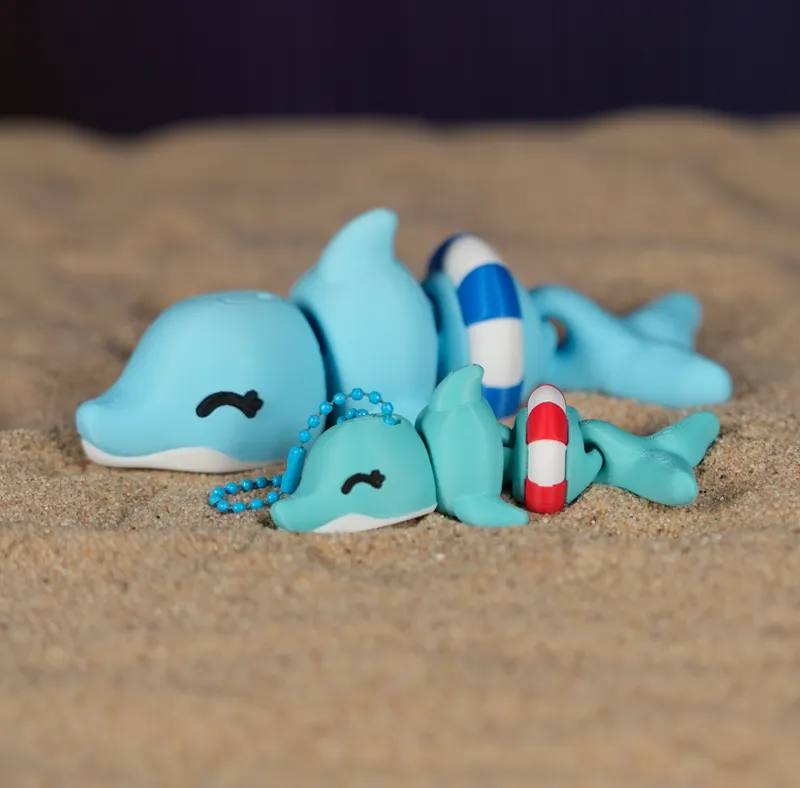
1. Dolphin Incoming! 🐬🌊
On June 1st, a new animal is coming to Cute Flexi Maker (CFM)… the Dolphin! And with it comes the ultimate summer accessory: the Lifebuoy. ☀️🛟 Of course, both the Lifebuoy and the new Dolphin parts will also be usable on other designs.
2. A tiny spoiler for one of the next Clickers…
Yes, you probably guessed it… and if you did, write it in the comments! 👇
And yes, it will be compatible with our latest Clickers.
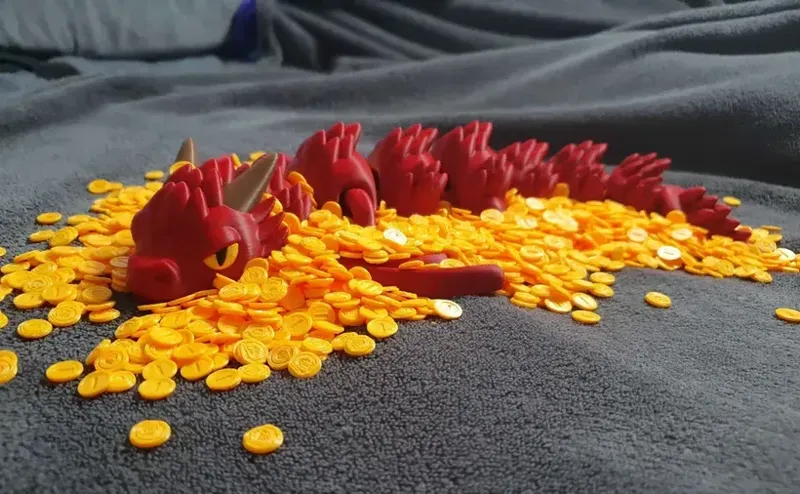
3. Your CFM print photos 🐉💘
Your latest creations on CFM are amazing… you keep raising the bar every time 😍 With CFM, you bring us so much joy and excitement by creating truly beautiful things! This month, we decided to give the spotlight to this gorgeous red dragon. It is absolutely beautiful. Congratulations!
Ph by #share-your-prints on our Discord Server 🫶
4. Last Chance to Grab Models from 2 Months Ago 📅
If you don’t want to miss the designs from the previous 2 months, make sure you’re subscribed to the Premium Tier, that way you keep access to the full collection without missing a thing.
5. Snapmaker U1: our first impression 🤓
Today we received the Snapmaker U1!
This means it will be much easier for us to support users who already own a Snapmaker U1, especially when it comes to printing our models and understanding possible machine-specific behavior. For those who don’t have one yet, here is our very first impression 👇
Please keep in mind that this is not a full review yet. We have only completed the unboxing and a first multicolor print, so we still need more time to test it properly with flexi models, longer prints, and daily use.
Discount Link Here or enter the code "VALERIA_MOMO___MATTIA_3D" 🤲
Unboxing: 10/10
The unboxing experience was very pleasant. Before receiving the machine, we had heard that some assembly was required, but honestly it did not feel like real assembly to us. Most of the process consisted of connecting snap-fit parts, plugging in a few cables, installing the nozzles, and inserting the USB modules.
There are quite a few screws for fixing the USB parts, maybe more than strictly necessary, but the process was still easy and quick. We followed a YouTube unboxing video and had no issues.
The printer arrived very well packed, but without excessive packaging, so the box still felt compact and manageable.
A very nice detail: for the small parts that are easy to lose, Snapmaker included extras, such as spare screws and cable clips. Good job.
The maintenance kit is also excellent. It includes useful and high-quality tools such as a spatula, nozzle cleaning brush, nozzle cleaning needles, lubricants, and Allen keys.
Slicer: 8/10
The slicer feels a little less advanced than Bambu Studio, but it is simple, clean, and intuitive to use.
We have not yet understood if it is possible to add custom filaments directly in the device screen, like in Bambu Studio. However, custom filament settings can still be managed from the main slicer interface, so this is not a major issue.
Overall, the first experience was smooth.
Machine body: 9/10 as a first impression
The machine feels solid and well built.
We really like the glass door, and the build plate system also feels very good. The plate is sturdy, and the guides and magnets make positioning it very easy.
Some parts arrived fixed with tape, and they looked like they might be easy to remove. At this stage, we are not sure if this is because they are intentionally easy to disassemble or if they are simply more delicate parts. We’ll understand this better with use.
The camera quality looks good, although we still need to figure out how to download a timelapse.
Noise-wise, we do not find it too loud. However, the sound is very different from Bambu Lab printers. It has a slightly alien “bzzz bzzz” sound, similar to what we have heard on some Anycubic machines. Some movements are a bit sharp and nervous, and during the first hour of printing, having it on the desk made us jump a couple of times. But it is something you quickly get used to.
The filament loading system is excellent. In our first impression, it feels much better than loading filament on a Bambu Lab machine without AMS.
One thing we would have liked to see included is the top cover. Personally, we prefer enclosed chambers, so having the cover already included in the package would have been a plus for us.
The only real limitation for our personal workflow is the number of colors. Four colors are good, but for the way we like to design and print, five would be much better. Having three main colors plus black and white would give us more creative freedom. For this reason, we cannot give it a perfect score.
First print
For the first test, we printed using non-proprietary filament, with manual settings for two different silk filaments, on a multicolor print with a fairly thin base and a screw-fit mechanism.
The result was not 100% perfect, but the imperfections were very minor and almost unnoticeable.
So, as a first print, it is fully approved.
We do not want to give a final score yet, because one print is not enough. We want to see how it performs with flexi models, longer prints, and more complex real-use cases.
First comparison with our daily-use printers: Bambu Lab H2C and P1S
Considering its price, the Snapmaker U1 feels like a very strong machine.
So far, we do not feel that it has much to envy from the Bambu Lab H2C except for the number of colors. Unfortunately, we find the four-color limitation quite restrictive, especially because it cannot be expanded. For our type of work, this is probably the biggest limitation.
One clear point in favor of the U1 is the speed of color changes, which was honestly excellent.
Another interesting point is the purge tower, which is much smaller compared to what we are used to with Bambu Lab.
That said, it still feels like a complex machine. As with our H2C, we would not personally use it as an all-purpose workhorse printer. In our opinion, it does not feel like a “highlander” machine in the same way our P1S does. Our P1S has been through countless prints, strange filaments, tests, and experiments without ever really giving up.
The U1, like many new machines with advanced features and more complex mechanisms, feels potentially more delicate. This is not necessarily a negative point, but it is something we want to evaluate over time.
Final first impression
As a first impression, the Snapmaker U1 is fully approved.
The unboxing was smooth, the machine feels solid, the slicer is easy to use, the filament loading system is excellent, the color changes are very fast, and the first print result was very good.
Now we need to test it properly with our flexi models and with more demanding prints.
We’ll keep using it over the next weeks and let you know if this very positive first impression is confirmed by real daily use.
6. Sign in to Cute Flexi Maker with Patreon 🔗
To enable your CFM account, go to your CFM Profile (you’ll need to register first on cutefleximaker.com) and connect your Patreon account 👇
7. New drop on MakerWorld: Parametric Storage Box!
Customize all 3 dimensions and watch the ribbed texture magically adapt to your box. Lid included, plus a ready-to-print tea box version with divider.
Thank you, as always, for your support and for all the feedback you keep sharing with us! We’re really excited about what we’re building together and truly grateful to have such an active and involved community with us on this journey. ❤️
Valeria & Mattia
Comments (12)
Hi. I am interested in the membership. What’s the difference between the first tier of commercial license and second tier? Also, is the lifetime access to Cute Flexi maker still active? Last one - do you have plans to add additional animals to the flexi maker? Thanks in advance!
Hi S. Sam, Yes, CuteFlexiMaker Lifetime Access is still available on MakerWorld. About the tiers: the main difference is that the second commercial tier also includes recurring access to CuteFlexiMaker updates and new monthly designs. And yes, we plan to add at least 1 new design every month to CuteFlexiMaker. Each new design will cost around $3 for crowdfunding backers, while it will be included for recurring Patreon members, even in the $10 tier. Thanks!
Is there a monster in the Trash cans?
more or less :p
From a speed and poop point of view the U1 is fantastic. The view through the door is no where as good as my P2S. Also P2S having 2 AMS's enables 8 colours which has its uses. I paid for the hood for the U1 but not coming until late in the year (Nov from memory). If we could hook up an AMS to the U1 so 3 dedicated colour heads and 1 AMS head it would be hard to beat. Especially for the price.
The snapmaker code doesn't work for the United States?
Use "jake_pillen" should give you the same discount in the US if unable to use the other code
Did i miss the google drive link for May? I dont remember seeing it.
you're right, We published it now, here's the link! https://www.patreon.com/posts/159706100
thanks for all the info, great detail!! Love the box too. I just had to order one because I couldn't find what I was looking for. this will be great for next time since I can adjust it easily.
So to use the timelaapse on the u1 you can type in the machines IP address in an internet browser select configuration then choose camera under other files on the right side it will show you all the timelapse videos and you can download them from there
owww super thank you!! we will try!!