


DADDY VISION SCRIPT: UPDATE R2
Hello AGENTS !
Download link: Click here
File: New_DaddyVision_R2_ZIP_FILE.zip
Daddy Vision Script Update
This update focuses on improving menu clarity, movement mode organization, and overall usability while keeping the script easier to configure during gameplay.
Main Improvements
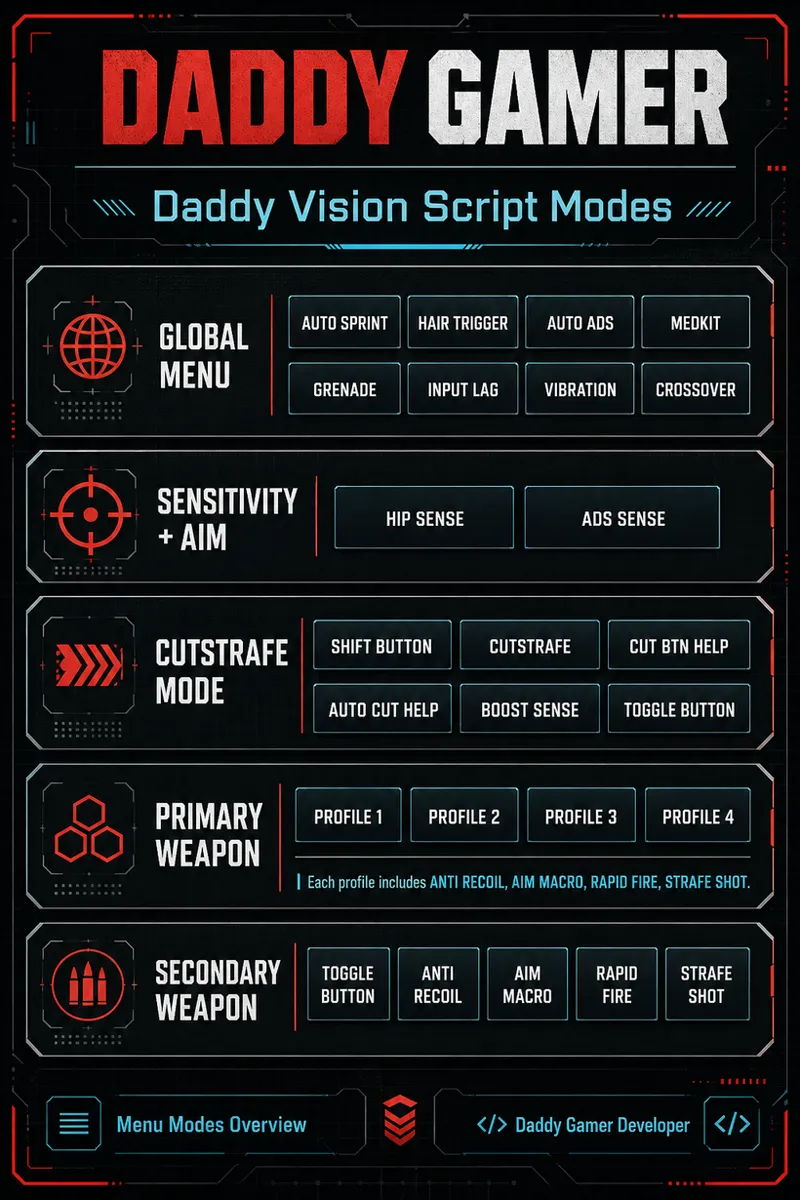
Menu structure reviewed and organized by categories.
Sensitivity section renamed to Sensitivity + Aim.
Sensitivity labels updated for clearer reading:
Native Stick for the controller’s original stick behavior.
Custom Sense for active custom sensitivity settings.
New footer legends added in key menu options to make button behavior easier to understand.
Cutstrafe Mode Improvements
Cutstrafe mode structure reviewed and reorganized.
New Snap Zigzag option added to the manual Cutstrafe system with Shift.
Clearer separation between:
Manual Cutstrafe
Cut Btn Help
Auto Cut Help
Cut Btn Help is now aligned with Auto Cut Help, so it only works as the directional trigger when Auto Cut Help is enabled.
Unused Cutstrafe combos and functions were reviewed and cleaned up.
Shift Button Improvements
Better menu legends for Shift Button behavior.
Xbox Elite paddle options now show clearer paddle mapping:
Paddles 1: XB1_PL1 / XB1_PR1
Paddles 2: XB1_PL2 / XB1_PR2
Added a footer hint to clarify hold behavior for running.
Secondary Weapon Improvement
Improved the R1 Secondary Toggle behavior while using ADS.
Fixed an issue where releasing ADS after the R1 fire action could immediately return R1 behavior and trigger an unwanted skill action.
Script Guide Added
New HTML guide created in English and PT-BR.
Added menu access and navigation instructions.
Added mode usage explanations for:
ADS
FIRE
ADS + FIRE
FIRE Only
Toggle
Secondary Weapon
Cutstrafe with Shift
Added an important Xbox Elite paddle compatibility note and the Elite Series 2 firmware downgrade command.
Update Goal
This revision makes Daddy Vision easier to understand, faster to configure, and more flexible for different movement and combat styles. The script continues to evolve with a focus on control, clarity, and smoother gameplay behavior.
Comments (8)
Do you have a problem with Matrix when you use macro for weapons? Like if I aim on target my macros go up but off target tit is a dot? Used you anti recoils and have the same problem. Aim assist is set to on in game.
I purchased the script today but for the life of me I cant get it to work in the game? I haven't used a Cronus previously. The script doesn't change anything and I'm playing as usual without it. The zen appears to be set up correctly with the PS5.
Hi, when you download the file from the website, it's zipped. The file you need is the .gpc file. After downloading the file, extract it before uploading it to Zen Studio. Use WinRAR. Inside the file is the gpc script.
Exelente amigo
Hey there, I purchased a subscription SILVER so I could download Daddy Vision, but now I can't download R2?
Choose your access 💎 One-time purchase Get full access + all future updates for free 👑 Gold Subscription Access the script while your subscription is active
How do you set recoil value for bighorn without scoping in all the time?
Do not use macro aim. You don't need aim assist for Bighorn, just activate Anti-recoil Locked.