UltraCam Calamity BETA 3 || In-Game Menu || Full Setting Control || Randomizer || NEW FIRST PERSON || NEW Entity Camera || Sequence/KeyFrame Manager || New Randomizer || Biggest Update
The past month UltraCam Calamity has went through lots of changes. A brand new UI has been added, took over 100 hours to develop, The Camera system has been once again reworked. Keyframes are now fully controllerable, deleteable, moveable, adjustable, frame pacing, FOV everything one can dream of! You can also fully replay each sequence, just like in any modern Video Player! Read more down Below.
If you are a Patreon, you can now download UltraCam Beta 3 from my Discord server. Simply go into Settings->Apps and Link your discord account. After that join the server Click Here and look for a channel named #ultracam-early-access ! :)
In-case you have any other issues feel free to text me, due to Beta 2 getting leaked, joining the discord is now a requirement. You don't have to talk or chat with anyone. Just join and download :).
New Features
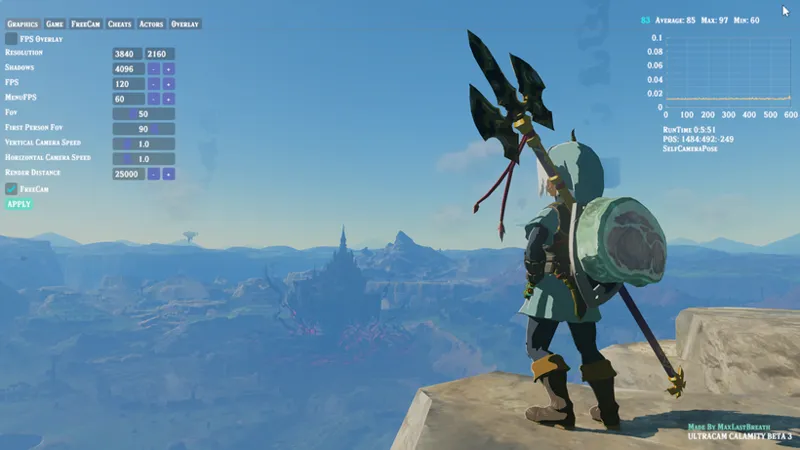
The Biggest Feature of UltraCam 3.0 is here. Game Menu.
Full Controller and Mouse and Keyboard support
I also spent time last week and fixed Ryujinx's keyboard implementation and has since now been merged! So the menu works well on Ryujinx too!
Graphics Menu
Resolution (Up to config Res)
Shadow Resolution (Up to config Shadow Res)
FPS
Menu FPS
Fov
First Person Fov
Camera Speed (Player, general gameplay)
Render Resolution
Trigger freecam with controller setting.
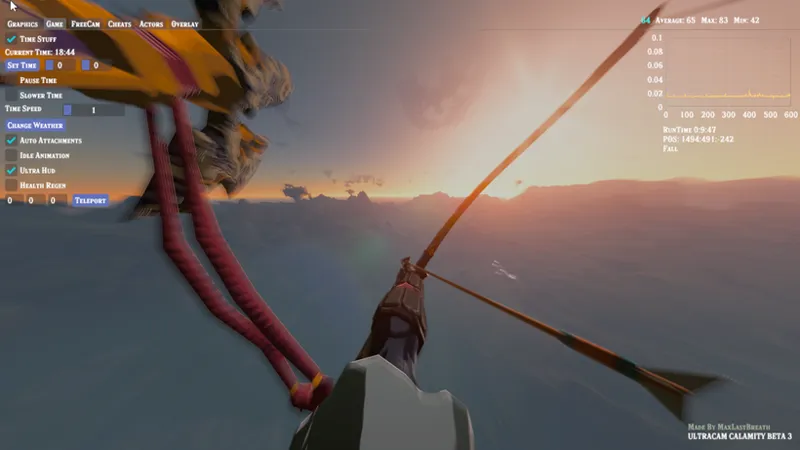
Game Menu
Time Control Menu
Set Time, Current time View
Pause Time
Slower Time and Time Speed
Change Weather Button :)
Auto Attachment Triggers the Ability to Auto-Attach Items (uses the last attached Item)
Idle Animations. Makes link stay in an Idle pose (Determinated by selfie camera)
Health Regen, Regens health 1/4 of a heart every second out of combat.
UltraHud, Basically hides all UI.
Teleportation, Let's you teleport based on Cordinates. Top Right you can see Link's position.
Overlay
UltraCam Overlay (Toggle)
Current FPS, Average FPS, Min, Max
TimeFrame Graph (Shows your time Pacing! Very important for smooth gameplay)
Gamespeed Delta Graph (This is useful to see how the delta updates the game speed :))
Can store up to 6000 Frames of information! (Default 600) - Only runs when toggled on.
Also displays Link's Actor State
Also displays Link's position and Total game run time. (More planned)
Camera Speed, The speed of the camera's movement (Freecam only)
Rotational Speed (First Person and FreeCam)
CameraDebug toggle, shows the cordinates of the camera, also allows for manual adjustments.
Sequence Manager (Toggle)
Link's Movement (Allows for link to move straight after the sequence has been played)
Sequence Speed, Fastforward/Slows down the entire sequence.
Fadeout Speed, the speed at which the last keyframe comes to a stop
Smoothing, the angle for the entire sequence (to be changed per keyframe)
Add and Delete Button
KeyFrame Manager
To Timeline
Plays the sequence starting from where this keyframe is located.
Allows for the movement of individual Keyframe (Up) (Down)
Pressing on a keyframe pops up a new KeyFrame window.
Allows for the manual adjustment of camera Position
Allows for changing of individual keyframe Fov
Allows for the adjustment of The duration of between keyframe A - > B
Setting to 0 FRAMES allows you to skip the frame and go to the next one with no interpolation
Update Keyframe
Updates the keyframe with current camera location
Restore Keyframe
Restores the Keyframe to it's Original Position and Data.
Backup Keyframe
Backs Up the keyframe for a restore point.
Focus/Follow Keyframe
Goes to the Keyframe
Follow the keyframe (useful for manual editing of params)
Delete Keyframe.
For the sake of keeping track of keyframes, each keyframe has it's own Color asigned based on it's hash.
Timeline
Play/Stop Button
Pause/Resume Button
Revers/Foward Button
Timeline
Allows you to control the sequence like a movie player.
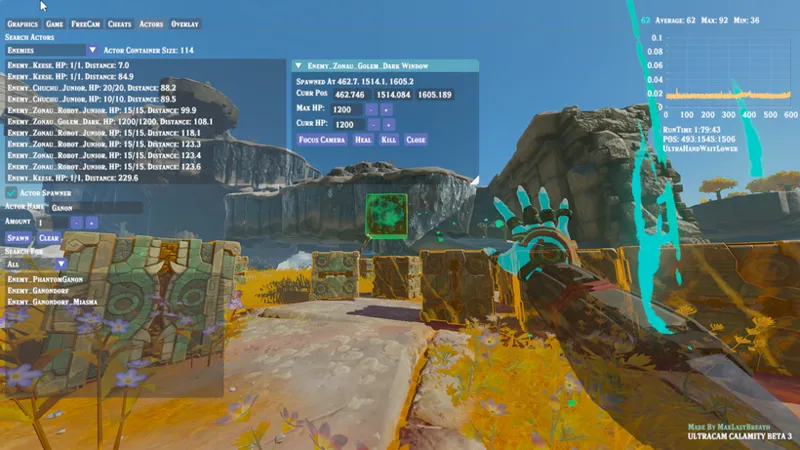
Actor Menu
Actor Spawning and Actor Control
Actor Control/Actor Container
The Actor Container holds pointers to each Actor (Enemies, Items and Weapons) spawned in the game!
Also has a setting allowing you to search for specific types
Currently in the container they are sorted based on distance (only in the menu, for optimization reasons) Also displays their current health/Max HP (Ik a big requested feature lol)
Clicking on An Actor pulls out a menu allowing you to control the actor in Various ways!
Change the Actor's MAXHP, Current HP kill or heal an Actor (WORKS ON WEAPONS)!
Actor Spawning
Allows for the spawn of ANY Actor with a search engine, the search engine is based on Actors kept in the UltraCam Randomizer
Currently it's set to spawn actors randomly around link within 5m of distance (There will be spawn modes and cords in the future)
Search engine
Allows for the search of Individual actors, they will display in the bottom bar
Allows for the search of groups of actors (elites, bosses, items etc) Making it easier to navigate with just a controller if desired.
For Actor spawning The + and = keys have been replaced with _ for the moment.
Cheats
Cheat Menu
Game Speed (30 is the default) (DO NOT RECOMMEND GOING BELOW 15, can crash the game).
Current Health, Allows you to modify Link's current health in real time.
Max Health, Allows you to modify Link's Max Health in real time.
Godmode.
Kill and Heal.
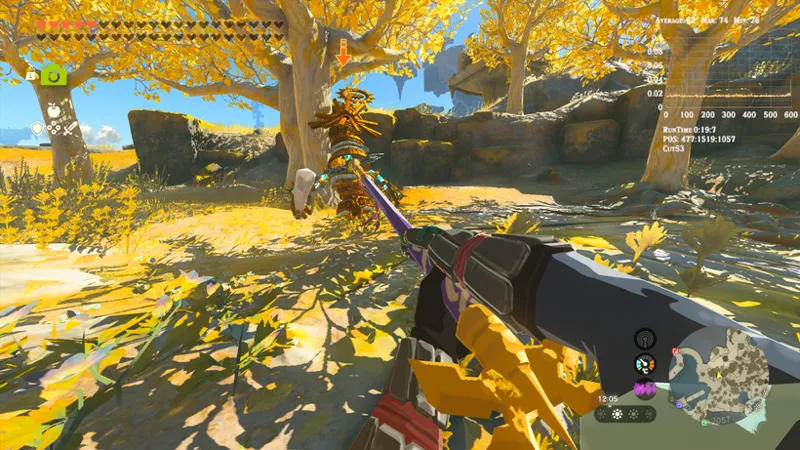
First Person (REWORK)
Now uses Link's absolute head position and face position
NearPlane has been adjusted to show more of Link's hands and weapons with no clipping.
First Person Now has a DYNAMIC camera.
Dynamic camera is used for specific actions such as:
Attacking
Climbing
Ladder climbing
Bow
Autobuild
Ascend
Lifting
Opening Treasure
Cooking
Dismount Horse
Getting Knocked Down/Getting Up
Charge Attacks (Swords, Spear and Claymore lols)
and a lot of other things...
Dynamic Camera is very important to make first person feel alot more cinematic and into the moment :), This is very work in progress but i bet most of you have never seen anything like this in a zelda game before.
Combat Rework, makes the First Person Camera feel like nothing before it!
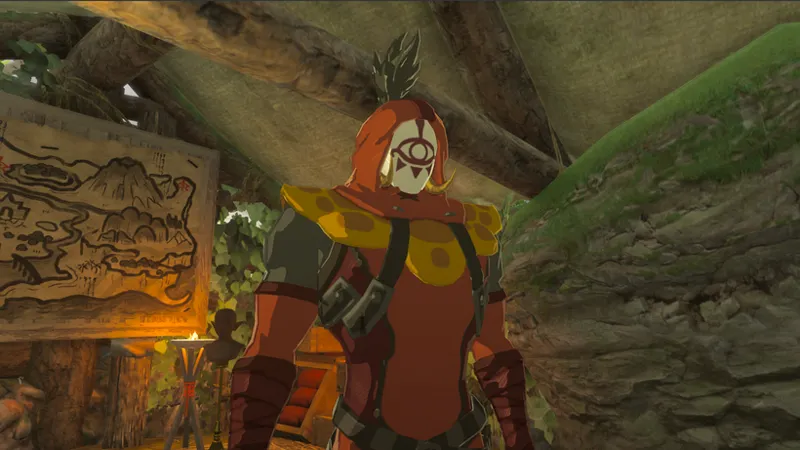
Entity Camera (Rework)This picture is taken with the First Person Mode in Entity Camera (WIP)
Allows for the switching between different bones (Left Button and Right Button)
Targetting has been completely reworked and improved, now it's 100% accurate.
Currently no way to keep Entity camera and switch to LockCam unfortunately, this is still very WIP
Pressing A while in Entity Cam will kill the entity attached.
Also added a way to find and attach to a specific entity in Menu :)
Sequencer Rework (WIP)
Sequencer now uses a class system, the entire system has been overhauled and rewritten
Each keyframe is stored in a hash, this hash is later used to find specific keyframes and move them around, it's also used to create a unique color for each keyframe for the Menus.
The way duration and time works has been reworked as well, benchmark is untouched.
Each keyframe is now stored twice, one for the sequence and one for a recovery point! :) The hash is useful to find the exact recovery keyframe and restore it to it's original Position (look above for the menu interface)
A Movie and Keyframe Editors now exist. They are very advanced atm, but maybe more can be done.
FreeCam
Internally the way the freecam works has been mostly rewritten, a lot has changed so some behaviors may be different now than they were before.
Each camera state is now it's own thing, I.e freecam, playercam, VRcam, EntityCam and Animation and Benchmark. This allows for a much deeper control of the Freecam.
Randomizer
UltraCam now has a built in Enemy, Weapon and Item Randomizer, this is just an extra feature that you can toggle and mess with, it's not as advanced or crazy as Waikuteru's randomizer, but you can toggle individual settings very easily and have some fun :)
Can Randomize Weapons
Can Randomize Items
Can Randomize Bosses
Can Randomize Enemies
Can Randomize Elites
Gameplay
Auto attachment has been fixed to hopefully not crash and also hopefully work's properly now (no more auto attachment on shield lol)
New Settings
Randomizer On/Off
Randomize Weapons
Randomize Items
Randomize Enemies
Auto attachment On/Off
Planned Features
More Stuff in the Menus (fog, lods, lensflare etc etc)
New LOD Control (Planned thanks to Fl4sh)
Better control of link's actor Matrix (First person no more clipping), Quantilions suck lol.
Hooking of Actor Matrix and Bone Matrix for VR (Specifically for hand control and more lol)
Fixing the Depth buffer
Making the UI feel more custom, more modern and more colorful! Also more zelda!
Adding toggleable popup notification for FreeCam states and stuff...
Adding Ways to change Actor affinity on the fly, making it so you can make actors fight with each other easily.
Adding more ways to control actors in general.
Adding more cheats, stamina, rupees etc all in real time. (Menus)
Adding Durability Cheats (1x, 0.5 or etc...)
Fixing The long known Master Sword Fuse bug (Planned to do)
Adding difficulty settings with Enemy Health Regen (somewhere)...
Re-Starting work on BOTW again sometime.
Put more work for VR, Handtracking and other stuff are planned, headtracking is currently in the works and it works OK.
Benchmark FPS and Settings display POP-up when a benchmark is complete :)
Add a complete control over Link's animation TODO.
Rewrite some more code.
Known Issues
Link's head clipping
Inconsistent Menu Toggle
Container doesn't have a self cleaning algorithm currently, I need to experiment with it to find a way to clean the container without killing performance...?
Inconsistent camera State switches
Ackward back movement during first person...
More Information
This Beta has taken hundreds of hours of work to be completed, the reason why they are taking so long is because of how complex this project has gotten. Only the UI system took around 70-100 hours of time to implement fully, I work on Ultracam every single day, sometimes I spent 10-15 hours fixing or working on things, It's very complex and very difficult to work on. Takes a lot of time and I'm just a single person, I'm currently the only person also testing any of the new features, very likely to have missed some stuff. Please let me know if something isn't working as intended and please provide more information on your particular issue, I need to be able to replicate an issue to be able to fix it. Thank you for supporting this Project.
New betas will take longer than previous release cycles, or they may be smaller bug fixes than before, beta 3 has the content update of multiple versions and mods inside of it, fixing bugs and reworking more systems will take a lot of time and a lot of effort. Beta 3 will continue it's update and development cycle for a few months at least, this is to ensure everything runs smoothly and well, Full Public release is unknown as of right now.
New Controls
(F12) toggle the Menu Overlay On/Off
HOLD ZL, ZR, DOWN to TOGGLE Overlay On/Off
ZL+ZR to toggle Link's movement while in the Overlay.
Up to use the Entity Camera
Left pad During Entity Camera to control which bone the camera is attacked to.
Right pad to control the distance of the camera from the said bone.
Fixed Actor spawning crashing Ryujinx And Switch
Installation Process
Standalone
Drop the files inside of your Emulator.
Drop the exefs/romfs in your switch atmosphere folder.
Optimizer Installation
Drop the Optimizer.exe in the Optimizer folder dedicated to the EA version.
Adjust your settings and hit apply.
For switch use the extract setting.
TOTK Utility/Console.exe
Turn on Ethernet access in your Emulator
For switch, change the IP address to match one of your Switch Ipv4 address or PC ipv4 address in both the UltraCam and Console Itself.
Comments (2)
S
ShadowRTX · May 30, 2024
How to get game menu pls give me the link
M
MaxLastBreath · June 2, 2024
Sorry I was away for a few days, it's available to download on the Discord link, I can dm you the stuff if you would prefer that!