





Introducing FA Studio
Browse, preview and download Forgotten Adventures assets and tokens—all in one free app.
Today we’re releasing the first public beta of FA Studio (v0.5.1), a free desktop app that brings our Assets and Tokens libraries together in one place.
Browse our catalog of 165,000+ assets and 1,600+ tokens without downloading the whole library first. Search for what you need, preview the artwork, and drag or copy it straight into the tools you use to make maps. You can also download full libraries to your own drive and use the files offline.
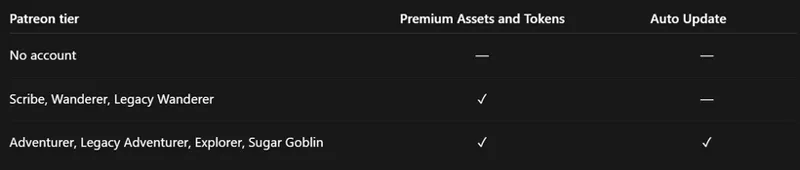
FA Studio is free for everyone, with no account needed to get started. Patrons can connect their Patreon account to unlock the Premium libraries, and eligible tiers can keep their downloaded libraries automatically up to date.
Download FA Studio
Windows (64-bit): [Download link]
macOS: [Apple Silicon] · [Intel]
Linux: [AppImage] · [.deb]
This beta isn’t code-signed yet, so your system may show a security warning when you first open it. Installation notes are below.
Find what you need
The Assets and Tokens galleries bring our releases together in folders organized by biome and category, from Core Settlements to the Underdark.
Search across the whole library, sort by newest to find recent releases, and adjust thumbnail sizes to suit your screen. For more specific searches, combine terms with AND, OR and NOT, or put an exact phrase in quotes.
Assets show their grid footprint, such as 2×2 or 3×1, and tokens show their size and scale. Token color variants are grouped together to keep the gallery easy to browse, with an All colors option when you want to see every variant.
Get a closer look
Hover over an item for a larger preview, or right-click to keep the preview open. Pinned token previews also show the available color variants.
If you prefer a quieter gallery, you can set previews to right-click only or turn them off.
Use it in your own tools
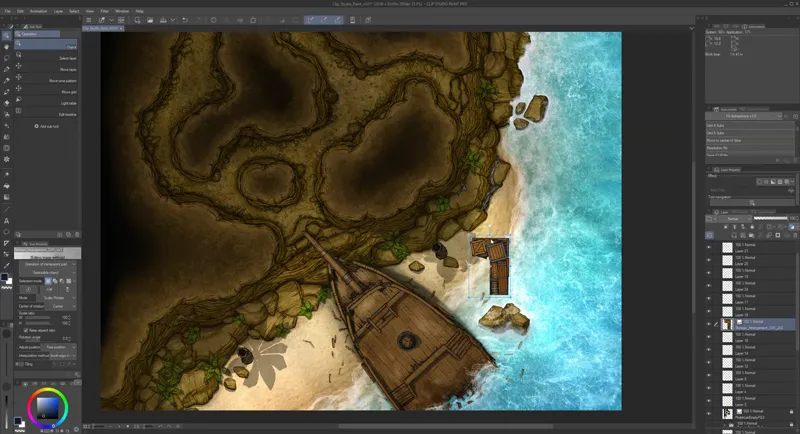
Drag an asset—or a whole selection—straight into Clip Studio Paint, Photoshop, or another app that accepts image files. Studio downloads cloud items for you as you drag.
You can also copy the image under your cursor with Ctrl+C on Windows/Linux or Cmd+C on macOS, just like “Copy image” in a browser.
Keep your libraries on your own drive
The Download Manager lets you download the full Assets and Tokens libraries in WebP or PNG, into a folder you choose. These are ordinary files and folders, ready to use in your own programs.
You can:
Check for updates when you want the latest releases.
Pause and resume large downloads.
Verify a library to check its files and repair anything missing or damaged.
Enable Auto Update on eligible tiers to keep your libraries current in the background, including new releases and repairs.
Studio can run in your system tray and start with your computer, so library updates can continue in the background. It also checks for new versions of the app and prompts you when an update is available.
Your downloaded files remain usable offline. If your membership lapses, they stay on your drive and keep working. You only need active Premium access again to download new Premium files or updates.
Free for everyone, more for patrons
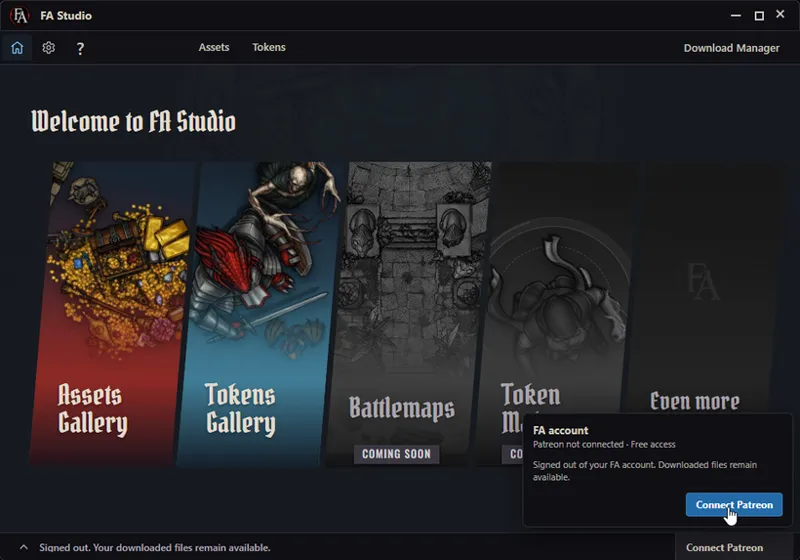
Without signing in, you can browse the entire catalog, preview and use items from the free libraries, and download the full free Assets and Tokens libraries. Premium items appear in the galleries with a lock.
To unlock Premium content, click Connect Patreon in the bottom-right corner of Studio and sign in through your browser. Studio picks up your membership automatically.
The upcoming Premium monthly tier will include Premium library access, and Pro will also include Auto Update. These tiers are coming at the end of October, as explained in our upcoming Patreon changes post.
What happens to pCloud?
We’ll continue updating the pCloud libraries while FA Studio is in beta, so you can switch whenever you’re ready.
Dungeondraft packs and Token Clip files aren’t available in Studio yet. We’re working on bringing them into the Download Manager, with Auto Update of their own.
Installing the beta
On Windows, the installer lets you choose where Studio is installed. Uninstalling Studio keeps your downloaded libraries unless you select the option to delete them.
Because this beta isn’t code-signed yet:
Windows: If SmartScreen appears, click More info, then Run anyway.
macOS: If the app is blocked, go to System Settings → Privacy & Security and choose Open Anyway.
macOS: If you see “FA Studio.app is damaged and can’t be opened”, copy Studio into your Applications folder, then open Terminal and run:
`xattr -dr com.apple.quarantine "/Applications/FA Studio.app"`
Then open Studio normally. This removes the quarantine flag from FA Studio only. Use this workaround with the app downloaded from our official links.For the Linux AppImage, make the file executable before running it, either through its file properties or with chmod +x.
Help us shape Studio
This is our first public beta, so there will be some rough edges. macOS and Linux have had limited testing so far, and we’d especially appreciate feedback from anyone using either.
Tell us what works well, what feels confusing, and what would make Studio more useful to you. If you run into a bug, please include your operating system, Studio version, and the steps that led to it.
Share feedback or report a bug on our Discord.
What’s next?
Here are some of the things we’re working towards:
Save searches and filters as bookmarks.
Keep Studio on top of other windows.
Open additional library windows.
Download and automatically update Dungeondraft packs and Token Clip files.
Browse and download our battlemaps.
Make your own tokens through Token Maker integration.
Browse your own asset folders alongside the FA libraries.
Thank you to our patrons for making FA Studio possible, and to everyone giving this beta a try. We’re looking forward to seeing how you use it and hearing what you think.
Comments (20)
Out of curiosity when the token maker gets implemented will we see more options than we currently have on the web based version? Namely stuff like Dragonborn, aarakocra, and other stuff yall already have assets for in the token library but aren’t available in the maker?
I've been having trouble connecting my patreon account to FA studio, once I've confirmed on my browser it seems to get stuck connecting on FA studio and then stops trying. Any help would be greatly appreciated.
Guys, im loving FG Studio very much. The file storage method works well for me.
This was so needed! THANK YOU!
Absolutely amazing! I use Encounter Plus as my VTT to link the tokens to the right monsters. In that they need the right names so I rename every token. I made an app to remove dashes and stuff like that, however a lot of tokens like "Astralfolk" need to be completely changed to something like Githyanki or Githzerai. Could there be a tagging system where I could tag the files or share a tag list with other people? That would help with other VTT's like Encounter +. We could make a shared resource in the discord and easily connect all the tokens without renaming them every time.
Oh heck yeah!
This is so excellent. Can I make a feature request for further path configuration? For instance, I'd like to save my tokens directly to my FoundryVTT tokens folder and my assets to a different folder for Foundry. Also, I think I'm on Legacy Wanderer; is there any way to get the Pro auto-update features without changing my plan completely?
Yeah further path configuration would make sense, especially once we add more things to download~ Auto-update is one of the benefits of being on a higher tier~ that's how whole concept of getting something extra on higher tier works :D
I am trying this out on Fedora linux and I cannot see any content. I get the same error when I am connected to Patreon and when I first tried it without connecting to my Patreon account. My logs say: Failed to update manifest_v2 SQL catalog assets Manifest_v2 request failed 403: https://r2-public.forgotten-adventures.net/assets/manifests_v2/assets_inventory.v20260924T161940Z.json.br Failed to update manifest_v2 SQL catalog tokens Manifest_v2 request failed 403: https://r2-public.forgotten-adventures.net/tokens/manifests_v2/tokens_inventory.v20260930T112658Z.json.br
Too many people out of nowhere started hitting the URLs so Cloudflare assumed we are under a bot attack and started blocking the requests... Should be fixed now! Please fully quit Studio and reopen.
If we had a paid membership in the past and have asset packs or tokens from that, can that be added to studio? Or is it only unlocked by having an active patreon with program? also can it be used as an organization program for any assets we have on our pc, not just FA files?
Currently it's only for our official library, custom sources are planned feature already for later update.
I'm just staggered. This is incredible. Thank you so much for this work.
Is the only option to get the premium subscription to wait for the billing switch on the 26th? This is the tool I've been waiting for to integrate with my map making and the free version is already very promising! My players and I love your assets and tokens thanks for making a great tool to accompany it!
You can subscribe now, Wanderer unlocks premium content, adventurer+ unlocks Auto Updates
An incredible improvement for the community!
That’s Great News.. looking forward to that experience! 🏡🏞️
Wow!! This is a game changer (literally)! I've been manually downloading and organizing my own drive library for ages, which makes finding assets only slightly more efficient for me than just using the live gallery. This is great news! Looking forward to trying it.
Will FAStudio work with Dungeon Draft?
You can drag & drop stuff into dungeondraft afaik, but it's definitely not recommended.