

Build Buy Gizmo Overrides
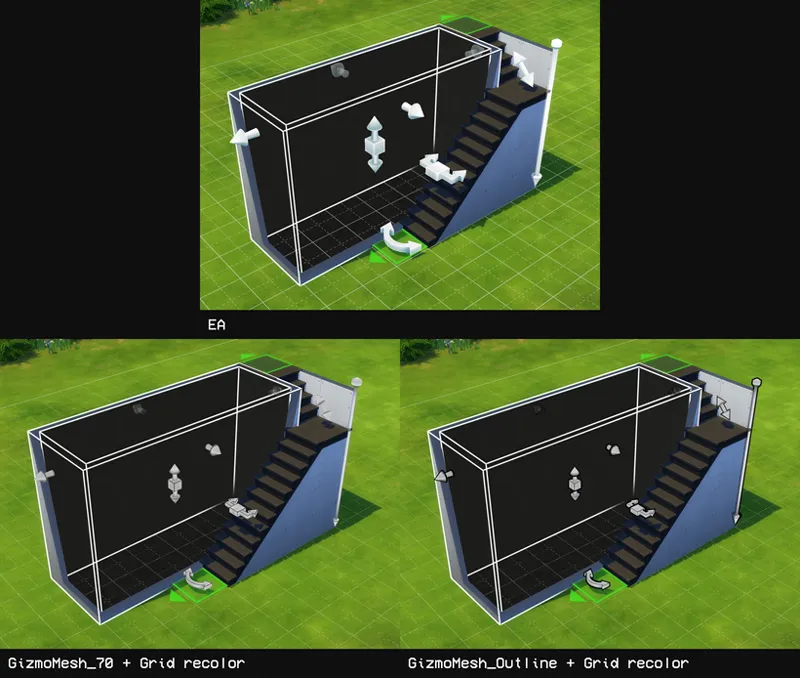
A brand new mod that replaces the build buy gizmos & grid! I've sized them down and added a bunch of recolors for you choose from ^^
// installation
Download zip, choose package file for each replacement, and extract into your Mods folder.
Separated files can be found in the SFS folder.
// gizmo - mesh overrides
Available in 2 versions: smaller (70% of original size) and Outlined.
Choose only 1 version.
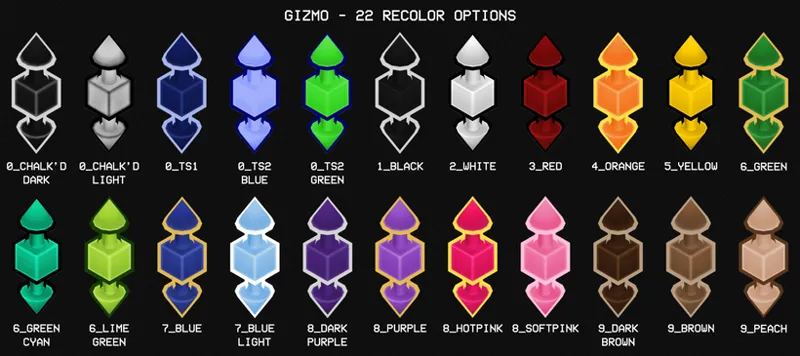
// gizmo - recolors
22 colors to choose from (pick only one).
All recolors can be used with either the sized down mesh or the outlined mesh.
// grid - recolors
7 color options (pick only one).
Subtler texture than the original grid.
// grid - simple (added 30 april '24)
Gets rid of the quarter guide.
Overrides the same texture as the grid recolor (pick only one).
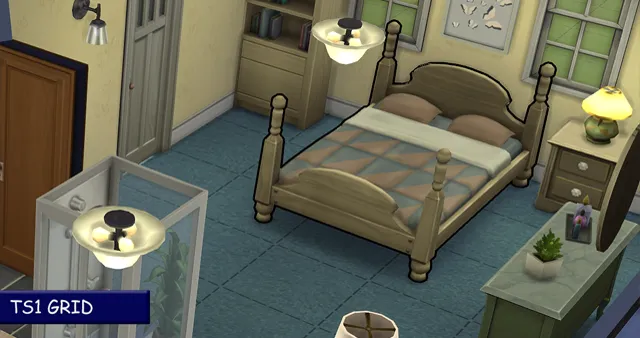
// grid - ts1 (added 6 march '25)
Dotted black square grid.
Gets rid of the quarter guide.
Alternate Link: SFS
Comments (32)
Beautiful overrides! The outlined and 70% smaller gizmo mesh is not compatible with the wall tool overrides, correct?
You can have both installed, the wall tool override will just be prioritized over the gizmo overrides.
Can you add a pink grid recolor one day?
Yes, please!
Great Mod! I love purple; it's my favorite color.
Do I download all the files ?
...read the description 😭 they're overrides. choose one only
hi, i just wanted to let you know how cool this mod is. i really enjoy building, but i usually find it hard to click the gizmos. i'm not even middle aged, but i have arthritis and carpel tunnel syndrome, so sometimes clicking on the right thing is not only hard, but seeing the standard gizmo color and being able to identify it can be difficult too-- what i'm getting at is how this isn't just a cosmetic upgrade, but one that aids accessibility. Thank you :)
Hello! Currently using this and several other of your mods, I love them all to bits, thank you so much for sharing your work! One thing that would really pull my current loadout together is that black selection outline you seem to have on that bed in the TS1 grid picture. I know you use Fogity's Hidden Highlights from your Tumblr resources page, but is there an override like this out there somewhere? I'm having no luck finding one. If there's also a way to tweak this myself I would love to learn how, if you're willing to impart the wisdom. No rush of course.
Hi and thank you! 😄 it's actually an override that I made myself, I just haven't shared it yet. I can set it up sometime today ^^
are we able to use a grid recolour AND the simple or just one? thank u for this!
just one, though if you know how to you can recolor the image/texture yourself
question, is this still compatible with the new patch update?
Should be. This one rarely breaks
question, will this work with the pencil you have for the tool? or would I have to remove it
you can have both as long as the files are in the same folder, the pencil will automatically override this mod
Is this compatible with Dskecht's Medieval Interface Mod? I love the dark brown gizmo rc!
yes ^^
hi, how i change the color?}
download the GizmoRecolors zip file and choose one of the package files of the color you want
would love a sims 3 version
Is this still working or does this need to be updated?
love this! will you be adding more grid recolors to match the outline of the gizmos ?? 🥺
my is purple now so nice but on top off my arrow is an icon that changed depending on what i build. it looks so ugly with the green icon, how can i remove it? :) <3
it can be removed only by editing the UI files itself. I don't think there's a mod to remove that though
How do I change the colours though? My arrows have started out black, what do I do to change them? :)
you get the new color file you want and put it into your mods folder, and take out the old color you chose, since you are only allowed one color.
Thank you so much!!! It is a awesome mod
thank you so much!!
you make content so perfect, that I even ignore how empty TS4 is
Wow! Thank you for the amazing content!
BRILLIANT! Thank you! This improves my building experience 100 fold. You've added real finesse to your Chalk'd product line.