

Family Loading Screen | The Sims 4
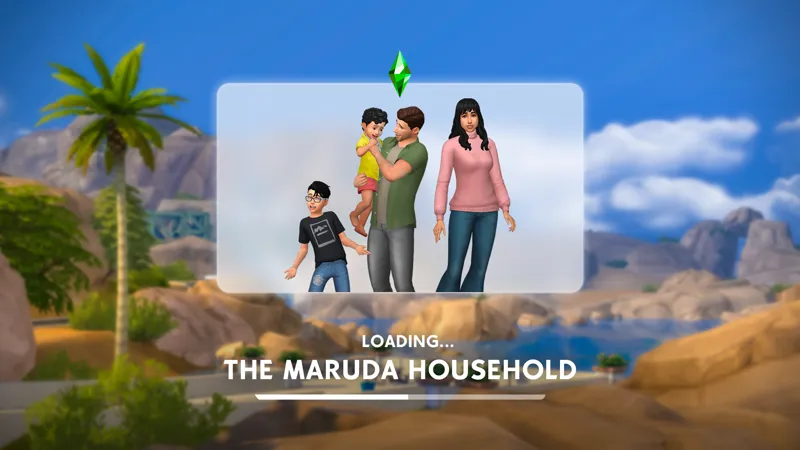
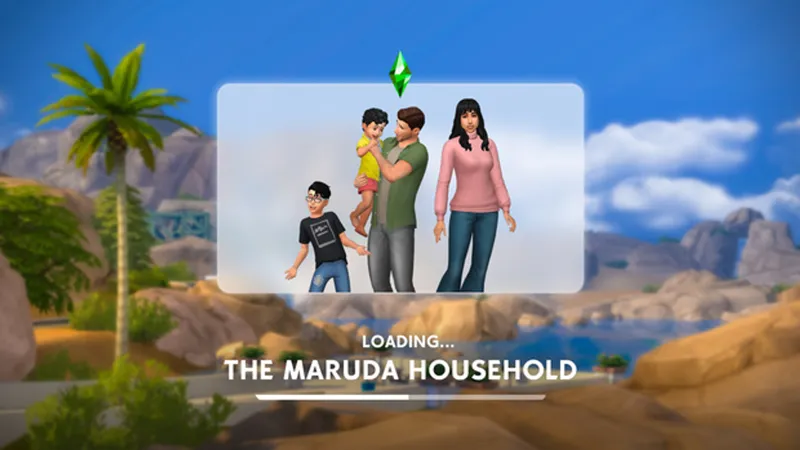
A loading screen for The Sims 4 that dynamically displays your currently played household against a background based on your active world!
What started as a simple vision in my head is now a reality. I am so proud of this project, and I hope it brings a more personalized feel to your game, just as it has for mine.
ℹ️ About this mod:
Displays your currently played household on a background that changes dynamically based on your played world.
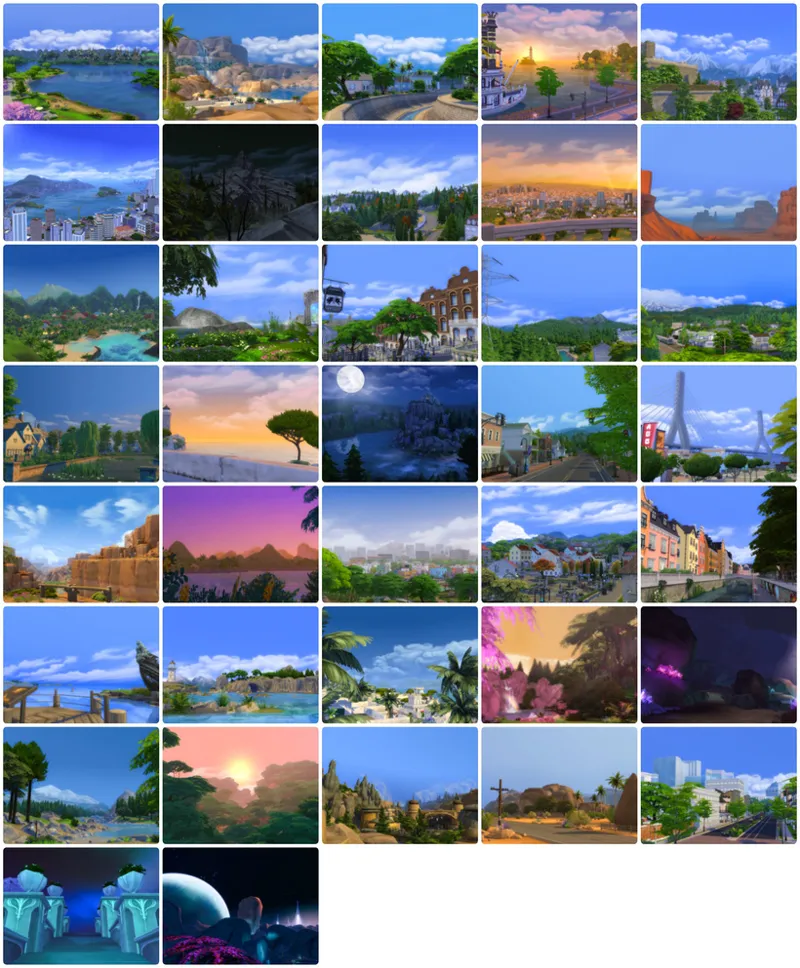
Includes 37 different backgrounds.
Features a real, functional progress bar.
Smooth, modern transitions.
Backgrounds have a subtle zoom effect as the game loads, which can be toggled on or off with the Z key.
Inspired by The Sims 2 loading screen and a concept I made a few years ago, back when I didn't know I would one day be able to turn this vision into a real mod. 🫶🏻
🛠 How to install:
This mod comes as a single package file. Installation is as easy as dropping the file anywhere in your Mods folder.
💡 What to know:
The first time you launch your game with this mod installed, there won't be any parsed data yet, so the background will be randomly selected. Once you load into your family and start playing normally, the data will be saved and persist between game sessions. Don't worry if you initially see a random world you aren't currently playing in.
This mod also increases the size of the household thumbnail, which improves its overall quality. The change will take effect once the thumbnail is refreshed (for example, by changing your Sim's look in CAS), or you can delete localthumbcache.package to force the update immediately. Before that, the family will appear smaller than they should on the loading screen, but this is only temporary.
🖼 Backgrounds preview:
⬇️ Download
Comments (72)
NOW!!!!! I was wondering if it is possible to do for this what you did for the main menu without the refresh background? Ilove his loading screen cause I can see my family on the screen will we be able to just have the family on the screen and the background we want instead of the world in the future? mayhaps?
is anyone else having naked sims on their loading screen since yesterday's game update?
Hi! I just wanted to lyk that after 2 months of trial & error of 50/50 my mods folder I discovered this loading screen was crashing my game when loading into families/travelling. I’m not sure if my computer just couldn’t handle it or if it’s the mods itself but thought I’d let you know in case it’s on your end at all. Thank you for all your hard work for the community! 🫶🏻
same for me!
Hi Matt, I was wondering if there's an option to make the backgrounds not blurry or grainy? I love the family screen and most of all the loading progress bar (I spent a lot of time staring at the loading screen) xD EDIT: Also ... do you have an idea why Maker-Pack stuff doesn't show up in the previews? It's very consistently not showing up. CC and in game items show up no problem but as soon as I use Maker Pack hairs, clothes etc. they don't show up on the main menue or the loading screen...
Hey! The background images were actually pre-blurred when they were created, so it's not possible to remove the effect. However if you use an external program like Sims 4 Studio, you can replace the images with your own. As for the Maker Pack objects, I'm really not sure. That's not related to my mod since the game itself provides those images, so it might be a bug.
Hi Matt love everything you have created but idk if you can answer my question so with the load screen my currently played sims show up in robes
question cuz im a dummy but this loading screen works when the game is opening up too or only in gameplay mode?
its a loading screen override so it works when opening game and in gameplay <3
does this take a toll on performance?
While there's more going on compared to the vanilla loading screen, and definitely more to calculate, the difference on modern hardware is practically unnoticeable. However, on older or lower-end hardware that already struggles to run the base game of Sims 4, you might see a hit to performance while loading.
Yay Amazing ! Thank you ! :)
hi! I really enjoy this mod, first and foremost. I hope you can get back to me on your own time. I'm having UI issues in my game, and all I have downloaded is family loading screen, refreshed main menu (yours) and ui cheats. the last I downloaded/updated ui cheats and refreshed main menu was july fourth, whereas this mod I downloaded in march according to my records. I couldn't seem to find this mod on your compatibility status page. Is it possible this mod is causing UI issues? Mainly what I'm experiencing, totally upon random my sim picture will disappear and the whims will turn into blue squares. Sometimes, going into build mode and then going back into live mode fixes it but at some point it actually crashes the whole game, to where everything is not clickable. I have checked and triple checked the status of all my mods, so I'm at a loss here! better exceptions is saying this mod or ui cheats or refreshed main menu is causing the UI exception that was happening when I was experiencing the issue. Thank you for your time!
Hey! If the list of mods you provided is complete, It’s most likely Ui Cheats. Your game probably updated and your UI Cheats was outdated. None of my mods from the list you provided would cause this type of issue.
This is literally the coolest loading screen I've seen! This is so cool
is this compatible?
https://www.simmattically.com/mods-compatibility-status/
is this compatible?
Was it updated for 123 ver?
Quick question, I just want to know if I did something wrong? I mainly downloaded this for the load bar, when I installed it and loaded my game I didn’t get the load bar, does it come over time or did I do something wrong?
The loading bar only appears if the game delivers the loading progress data. This feature, originally from consoles, isn't fully reliable on PC/Mac, but it should work most of the time!
Hi, I recently installed your family loading screen and I love it. Since the new patch update, I've been getting an Ui exception. I've checked your compatibility status, and it's not listed and I keep getting the error, so I came here has prompted.
Hey. What makes you believe my mod is the cause of it?
Heyy! Do I need to wait for your Mods to be updated? I tested all my mods and it seems when yours are installed my UI completely disappears.
https://www.simmattically.com/mods-compatibility-status/
I love it. A small issue I've noticed with my game... On my updated game and with all the mods installed, it randomly creates a Limited Edition (LE) with WickedWhims animations at a certain point in the game. I removed it from the game and the LE disappeared, which is a shame, as I said above, "I love it." I also noticed a significant drop in FPS during game loading (using ReShade to display FPS; for example, if I'm running at 200, it drops to 100). Once the mod is removed, everything returns to normal (200). Normally, I get 60-80 FPS in-game, but with this mod, I'm getting around 30-40. Unfortunately, I didn't think to keep a LE for you to check, but I'll reinstall it to see if the problem persists. FYI I used it at the same time as: - SimMattically_RefreshedMainMenu3_BASE - SimMattically_RefreshedMainMenu3_DefaultBackground_#E7F1BFE1A7B056C9
i love this but sometimes when you have multiple infants and they are sitting down it cuts them off, is there a way to expand the screen to change this
This mod make loading screens exciting to watch lol
I only had World Select before; now I'm about to go on a binge xD
I love this loading screen
Hi, I just wanted to say that this loading screen was affected by today's update. Could I please ask for an update?
https://www.simmattically.com/mods-compatibility-status/
i have both your legacy backgrounds and refreshed main menu, will this mess with those at all? i'd love to add this to my game!
Nope! This is a custom loading screen and will only conflict with other loading screens.
This is amazing I downloaded it today. I was just wondering though, if its possible to tweak it slightly. When you load a game and it takes you to the world, when you click on the house to play you get a loading progress bar which is really good, but if you resume the family from the menu you dont. Just wondering if its possible to add the progress bar there as well
My mod is designed in a way so the progress bar shows up only when the game provides the progress data. If there is no data, there is no bar!
Thank you so much, I really love this!
Wait this mod is so cute I can't wait to use it 😻💓
I love your mods so much, thank you
can we use this mod with Older Game Versions?
Yeah, it should be fine!
Hello! If we use this mod, do we have to remove the "New Refresh Loading Screen" mod? I am not sure if the two conflict with one another. Thank you for your amazing work!!
Hello! Yes, these are two separate mods!
this look so amazing this just gives me sims 2 vibes again you did what EA can't seem to do make the game better
Love this idea can't wait for it to be free.
words cannot express how much i really love your works oml🥹🥹💕
I’ve just subscribed to your Patreon and wanted to say a huge thank you for your mods and for everything you contribute to the Sims community. Your work is truly amazing . You’re brilliant! 💛
Thank you so much for your support and your kind words! I appreciate it! ❤️
Bringing back the sims 2 nostalgia 🥹, thank you
This is amazing, thank you so much!! 🥰
the talent 😭🙂↕️
i like the cool family thing. is it possible for you to make a version similar to new refreshed loading screen. i dont quite like the "loading..." and the progress bar.
This looks so great!!! Would it be possible to have these backgrounds in rotation for the refreshed main menu as well?
Yeah, I will make a background pack with them soon! :)
ur so so talented 🫂🫂
Thank you Dey 🫶🏻🫶🏻
Hi Matt, Would you be so kind and share the pictures you used for this loading screen as a standalone 'package' (in a sense of a zip file, not a mod, ha ha), so we can create additional loading screens/main menu pics for us to use? I can see Ondarion there etc., I would very much like to use them. I've been using the main menu mod and the loading screen mod (the previous one) since early access and still loving them. I exported the PNGs from this mod, but they are very blurry, I guess that was the design for this mod? I'm not sure if you'd be willing to consider sharing those pics like that, but I thought I'd ask. As always, thank you for everything you do for this game!
Hey! I have no problem sharing the pictures, but yes, they come already pre-blurred in this mod. Is the original version something you’d like?
this is so cute omg
💚💚💚💚
Love this! Does it clash with main loading screens at all, so will it work with your other loading screens or is it a standalone? Like as a secondary when loading into the world
This is a standalone mod, you can't use it with other loading screens.
Hi Matt! That's a brilliant idea! Love it! And I understand that I should decide which loading screen I want to see, the one I made with your tool or this one.
Thank you! And yes, this is a standalone loading screen, you can't mix it with other loading screens.
I love you Matt. This is the most loved mod that you've done! Cheers
Thank you! 🥹
This is so cool/cute !! You're seriously a rockstar 🫰🏼
Thank youuuu!!
ur keeping my sanity intact for this game🫰tysm, keep up the great work :D
Thank you!! 😅
You continue to drop the coolest stuff! Thank you.
Thank you!! 😊