
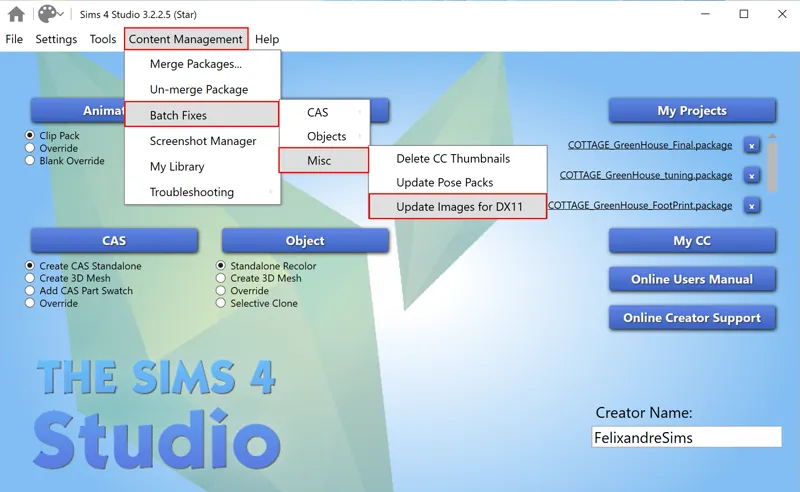
DirectX 11 Walls Issue
Hello Everyone :),
UPDATE 10/10/24
These are the Updated Sets so far. I have reuploaded the files to Curseforge, and I will take care of anything older than the Florence Set soon:
Soho Part 1
Soho Part 3
Fairylicious
Chateau Part 1
Chateau Part 2
Chateau Part 3
Chateau Part 6
Chateau Part 7
Fayun Part 3
Grove Part 1
Grove Part 3
Gothic Revival Interior
Gothic Revival Exterior
London Exterior
London Interior
Georgian Set
Colonial Part 1
Colonial Part 3
Paris Part 1
Paris Part 2
Paris Part 3
Florence Part 1
To be Continued -->
---
It's one of those moments again: a Sims4 update causing CC to break. We have been lucky for a while, but this time, it caused the walls to show incorrectly. Luckily, there is a fix available via Sims4studio.
I will update and reshare the walls bit by bit; taking care of so many files is overwhelming. If you don't want to wait, you can download the latest version of Sims4studio and run the Batch fix as shown in the picture above. I already got plenty of feedback that it's smooth and fixes the issue.
I hope all goes well!
Lots of Love,
Felix xxx
Comments (46)
have all the wallpapers been updated? I still have some issues .
Hello! Some of the wallpapers are still broken sadly :/
Hello, the walls are still broken for me, even though I downloaded them new again? Can sb help me
Mine too, the Paris walls. I tired downloading them again yesterday and their still broken
I tried many times with Soho but doesn´t works :(
Hi ! Wallpapers from Florence, Paris and Blois are still broken in my game. (Mainly with high walls)
Yes but Paris's wallpapers are only broken with high walls.
wallpapers for Paris still not working?
I redownloaded all the fixed wallpapers on CurseForge but they're still broken. You might want to recheck them! Edit: I checked again. All walls are fine except Florence.
Hello, walls are working for me but when I put windows my game can’t save the party and infinite load… just because of windows… otherwise working well
If it says loading does that mean it’s working?
Sorry to ask, the list of names on this post are files that have been fixed?
Hi, Can I have a link to the Curseforge for all the updated files? Or its not up yet?
Hi ,did you manage to find the updated versions
Hello Felixandre! I was once a Patron of yours and I'd like to subscribe again now that I have a new account, but I just wanted to tell you how talented I think you are. I'm sure you have a lovely team who helps you with the administrative side of things, so credit to them as well, but your vision is so distinct and well executed that sometimes I'm just sitting there, in awe of your creativity. I can't begin to imagine how much time all these beautiful creations must take you, and I want to thank you for bringing so much joy to my game.
Yes and yes!!!
Heyy, I tried the batch fix via S4S. Do you know how long it takes? Cause it has been loading for quite some time now :( Thanks!
I hope you managed to get yours sorted! With my CC it took my computer 2 hours to batch fix.
Will you update us when all the wallpapers are fixed?
This is might be a dumb question, because I've never used Sims 4 Studios, but... I'm trying to run a batch fix in S4S and I see that a file gets generated and put in the "Batch Fixes" folder after it finishes the process. Do I now need to take those files and use those to replace the broken files to fix the issue?
The files are already updated in your mods folder. The Batch Folder is just backup files. You don’t have to do anything else.
I could never get the studio to work 4 me
I don't have the option there, my s4s is up to date but it's not there.
Are you sure? If it's up to date it should be there, try reinstalling it.
i updatedet my whole cc folder (there are a lot more mods, in my case over 2800, nedded to be updatet) (took a nigth time) but the game is now running much better and take just the half of memoryspace. i had no isshues and everything is working perfect.
The stair railing for Chateau is also having a DX11 issue and does not work in DX9
will this work for harries DirectX 11 out of date wallpapers as well?
for all mods that needed it!
Is there also a way to fix cc beds from before the high school years pack. None of them show anymore.
I am pretty sure that there was a batch fix for those. I see it in my S4S. I am unsure of how I did it though as that was a while ago.
Is that with all of his cc or just the wallpapers?
just wallpapers I guess
Can i download the content after the update. I just started a new game on my mac Friday after the 9/18 update. i love ur cc and would like to know if its safe for me
What happens for us Mac users?
UPDATE: Just wanted to clear up some confusion. As far as I'm aware this should only be an issue for PC users as mac does not use DirectX to run the game. (this is from heyharrie post) but you can also download sims4studios to do the directx thing or in game settings you're allowed to go back to direct9, i hope this helped
As someone who also has tons of CC I literally ran it overnight and it still wasn't done and ending up just not responding and crashing, so i hope this is only a short term fix.:(
I had the same issue as well. Another user with way more CC said it took her two hours. I have way less CC and mine never finished. It just crashed too.
Is this the only way to currently fix this issue? I've never used Sims4Studio so I'm feeling a bit overwhelmed about how to use this.
Thanks. I'm afraid when I see the walls texture missing. I hope the batch fix will work. I have 4700 CC in my folder so it will take time :) Thanks for your beautiful creations Felixandre
I have 15,000... I am in hell rn
thank you
it didn't worked :(
Sims4studio for me did not fix the "London Set" walls unfortunately :(
Update: ran it again, it worked perfectly this time :) (I have lots of mods, took me like 1h30mins)
Yay!I saw this the other day at Harrie s and fixed all the issues.Thank you for letting us know :)
This was my first instinct to use 🙂🧠😆