



how to add your own spanking scene
Any REGULAR TEACHER of Highgrade Manor School is - following the rules of our school - allowed to add own spanking scenes. These personal spanking scenes are only visible for you, they are not added to the public class. If you want to add your individual spanking scene you need two images
a main image of the student, recommended a nice face pic
an image showing the punishment scene
1) Define your own spanking scene by navigating to the principals office. Please make sure to have no student called to the office (send them back to detention room or send them home).
2) Now "sit down for administrative tasks". You will get to the manage students screen.
3) Select "add new direct punishment scene" to get to an empty form for your spanking set.
4) upload your images one by one. Select "main photo" when you upload the face pic and select "punishment position" when you upload the image of the spanking scene (see first screenshot)
5) Now enter the name of the student into the field "unknown person" on top of the page and enter the name of the spanking position showing on the image on left hand side. (see second screenshot)
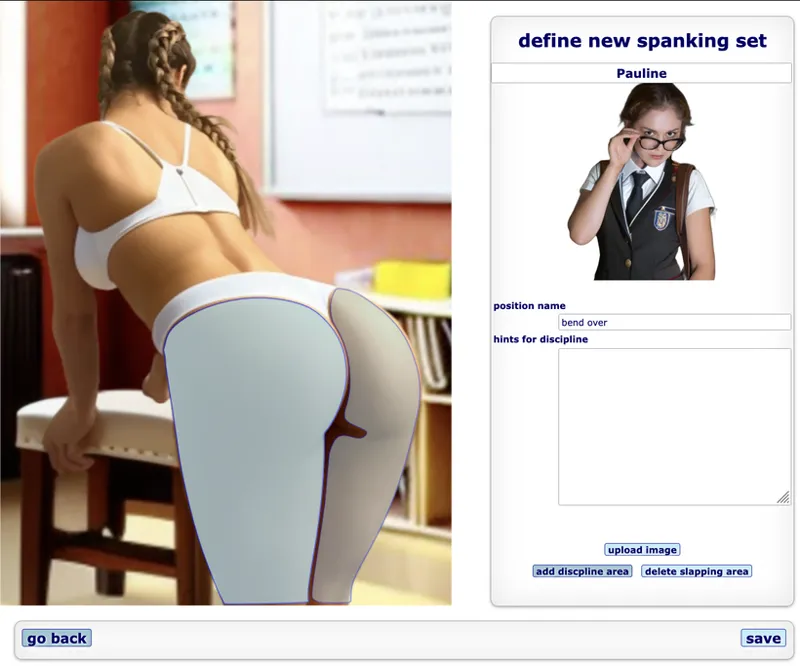
6) You are ready to define the punishment areas in the image. Klick "add slapping area" to start defining mode. Mouse pointer will change to crosshair for better aiming. You also can double-click on the first point of the slapping area to start a shape. Now define line by line the first shape in the picture where some slapping will go on later. You can see a line following your mouse every time you click on the image. When you are done, close the shape by selecting the button "close discipline area". Alternatively you can also double-click. The shape will be filled. (see third screenshot)
Repeat step 6) to add more shapes to the image. You can define as many shapes as you like to the image. Shapes should not overlap. (see fourth screenshot)
If you need to correct a shape you can click on "delete slapping area". This will clear all defined areas and you can start from the beginning.
7) When all slapping areas have been defined click "save" button and go back. Now your individual spanking scene has been added to the students who are sent for punishment to your office. Each time you look at the sheets on your desk a random student will be presented for punishment. Your new spanking scene will appear at some time.
Whenever your one of your private students misbehaves you will be offered your individual spanking scene to give her the punishment she deserves. Of course you can take a photo for your records when you are done with the spanking.