
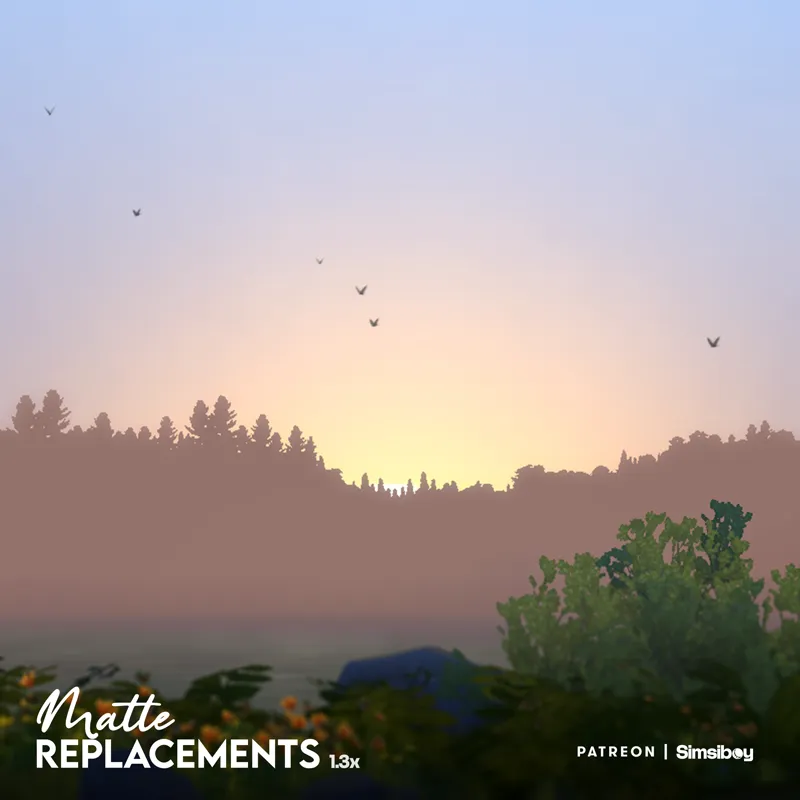
Matte Replacements | Update v1.33.4
Breathe Life into Your Worlds! Transform your game 🏔️
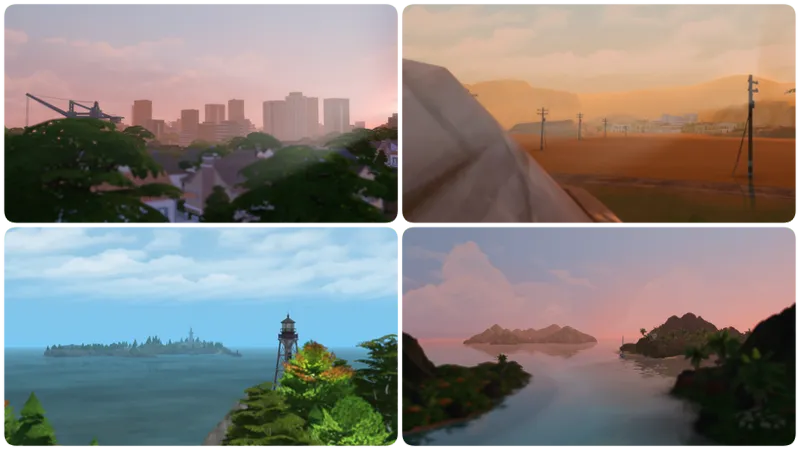
This mod replaces the 2D background scenery with 3D landscapes, giving your worlds depth, dimension, and a more open feel!
🔹Base Game & Seasons Compatible
🔹Minimal resourses needed: This mod was created with optimization in mind
Installation:
Extract the file into your Mods folder (REMOVE OLDER VERSIONS)
Highly Recommended Mods:
Graphics Mod by Simp4Sims (Fixes distance clipping)! OR
Better Graphics Solution by SulSulDUCK (Does not fix distance clipping)
‼️IMPORTANT‼️
If you use MizoreYukii’s No Fade On Everything mod, make sure Matte Replacements loads first, then No Fade On Everything.
Huge thanks to Jaycee for this fix!
CHANGELOG
v1.33.4
This is a small update, providing a fix for both DX11 & DX9 where matteGCW_Backdrop_Hills_01 was floating above the world for a few minutes as well as red flashing.
v1.33.3
This is a small update, providing a DX11 fix for matteGCW_Backdrop_Hills_01 that was floating above the world for a few minutes.
v1.33.2
General Bug Fixes & Improvements
Updated matteGCW_Backdrop_Hills_01 & matte_EP08_Backdrop_Valley to have more details
v1.33.1
General Bug Fixes & Improvements
Fixed an issue where backdrop buildings would be clipping through the terrain in the Fashion District
v1.33 | Royalty & Legacy
Bug Fixes & Improvements
Overrides for the latest EP
Updated few of the older overrides
v1.32.2
Updated Mt. Komorebi override
Bug Fixes, such as the override in the studio area in Del Sol Valley
Other minor improvements
v1.32.1
Made the mountains a bit taller in Gibbi Point
Minor improvements
Fixed a texture issue on the Mt. Komorebi override
v1.32 | Adventure Awaits
Replacements for Gibbi Point
Other minor improvements
v1.31.2
Minor fixes and Improvements
Added compatibility with NerdyDoll's Swimmable Worlds
v1.31.1
Fixed a DX11 Texture Issue
Other minor fixes
v1.31 | Enchanted By Nature
Added replacements for Enchanted By Nature
v1.30.1
Fixed an issue where 3 squares would be visible near a lot in Moonwood Mill
Now the files for the clouds will be a separate optional file, so that you can use custom cloud replacements without issues
v1.30
A Visual Overhaul, updating the majority of the backdrops and giving them a refreshed look!
Comments (89)
my game won't open when using the latest version
Is there an error message? Or anything at all? If so please provide a screenshot of the error
im getting weird flashes with the latest update
Thank you very much for keeping the mod alive and updated ♥
It's my baby, my very first mod, I don't think I'll ever stop updating it 🥹💕💕
This causes a red blinking ribbon on certain lots. Sometimes its way in the distance and sometimes it flows into the builds. I asked in a discord what could be the cause and others said they noticed it went away after removing this mod. I can confirm I haven't had the issue since removing this. https://imgur.com/a/X7DXdjn
can you make these buyable in debug for those who want to custom place them in when making a world from scratch using tool mod? thanks!
Hey, I have a problem after the last update: I have this and your matte tree replacements installed and when I go to Ancient Ruins in Windenburg, there is a big mountain covering the whole lot so it's not playable. (When I remove both mods the lot is fine)
Do you have Nerdydoll's swimmable worlds mod installed for windenburg? Specifically, the world override file for Windslar (EP02_Rural_01.world) cause I know this one is a direct conflict.
hey simsiboy! i just encountered an issue with this mod combing with the Matte Trees Replacement. Over the highway of Oasis Springs, i saw a road with red lights in rows.. It kind looks disturbing haha. Did i installed it correctly or not ahha cuz i dont use any lighting mods that alters the backgrounds or such.
Do both files need to be installed?
The clouds file is completely optional, it just alters them so they won't clip through the override 💕
Hi, for some reason I am encountering visual glitches with Update v1.33.2 in Newcrest, specifically Llama lagoon at the Avarice Acres lot (current game version 1.125.59.1030). I have rolled back to an older version of this mod as it does not have this specific visual glitch.
Could you provide me with a screenshot of the issue? ♥️
Is it necessary from the "GraphicsRules Override" mod for this mod to work? or does it already work on its own?
It's not necessary, you can use the mod without it! The Graphic Rules file is recommend to prevent the distance clipping that's happening when you're too zoomed in in the world, but if you don't mind that, it will still work 💕
Hi, when you say "If you use MizoreYukii’s No Fade On Everything mod, make sure Matte Replacements loads first, then No Fade On Everything." - how do we make sure Matte Replacement loads first? If this is done by moving one of the 2 mods into the Overrides folder, which one of them needs to go there? (is the override folder loading "first" or "after" the other mods?)
This should help 💕 https://modthesims.info/t/558576#:~:text=To%20make%20a%20file%20load,order%20of%20your%20mods%20too.
When is your minimalistic main menu override going to be updated patiently waiting no rush
Hi, Simsiboy! I doubt that there's anything you can do about this, but I thought I'd let you know that the SGR from Simp4Sims you recommend is no longer downloadable.
copy the download url for the graphic rules and then paste them into the wayback machine!
hey! I love this mod but recently have been experiencing a visual issue in ciudad enamorada with the windows on the 3d buildings, when panning the camera they flicker and the textures go bad, I added some pictures here: https://ibb.co/fLtGXy5 https://ibb.co/LX2Jw48X I tried with only this mod in the folder and it's still like that. I haven't edited the graphicsrules.sgr except to turn ssao off to remove distance blur. I also then tested it with the graphics rules file you recommend from sulsulduck because Simp4Sim's one has a dead link but it also made no diffrence. Please let me know if you have any suggestions because this mod is so amazing would be a shame to play without it. I also have my graphics set to Ultra and playing on Windows PC if that makes any difference. Thank you :)
Hello. There seems to be a problem with this MOD. https://imgbox.com/O3yU5hL8 https://imgbox.com/gilDkOUK https://imgbox.com/8Gns0LSy Location is Courtyard Lane, Willow Creek. I tried everything I could think of like putting it in an Override folder, deleting Mizoreyukii's No fade mods, and even Better Build Buy but to no avail.
Not sure why this happens... Do you also use the Matte Trees Overrides? if so which version?
Hi! First off, thank you so much for this. I absolutely love this mod! I've come across this visual bug in San Myshuno (view from Chic Street apartments), and I figured I'd share it. Does it look like this for anyone else? https://imgbox.com/ptmcOKQ8 https://imgbox.com/FWkLv1dM
Hey! Do you happen to have no fade on everything mod installed? It can conflict with this mod 😅
Hi! This mod is amazing 🫶🏻 I noticed one bug where some of the 3d trees seem to be floating in the distance, do you know if there is any way to fix that?
Could you provide a screenshot? Thank you in advance 💕
Hello, there appears to be a conflict with NeryDoll's swimmable worlds (phase III), causing Windenburg Windslar's background to be bugged.
It does. Is there any chance to fix this?
hey!! much appreciation for the fast fixes and all the work you do on this mod! :D I just had a question about the matte replacements in pendula view in willow creek and also llama lagoon in newcrest. there seems to be a large ring of 2D houses around the entire world; i was just wondering if this was intentional or perhaps a glitch because i don't see it or that kind of thing anywhere else, and one time it disappeared, but then it came back again. so i just wanted to share! :) thanks so much again! https://imgbox.com/CYqeU7Ze https://imgbox.com/hkpfTpG6 https://imgbox.com/hzTiG1oD
It is intentional, the reason for this is resource management, during the testing phases of that override, I had all the houses in 3D and my game was lagging, that is why only the inner ring has 3D houses while the others are 2D
Hi! I was wondering which download link refers to 1.32.2 since there are only mr.clouds package, 1.32 package, 1.32.1 package and a no version number package link on my patreon😔
Hi Good Day! I just want to ask if I need to download the Matte (Trees) Replacements v1.8 or Matte Tree Replacements 2.0 BETA 2. And do I need remove other tree replacement that I've been using? Thank you so much
The 2.0 Beta offers animated trees that can also cast shadows remade from the ground up, 1.8 doesn't offer that but since it's a full release, it replaces 99% of the trees I would recommend the 2.0 Beta version but it all comes down to your preference and what you prefer most But to answer your question, yes, you have to keep only one version in your mods folder to avoid any issues 💕
Hi! I’ve run into a problem in Windenburg, on the island area: https://imgbox.com/9QTPPPPs . When I install the mod, the mountains get distorted — it looks like a 2D texture is clipping through your 3D mountains. I checked for conflicts but didn’t find anything. I wanted to ask if this issue is known, or if I should keep looking for what might be causing it?
Tried replicating the issue, but it looks fine on my end (https://imgbox.com/JJviaSeC). Did you accidentally maybe have an older version of the mod in a different folder? The mod also conflicts with the MizoreYukii’s No Fade On Everything mod (unless you make it load after Matte Replacements) 💓
hey! i just wanted to share (again, sorry 😅) a glitch i found, in the studio area of del sol valley! i've linked a ss but it seems to be a glitch maybe with the trees? i tried with just matte replacements in my folder (and a mod that allows me to travel to the area) and it appeared like this. could anything else be causing it? thanks! :) https://imgbox.com/gLcdIzUZ
Yeah that is an oversight on my part, I apologize. It'll be fixed in the next update! thank you for letting me know!
Could there be Matte Replacements for more of the pack worlds in the future?
Since there is a MR_Clouds.package file in the mod, is it feasible to take that file out so I could use the matte replacements in conjunction with other clouds replacement mods from Softerhaze (https://www.tumblr.com/softerhaze/708271557923995648/alf-sis-cloud-default-replacement-updated-for), Moriel (https://www.tumblr.com/lady-moriel/search/clouds) or elsewhere?
Of course!
Hi! I downloaded this amazing mod and tested it without other mods and it seems not to work in Willow Creek. My game is on DX11, is it why it possibly doesn't work?
Do you happen to have an older version somewhere in the folders? Also make sure the mod itself isn't too deep in the mods folder 💕
Hi! I’m noticing this mod is causing a glitch in the backdrop. SS here: https://drive.google.com/file/d/1IRkTJSkpx2_QcRmy4_lQ47x9Unsfrucm/view?usp=drivesdk does this conflict with other mods?
Do you happen to use the No Fade on everything mod? Maybe an older version of the mod in another folder? 😅
hi.. i don´t know what i´m doing wrong, but when I install the latest version of this amaaazing mod it always messes with the landscape. Sadly, only version 1.30.1 is working correctly in my game. :( (ps: my game and mods are updated)
I have the same problem
Can I use this on older game versions? Like the one before recent patch?
It should work 😁
Bonjour, Petite question : Fau-il mettre le dossier Mr_clouds dans le dosssier mod ?
help i dont think my laptop can handle this and i deleted the folder with the mod but its still in my game rn ;-; idk how to remove itt
You really just remove the matte Replacements file, and it's deleted for good 😅 have you maybe accidentally put it in 2 separate folders or something? 💓
Thank you, one of my must haves!
Thank you for your work! But i've encountered a problem. In San Sequoia, if you look from Hopewell Hills towards the city, the buildings in the background turn purple at night. I even tested it with no other mods installed, but it still looks the same, so I don't think it conflicts with anything. Any ideas why this happens? Screenshot: https://drive.google.com/file/d/1OHjLN170jwRlfmoElI35pk1G3WA5z5Kr/view?usp=sharing
Thank you for the screenshot, probably happens because of the latest dx11 update, I'll look into it 💓
unfortunately the mod is causing a terrain texture glitch in Moonwood Mill, where there are ´´three squares ´´floating near the 40x30 lot :(
Working on a fix! thank you for letting me know!
can you make a version that doesn't change the clouds? the override for the clouds i use doesn't work anymore when i use both mods 🙏
Thank you, just a quick question.. This shouldn't affect k-hippie enhancement mods but rather increase the visuals?
Hi! I wonder if the mod is compatible with the May 27 update. Dol Sol Valley seems to be affected. https://forums.ea.com/idea/the-sims-4-bug-reports-en/background-from-the-pinnacles-disappears/12213780
I don't think this is something that was caused by the latest patch, I remember during the testing of the mod, when I was zooming too far in the same clipping issue would happen, the graphics mod by Simp4Sims fixes that issue 💙💙 So technically it is compatible I'd say, but you should you the graphics mod, it also happens in other worlds as well!
Hi, this mod doesn't work with cloud replacement, is there any way to fix this?(
Please add a compatibility patch for No Fade On Everything(((
it actually works with no fade on everything!! you have to make an "overrides" folder in the mods folder then put the matte replacements file in that folder and it should work :)
Hello! For some reason the backdrops seem broken. They're super stretched, overlap in an ugly way and don't look the way they're supposed to. It's like their placement, mesh and XYZ scaling is completely off. I'm using map replacement mods that replace the map when you go into the world tab, as well as cosmetic changes to the loading screens, intro and main menu. That's about it, though. I've nothing else that should be interfering with the background. I installed both the matte tree replacements and the matte replacements mod. Pls help. I'd love to be able to use this! On the latest version with all DLC including Businesses & Hobbies. <3
Do you have MizoreYukii No Fade Everything? I had the same issue and it's because the two mods override the same assets I think. If you do, using the Override folder method mentioned by MizoreYukii works!
OMG ...
Hi! Does this conflict with any of khippie's overrides? This is such a brilliant concept!
I love this mod so much. It's on my wishlist for backing when/if I get back to working and getting an income again. You're awesome, Simsiboy!
Hi! Is there any chance to have this mod be in separate packages per world? I don't own some EPs and GPs that have worlds and it'd be nice to just pick and choose. I'm trying to minimize my Mods folder for performance but I just can't let this mod go. Thank you <3
Thanks for updating the mod. Sadly I am encountering the red flash lines, specifically in Oasis Springs backdrop while play testing with only this mod installed. I do however use the sunblind lighting mod which edits the game's world map files.
The sunblind mod doesn't have to do anything with the red flashes 😁🤍 Is it only in oasis springs? And if so, in which neighborhood? 🤍
I apologize for my poor English; it’s not my native language. I know that the mod conflicts with the No Fade On Everything mod by MizoreYukii. But is there any way to make them compatible? Thank you very much for your work.
idk if you need it anymore but I tried the Override folder method mentioned by MizoreYukki (except I put this mod as prio over no fade) and both mods work for me now!
Hi Matte! I really love your work ... without this replacements.. I simply cannot play. I was wondering if you can also recreate skies in TS4 to look more realistic?
Hi! Can you please provide an alternate link to download Matte Replacement? Simfileshare has been too slow, it's giving me 3 days to download this one file
Added a second link!
This is one of my must have mods! love it sm. But in some of my saves the backdrop is floating? any idea how to fix that?
You're talking about the base game backdrop that's used in Willow Creek and other worlds? That was very possibly caused by a recent DX11 update (something about improving how items load in the background or something like that), it fixes it self after a few seconds. I unfortunately don't know how to fix that, I also saw a post on Twitter where the vanilla backdrop is floating so I'd say that's a DX11 update issue and not a mod issue I guess it is more visible with the mod because there are more polygons and mesh groups than the original backdrop.
tyyyy <3
Absolutely love this, does it conflict with softerhaze's Sunblind?
It doesn't ❤
This mod is so good! But it's conflicting with Evergreen Harbor and having 1-3 large flashing red boxes appear near the backdrop of the map!
Red flashing is mostly occured from the Lighting Quality set to low!
Since I don't like the mess that EA makes mixing 2D things with 3D, I don't know if there is a mod that replaces the houses mixed with the 2D trees or another that replaces all the 2D cardboard.
Hello, The mod is nice and feels much better with 3D trees, but I just want to suggest that it be expanded so that the "houses" with 2D "trees" are 3D and one question, how did you modify the mesh?
Thank you with all my heart. Later this week, I'll tell our subscribers about this fabulous mod, I'm behind on other projects, so I'll do it as soon as I can, thanks again!♥
Aw that's so sweet! thank you for letting me know about this issue!