
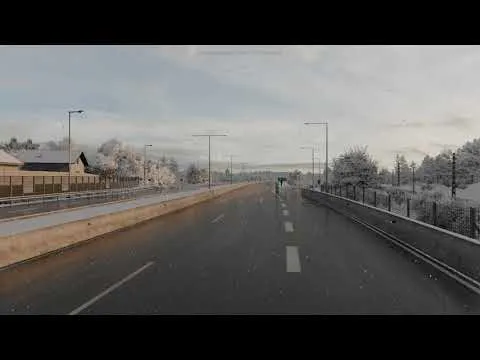
ETS 2/ATS Lighting v3 Preview 3 - Dynamic Snow
New dynamic snow system integrated with default weather system.
Smooth transition between dry - rainy - snowy weathers.
Snow accumulation is faster than usual for video recording.
This is a development version, it is missing some features and there might be some issues.
It is going to be released when it is ready.
Comments (44)
Without you, I don't think I would be playing ATS/ETS any longer. Amazing work as usual!! Do you use the PNG texture pack on your demos?
I can't wait to use it
He pagado 12 meses con antelacion y no me arrepiento, aun teniendo una grafica rtx 2060 teninendo una caida de los FPS con snowymoon, lo resuelvo con lossless scaling y se ve de maravilla, ningun problema, juego muy fluido, Gracias por tu trabajo.
Hi, I have a problem with the turn signals in ATS. They look weird and badly cut off on all trucks. I also have Snowymoon and Brutal Weather installed, but the problem is still there even when I disable Brutal Weather. Does anyone know what could be causing this?
El creador de Brutal Weather especifica estrictamente que su mod no debe combinarse con ningún otro mod de clima o gráficos globales, ya que ambos intentan sobrescribir los mismos archivos de iluminación (flares y texturas de renderizado) del motor del juego. Al tener Snowymoon y Brutal Weather activos a la vez, las texturas de los intermitentes se rompen por completo en todos los camiones, si quitas Brutal Weather intentas limpiar cache, ya que algunas veces se quedan algunos archivos crea conflicto con snowy.
I'm really very much hoping this ends up being an optional feature rather than a mandatory addition. Personally, i'm not huge on snow, and i also worry that a tacked-on implementation might not feel fully integrated with the core engine. Because of that, i'm a bit skeptical about how well it will handle the trucks and gameplay mechanics, rather than maybe just worrying about graphical performance.
It is enabled by default but you can disable it
Just look at those trees! Stunning!
This is nuts mate!
Harika
Hello one question its lighting v3 more powerfull than snowymoon v2?
Snowy Moon about V3: Lighting Improvements v3 includes: * Better performance compared to v2 * Better compatibility * Custom weather system including snow from default game + dynamic snow for environment * Custom sky system using only real high quality HDRIs (I tried volumetric clouds again but nope, it does not look good as HDRI and not good for performance) * Custom tonemap/color processing for each sky with new custom sky system * Going to try ground/grass/tree color/thickness modification at runtime for dynamic season system * New post process effects" What do you think - will it be more powerful?
You have been a gift from heaven itself my friend. Excellent work.
have v3 hdr support?
Looks good. Such work deserves respect. How will this work in Snowy Moon, as a toggle or as an addition to the time change?
What you’re doing is absolutely insane — in the best possible way! I’m already counting down the days until the winter season. 😂 Keep doing what you’re doing for us players! At this point, I’d probably sell a kidney for this content. Every penny is worth it! 😂 Seriously though, thank you for all the hard work. You are absolutely killing it!
Will the snow also aply to the road? That when theres not many cars driving it will stick onto the road or?
Truly fascinating! Is there any way to make the snow to accumilate slower? [the groundcover change is too rapid and fast] [suggestion]
Waaaaaaaaaw you are just the ultimate goat
就像在现实世界里
Honestly this is soo fucking good!
I still can’t believe I’ve been missing this so much. One question, DLSS 5? 🙏🏻
If NVIDIA fails to dramatically optimize Neural Rendering, the future of the technology will split into two categories: Selective Object Rendering: NVIDIA has stated that DLSS 5 is intended for use on specific objects or surfaces (e.g., exclusively on characters, materials, or photorealistic lighting) rather than the entire frame. This significantly reduces the computational cost. Combination with DLSS Frame Generation: To offset the FPS drop caused by Neural Rendering, the use of Frame Generation / Multi-Frame Generation will be considered mandatory. If its final implementation requires this much Tensor Core processing power, GPUs like the RTX 5060, 5070, or the older RTX 40/30 series will indeed be unable to run it at native resolution without massive compromises. It will end up as an "Enthusiast-only" setting. Running DLSS 5 Neural Rendering at native 4K or 1440p will heavily strain cards like the RTX 5060 and 5070, making ~30 FPS a very real risk without upscaling. To maintain playable framerates, these mid-range cards will rely on DLSS Super Resolution (e.g., Performance mode), running Neural Rendering on a lower internal resolution (like 1080p) before upscaling to reduce Tensor Core load. Frame Generation will be required to artificially boost framerates (e.g., from 30–40 real render FPS up to 70–90 displayed FPS), though higher input latency will remain an issue due to the lower base framerate. RTX 5060: Focused on 1080p/1440p; will struggle with heavy Neural Rendering + Path Tracing unless aggressive DLSS Performance and Frame Generation are used. RTX 5070: Aimed at 1440p/4K; should handle 1440p well at 60+ FPS, but will require aggressive upscaling to avoid drops to 30 FPS at 4K. RTX 5080: Serves as the entry point for true high-resolution Neural Rendering. Handles 1440p with ease (60+ FPS), but native 4K with Path Tracing will still demand DLSS Balanced/Performance plus Frame Generation to stay smooth. RTX 5090: The flagship standard for DLSS 5. Thanks to its massive VRAM and raw Tensor performance, it is the only GPU capable of running full Path Tracing and Neural Rendering at 4K with DLSS Quality/Balanced at native-like responsiveness without relying purely on Frame Generation. Until NVIDIA delivers official software optimizations, enabling Neural Rendering on mid-range GPUs may act more like a "Screenshot Mode" than a smooth gameplay option, while top-tier flagship cards like the RTX 5080 and 5090 remain the true target hardware.
Does it work in VR??
Legal de mais
SnowyMoon, all of this sounds absolutely amazing! Your direction and reasoning align perfectly with what I’m looking for. Moving to a single, all-in-one plugin—and completely stripping away the need for extra PNG, standalone Weather Mods, and heavy configurations—is definitely the smartest, cleanest solution. We maximize performance, keep the system lightweight, and still achieve top-tier visuals with zero risk of conflicts.
Hi, just a question: will the road be snow-covered too, or is that impossible due to the game engine or something else?
When is it coming out and how much does it cost?
As Snowy always say: It'll be released when it's ready. You need to subscribe at a minimum cost of $1 per month.
Is the Dog Barking part of it also ? If so I noticed the barking Gets Louder each time then Quieter at the end. I think Maybe keep same volume. A Dog will get louder as it comes towards you But It Doesn't all of a Sudden Run half mile in 2 seconds in opposite direction. That's what it feels like to me. (Constructive Input only. As I think you Do a Fantastic effort & Thumbs up with Aces all the Way ) Ohh just to ask Can we see The effect the snow would Have On a Truck Windscreen? Obviously This affect Would be different Of Rain But it would be Nice to See. Keep up the Excellent Work 👍🙏
Dog barking is from game :D Snow particles on windscreen is same as default game from winter map, I will show it when cabin lighting is ready. Thank you <3
Yeap, exactly what I feared is happening, winter is coming 🫣
Greate! Greate! Greate! Can't wait for it! Super work.
amazing works
be fast to release bro, i want it
Hay what command to turn on this snow?
Default game does not have snow in climate system, I just edited default climate system to have random rain/snow instead of just rain
Very good, brother.
Very nice
Would this work in all states or only the ones that actually get snow?
It is decided by default weather system from game, I am not sure if I can filter out somehow or maybe game adjusts temperature based on position if thats the case I need to try
Dude youre truly amazing for making this stuff for us. Very much appreciated. You make the game so much more enjoyable especially when paired with other mods. You are doing great
Thank you <3
Nice