
The Birthday of My PC – or How I Almost Lost Everything in One Day
Over the past 24 hours, I’ve gone through the entire spectrum of emotions — from panic and despair to quiet acceptance and relief. I nearly lost my PC. Literally. And it all started with an AIO replacement.
I bought a new AIO cooler to replace my old one and — spoiler alert — the CPU overheating issue is now completely gone. So yes, the AIO was indeed the problem. Huge thanks to Tomas Devat for sharing his story and advice.
So. I decided not to take any chances and called in a technician to install the AIO. I’d been extremely tired over the past few days, my head wasn’t in the right place, and I thought it would be smarter to get a “professional” (you’ll soon understand why that’s in quotes). A young guy, maybe 25-29 years old, showed up. He removed the old AIO, changed the socket bracket, and installed the new AIO. Unfortunately, I didn’t watch him the whole time — and I deeply regret that now.
He finished assembling everything, we plugged in the PC, hit the power button and... nothing. The fans were spinning, the motherboard lights were on, and the VGA error light lit up. The look on the "specialist’s" face told me everything — something was very wrong. When I asked him what happened, he just mumbled something like, “Maybe I accidentally pulled a cable and a connection was lost.” We double-checked every cable, confirmed they were plugged in correctly, and tried again. Same result.
The "professional" started calling someone for advice. After wasting over an hour and a half without any progress, he tried to quietly back out, blaming the issue on me. According to him, the GPU was already faulty, supposedly because of a render. When I explained I’d been rendering just 30 minutes before he arrived and everything was working perfectly, he just shrugged and kept repeating that the GPU was dead. I was horrified.
I started arguing with him — everything was perfectly fine before he touched the system.
And then he just left. Can you believe that? He broke my PC and simply walked out.
Naturally, I immediately called his company, explained the situation, and demanded either a full repair on their dime or a complete refund. They sent another technician, this time a more experienced one.
The second tech checked everything and confirmed the issue seemed to be with the GPU. He removed it, disassembled and cleaned it, applied fresh thermal paste, and reassembled it. Then came something terrifying. While plugging the power cable into the PSU, with his other hand touching the case, the technician got shocked. We were stunned. What the hell?! The PSU was off!
By this point I had mentally said goodbye to my PC and was already worrying about the loan I took to build it. Then the technician turned it on. Nothing. Again.
"Did that moron really fry my PC?" I thought.
But the technician told me not to panic yet. Apparently, my GPU has a mode switch — between "Game" and "Silence." He flipped it — and miraculously, the PC booted up. It worked! He tested both modes, and the GPU was alive and fully functional. The only question was — why didn’t it work before?
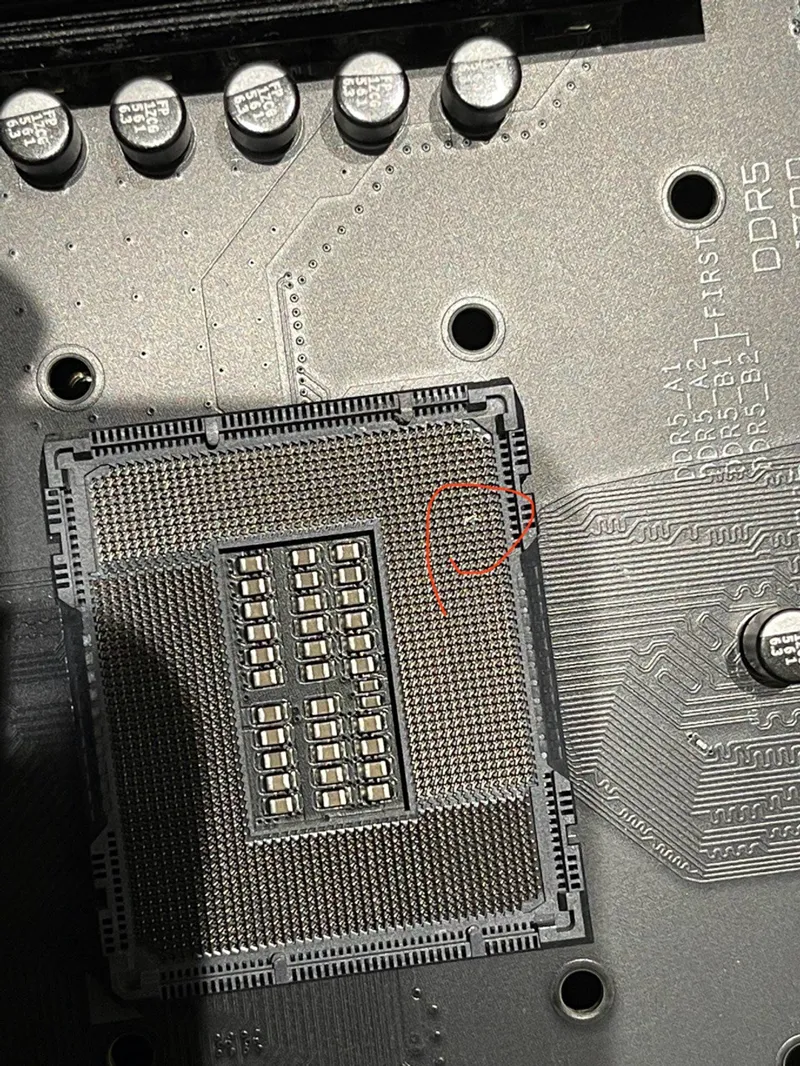
He dug into the rest of the components, found nothing unusual. Then he decided to take off the AIO and inspect the CPU. Everything looked fine... until he removed the processor.
And that’s when we saw it.
Two bent socket pins. Worse — they were touching. That could’ve caused a short and potentially destroyed the motherboard — along with anything connected to it. This was clearly the fault of the first “specialist,” since there were no bent pins before. After a long and delicate process, the technician managed to carefully straighten the pins back into place.
We reassembled the PC again. It booted up. Everything worked — except the mouse. Somehow, the USB cable had died. The mouse was completely unresponsive. But every other device — keyboard, headphones, monitor, printer — worked fine. After plugging in another mouse and confirming all USB ports were functioning normally, we ran a few stress tests on the GPU and CPU.
GPU temps didn’t go over 85°C, CPU stayed below 80°C. No more overheating spikes during rendering. Everything was finally running as it should.
We rebooted the system 6-7 times, confirmed stable starts every time, and called it a day.
The company gave me a huge discount on the service: instead of charging $450 (!!!), they only asked for $150. Honestly though, I still think $450 is insane for what they did: AIO installation, dust cleaning, and fixing two bent socket pins. That money could’ve gone toward a new motherboard or CPU. And the discount didn’t impress me at all — especially since their first technician caused the damage in the first place. But arguing would’ve been pointless. If I’d gone to a different service, they definitely wouldn’t have given me any discount.
So I paid.
I haven’t been this stressed out in a long time. But I’m relieved it all ended well and the PC is working again.
In hindsight, I wish I’d just installed the AIO myself — I installed the previous one on my own. But what’s done is done. I’m definitely never using that company again.
Lost some money. Lost a lot of nerves.
But most importantly — my PC survived.
That’s my story from today. Be careful when choosing technicians. And if you can, always be present while they work — so you don’t end up in a mess like this.
Writing this post with a massive headache, but also with deep relief.
Thanks for reading to the end.
Wishing you all a great week — and a long life to your PCs.
Comments (8)
Dont let the everyday Bullshit discourage you, we love what you do and we stay here because of what you do...👍🫡👊
Thank you for your support! It’s a huge motivation to keep going forward❤️
Thank for the Update, and glad it helped you, and sorry to hear about the other issues, and in my opinion the service should of been FREE if not with a future service discount for the 1st technician mess up, as an apology for almost (practically) destroying your PC...
I completely agree that the service could’ve been provided for free, since the mistake was entirely on their side. I definitely won’t be going back to them again
If your PC had actually died and all your renders were lost, that first 'professional' might’ve followed your renders into the void courtesy of my hands. Really glad it all worked out in the end!
The renders wouldn’t have been lost, because I always make backups. And I had just done one right before replacing the AIO. But yeah, if I had lost my PC, I wouldn’t have been able to get back to work for a long time — since it’s the only one I have. Yeah, I’m really glad everything turned out fine too
Glad replacing the AIO fixed the issue, and very glad the worst was avoided. Bending two pins and having them touching is nightmare fuel
Yeah, and the worst part is that he either didn’t notice it, or — even worse — noticed and stayed silent just to avoid fixing it. And judging by how he works, things would’ve only gotten worse if he’d tried to fix it himself. Luckily, the experienced technician who came after him was able to handle the issue