






Voxta v1.9.0: Expressive Voices, Video Generation & Smarter Memory
Hello everyone,
This one is packed. Alongside a huge amount of work on memory, transcription accuracy, and VRAM awareness, this release brings three headline additions: voices that can act with real emotion and prosody, video generation in the playground, and characters that build a genuine understanding of themselves and of you over time. There is a lot to dig into, so let's get started.
🎙️ Expressive Voices: Prosody & Affects
Voices can now carry real emotion. Anger, whispering, laughing, and more come through with proper prosody and affects.
Supported well on OmniVoice, ElevenLabs, Azure Speech, and Sesame CSM
On by default for cloud LLMs
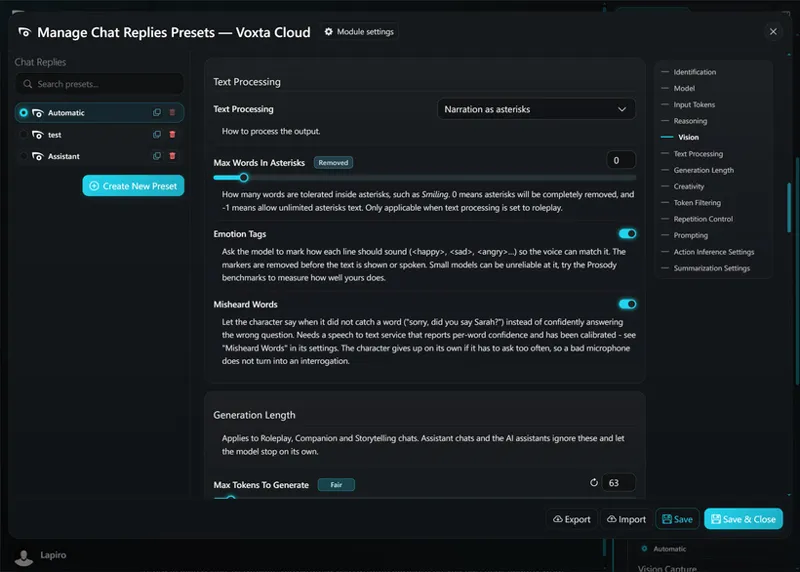
For local LLMs you can turn on Emotion Tags, and a new benchmark tells you whether your model handles them well
ElevenLabs upgraded to eleven_v3, including sound injection (for example moaning)
Reduced Chatterbox cutting off sentences
There is also a Text To Speech playground with affects support, so you can hear exactly what each voice can do before committing to it.
🎬 Video Generation
Voxta can now generate video, available in the playground, with support for both XAI and ComfyUI backends. A dedicated Video Generation playground gives you a place to experiment with it directly.
🧠 Subject Memory & Smarter Long-Term Chats
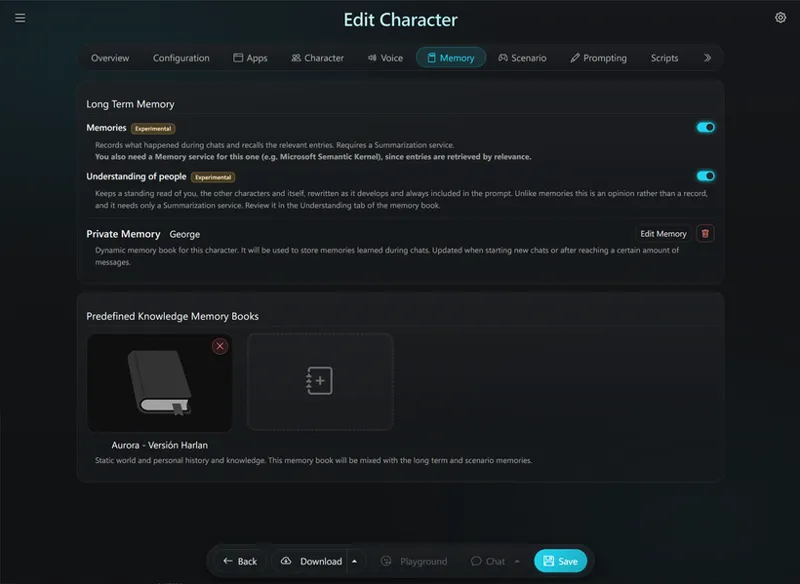
Characters can now build an understanding of self, of you, and of other characters as part of their long term memory. Enable Memory per character, with the Semantic Kernel module strongly recommended.
This sits on top of a major overhaul of how Voxta remembers:
A new hierarchical summarization system for far better memory in long running chats
A new memory extraction and recall system, with auto-correction of memory texts and weighting against frequency
Chats now get titles generated automatically
🎧 Hearing You Better
A big pass went into understanding what you actually said:
Characters can detect misheard words and ask you to repeat (enable in the voice menu in chat)
Automatic replacement of often-missed words by speech to text
Turn detection gives more headroom while you speak
Ignored interruptions for filler like "yeah" and "sure"
LiveKit now uses a small CPU model to determine when you are done speaking, an improvement over the built-in heuristics
Voice sample transcription can use OpenAI, WhisperLive, AssemblyAI, Deepgram, or Voxta Cloud
Deepgram upgraded to Nova V3
📊 VRAM Awareness
Voxta now knows what will fit on your GPU before you launch anything:
A VRAM estimator in the playground
Estimated VRAM requirements shown for downloaded and recommended models, and inside model fields
Estimated VRAM shown for modules and their settings on the service tests page
Voxta now prevents launching a module or a chat when there is not enough VRAM for the estimate
You can see how much disk space your characters, scenarios, and packages take up
⚙️ Backends & Reliability
Structured output support for more reliable tool calling and action inference (GBNF/Formatron for locally hosted models)
Automatic prompt formatting template detection, best effort
Reduced VRAM usage across many Python modules: OmniVoice drops from 15GB to 4GB, and ExLlamaV3 by several GB
Lower RAM priority for Python so overloading no longer makes your system unusable
ExLlamaV3 1.4.0, with a fix for it not stopping on end of turn tokens
Python dependencies are now pinned so upstream changes cannot break installs
Scripts: message expiration, so a message only shows up in history for a set time
Stops preloading image generation in chats that do not use it
Fixed empty speech requests crashing in Voxta Cloud
Fixed Windows Speech broken transcription (still very rough)
New long context benchmarks, and general memory usage improvements
Telemetry now includes sanitized error context and chat stats such as message counts and misheard numbers
🖥️ Voxta UI
The interface got a lot of attention this release:
Volume knob in the chat
Redesigned mic and voice icons in the input bar for more options
Speech To Text confidence markings
Voices catalog now has culture filtering
Improved model field display, now including VRAM
Shows when a key or user was last used
The build commit now appears in the version badge
Typewriter animation matches the expected speech length, and no longer restarts or starts before speech
Spacing added between roleplay and non-roleplay text
Ability to kill another session's chat
Incomplete downloads now show in the model dropdown
Quick navigation in the service settings and module configuration editors
Collapsible import fields when importing
The Wizard now recommends LiveKit and Semantic Kernel
Fixed the unusable service settings editor on mobile
Fixed models not showing when selected but not downloaded
Fixed dictate mode overwriting corrections you made to previous utterances
General performance and smoothness improvements
📱 Voxta Mobile
Fixed the e.setSinkId error
Detects missing language packs and starts the download with Android Speech
Exits the current chat when you switch away from the app, then reclaims the media controls and current chat when you switch back
Thank you all, as always, for the continued support and feedback. Whether you are giving your characters an expressive new voice, generating your first video, or building a companion that truly remembers you, we hope you enjoy this release.
After subscribing to the required Patreon tier, you can get the latest version at: https://portal.voxta.ai/
Comments (1)
Quick heads-up: the current Orpheus TTS module appears broken with the latest llama.cpp dependency. Voxta calls llama_sampler_init_penalties() with 4 arguments, but the current llama.cpp API now expects 5, causing TypeError: this function takes at least 5 arguments (4 given). Repetition Penalty also isn’t exposed in the UI, so there doesn’t seem to be a settings-side workaround.