




Voxta v1.2.0: Visual Configurations & Document canvas
Hello everyone,
Voxta v1.2.0 is now available, bringing several upgrades across functionality, performance, and UI polish. This release introduces a built-in solution for local image generation, improvements to Documents and Collections, and a new way to visualize your configurations.
✨ New Features & Updates
Public Documents & Collections
Both Documents and Collections are now public, making it easier to organize and share your knowledge bases and curated resources.
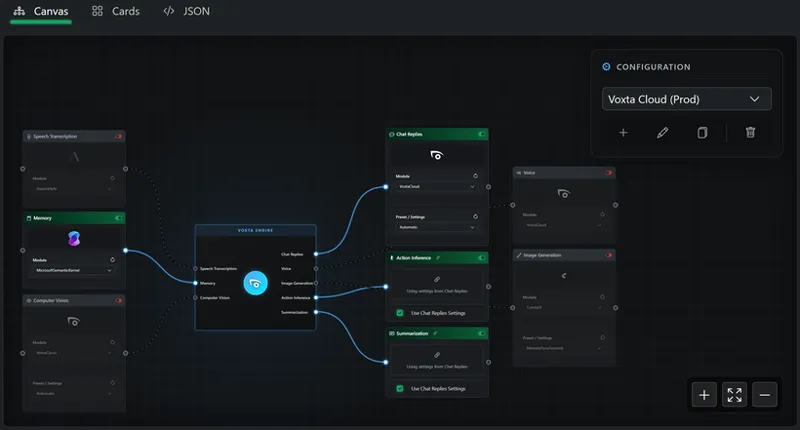
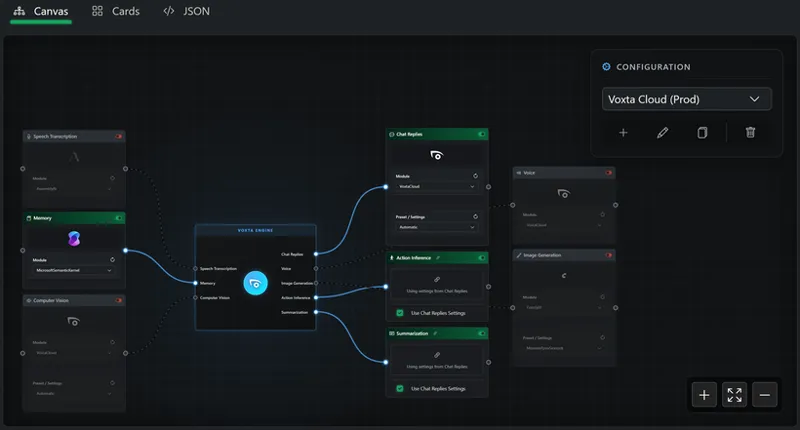
Configuration Nodes Visualizer
A visual node graph has been added to help you understand and explore your service configurations.
RPG-Style Suggestions
A new chat suggestion mode delivers RPG-style outputs, grouped into positive, neutral, and negative responses.
Randomized Greetings
Characters can now have alternative greetings selected randomly whenever a chat begins.
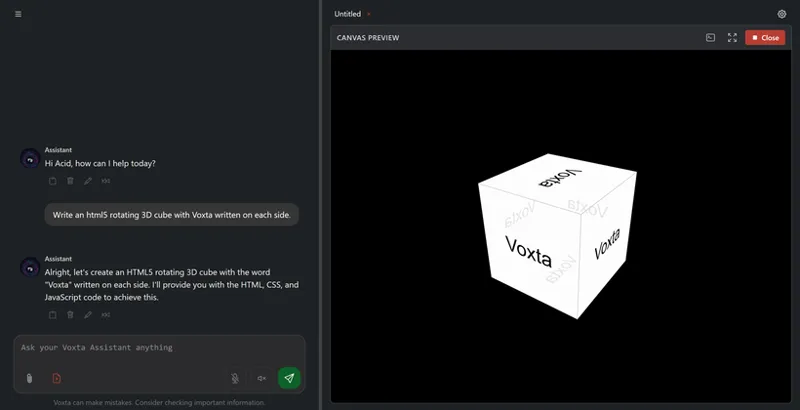
Document AI Editing
You can now edit your documents with AI directly inside the interface.
Mobile QR Code (Experimental)
Quickly open Voxta on your Android device over LAN using a generated QR code.
⚙️ UI and Workflow Improvements
Stop Generation Button
A new button allows you to immediately stop text generation in all playgrounds.
Desktop Terminal Upgrade
The desktop app now includes a higher-performance terminal that can also be detached into its own window.
New Avatars for Catherine
Additional avatar options have been added for the Catherine character.
Mobile Improvements
Enhanced usability on mobile devices, including full-screen autocomplete dropdowns.
Inline Resource Addition
Resources can now be added directly inside the Content Package editor.
Code Editor: Compare with Clipboard
A new feature in the code editor lets you compare your current file with the clipboard, making debugging easier.
General Visual Polish
Cinematic background blur, smoother transitions, and relocated notifications to the top-right corner.
🛠️ Key Fixes & Technical Enhancements
WhisperLive Performance
Improved accuracy and significantly reduced persistent GPU usage.
F5 TTS Improvements
Audio cleaning has been added to deliver better speech quality.
ExLlamaV3 Update
Updated to the newest version.
Crash Fixes
Resolved crashes related to the Deepgram SDK, script execution when no characters are active, and multiple race conditions.
Audio Fixes
Corrected issues where volume 0 acted as 100%, enabled decimal volume values, and fixed 0-duration issues in the TTS playground.
Avatar Fixes
Fixed a bug where avatars could get stuck displaying previous emotions.
Thank you for using Voxta. If you encounter anything unexpected in this build, feel free to reach out and let us know.
Comments (12)
how tf do i download this????? give me a link lol
Once you subscribe to Patreon, you can visit portal.voxta.ai to download the latest build.
TorchCodec audio engine in recent AI updates (v1.2) Is missing. I tried to install this and trouble shoot this for a few hours. Voxta will still not allow custom voices in wave format. I need you to fix this as we are paying for your service. Please include the dependencies in a update and let us know. Thank you for your attention in this matter.
The discord invite link is messed up, it’s saying whoops… unable to accept invite. I can join other Patreon creators discord servers no problem.
Please Disregard previous message, ill go to discord :)
Hi there, I am probably the worst at setting up Voxta and need some help, I also noticed there is no support chat like Aress, so, i hope i have found the right place. The problem for me is models using koboldccp. I have a RTX5070 ti with 64gb of ddr5 ram. However, its probably due to the setup of kobold or the models internal to voxta. no matter what i try, i get a very very long responding conversation. or it just stops responding. For example i will say something. then usually it gets cut off similar to Charles comment. Then takes about 1 to 2 mins to respond. Then i usually have to look at the voxta terminal to see what is said as it sometimes gets cut off too. May i ask for a noob, a basic model download list for koboldccp that i can begin with, i am probably missing some models as well. and sometimes i load models that are not compatible with other models. Or should i forget Kobold and use Voxta itself? either way, my setup is crap, and i have tried a few times. It takes a while for a model to download only to be rejected by kobold... Please Help :) PS This is asking for a setup to use with Virt a mate. A standard conversation in voxta seems to work better, however inside virtamate, its really really slow and buggy kobold seemed to help, yet its still really bad for me
“Sorry, but I can’t find a support chat where I can write, so… is it possible that there isn’t a setting in Voxta where I can choose or set EXLlamaV3 or V2 to use more than 24 GB? I have a 4090, 64 GB of RAM, and a 7950X3D. With this configuration, am I able to use models up to 70 GB
ExLlamav3 works only with GPUs. It's not meant to be used with CPU + RAM. Besides, I don't think it works with AMD GPUs at all.
I am new to voxta, and just downloaded v1.2, I am using voxta cloud for everything, but find this annoying problem that whenever I speak and the AI character talked back to me, my microphone then stops picking up my speech for transcripton. So I then have to click on the microphone icon at the end of chat box to turn it off and on again then it will pick up my speech again, but as soon as the AI speaks again and after that my speech is not picked up again, so I have to repeat clicking on the microphone icon for each sentence as the conversation goes. Any solution to this?
to update this, I just installed v1.2 lite version (same problem). I then tried v1.0.2 lite, and v1.1.3 lite, the mic now works normally for both older version as it should, so I guess if v1.2 is the one that has the problem.
Anyone else not able to install this update? I keep getting a Critical Error saying Voxta is already running. And that is before doing anything else besides logging into Windows after a full power cycle. Maybe I will try running it as Admin to see if that makes it work, but I have never had to do that with any of the other updates. Hmm...
That security measure ensures your data stays protected during an update. It means the installer can't rename your data folder if it's being used by another process, and when it fails, it shows you that error. It could also be because your directory has strict permissions.